

Buyer’s decision table / practical deployment guide
GoLive 0.1.0-alpha.3 offers an approval-gated route from an AI-agent prototype to accounts you control, with six disposable live-tested journeys and separate confirmations for DNS, deletion and live production work.
At a glance
- GoLive 0.1.0-alpha.3 lists six disposable live-tested journeys, including hosting, database, test-mode payments and teardown.
- Google’s OAuth guidance requires separate projects for testing and production when an app moves beyond development.
- Stripe’s go-live checklist says test objects cannot be used in production mode and production webhook endpoints must be registered separately.
- CoSupport AI claims a support agent can be configured in under 10 minutes, but that is not evidence that its connected accounts are production-ready.
What does an AI agent builder actually build?
An AI agent builder usually creates the decision layer: a system that reads a request, searches supplied knowledge, calls approved tools and returns an answer or action. That is useful, but it is not the same as owning the hosting account, database, domain, email sender or payment configuration where those actions happen.
MaiAgent’s Agent Builder, for example, presents no-code configuration for knowledge bases, response modes and tools. Its product page also describes customer service, data analysis and workflow uses. Those are prototype capabilities, not a published assurance that the resulting integrations have the right production identity, access boundaries or recovery plan.
The missing layer is operational control. An agent that can send a reply is one thing. An agent that can create DNS records, use a payment key or read customer data is operating inside accounts that can create real costs and real obligations.
Keep the model’s ability to suggest an action separate from the authority to make it. A human should review the destination account, the scope of access and the exact write before production credentials are used.
Which AI agent builder path should you buy?
The practical choice depends on what you need to own at the end. The table separates checked product facts from vendor performance claims and forum discussion. Its useful comparison is control after the prototype: who owns the accounts, who approves writes and whether removal is described.
| Concrete option | Exact published figure | What you hold after the prototype | Best fit | Evidence tier |
|---|---|---|---|---|
| GoLive | Version 0.1.0-alpha.3; 6 disposable live-tested journeys | Your provider logins, an approved plan, verification output and a documented teardown path. | A coded application that must move onto accounts your team controls. | Primary project documentation |
| MaiAgent Agent Builder | “>99%” answer-accuracy claim | A no-code agent configuration for knowledge, tools and response behaviour. | A business workflow that starts with narrow, reviewable actions. | Vendor claim |
| CoSupport AI tutorial path | Under 10 minutes; “up to 90%” inquiry automation claim | A customer-support workflow connected to uploaded material and selected help-desk tools. | A supervised support pilot with clear escalation to staff. | Vendor claim |
| AgentSite website agent | $79 monthly when billed yearly, or $99 monthly | A hosted marketing website, rather than a general-purpose operational agent. | A business site where the intended output is a published website. | Vendor-published price and claim |
Evidence tiers matter. A vendor’s speed, accuracy or savings number is not equivalent to a production control tested against your own accounts.
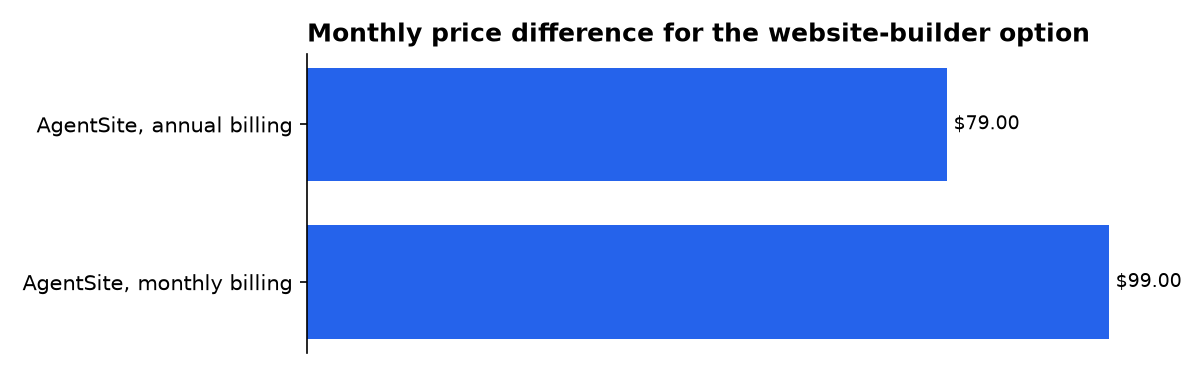
AgentSite lists two monthly prices for its website-building product: $79 on annual billing and $99 month to month. That is a useful reminder that “agent builder” describes different products. A site generator can be the right purchase, yet still be the wrong tool for an agent that must handle support, customer data or payments.
How can I build my own AI agent?
Build your own AI agent by starting with one task, one approved data source and one action that can be checked. Do not begin with a multi-agent system. A Google developer discussion published on 3 April 2026 argues that a single agent plus tools is the simpler default, while separate agents become justified when roles, tools or memory need real isolation.
Start with this sequence:
- Write one job in plain language, such as “draft a reply from approved help articles.”
- Make the first release read-only. Let it retrieve, classify or draft before it changes records.
- Define a human handoff. The agent must know when it cannot answer or act.
- Add one tool at a time, then test bad input, duplicates and missing information.
- Only later connect the production account, using a new production project and limited permissions.
The Google developer discussion is not a product specification, but its design advice is sound for a buyer: complexity should solve a governance problem. Splitting a prototype into planners, executors and memory agents does not make it safer unless their permissions are also separated.
How should prototype credentials become production access?
Move credentials in stages: local prototype, disposable test account, controlled production account, then routine monitoring. The key rule is simple: a credential that proved a demo works should not automatically become the key that reaches customers.
GoLive’s published workflow reflects that distinction. It detects requirements, shows a plan and destination accounts, then requires approval before writes. Its apply command also requires an approved plan identifier and explicit confirmation; DNS, deletion and live work have additional confirmation flags.
That is a better default than pasting a broad administrator key into an agent chat. The project warns that an agent already logged into a provider can still write directly without a GoLive plan. Treat that limit seriously: workflow guardrails reduce mistakes, but they do not replace account roles, provider logs or a careful choice of who is signed in.
Use a short production-access checklist:
- Create a separate production account or project where the provider supports it.
- Give the agent only the permissions needed for its first live task.
- Store secrets outside the repository and rotate any key used during development.
- Require a named human approver for domains, payments, deletions and customer-data changes.
- Keep a written record of the resource name, owner, renewal date and removal procedure.
What must Google-connected agents do before launch?
A Google-connected agent needs a separate production project, accurate identity details and the smallest OAuth permission scopes, meaning the specific slices of account access an app requests. Google’s production-readiness policy says sensitive or restricted scopes require verification before a production app includes them in an authorization request.
The consent screen is not cosmetic. Google says a production app’s name, home page, privacy policy and optional terms are shown to users and administrators. The same guidance requires production domains to be owned and verified, while web redirects and JavaScript origins must use HTTPS rather than plain HTTP.
For an agent builder, turn those requirements into a launch gate. Ask: does the consent text say exactly what the agent does Can the agent work with read-only access Does its redirect return only to a domain you own Is there a privacy policy that matches the actual data flow
If any answer is unclear, keep the agent in a test project. A polished conversational interface does not change the compliance status of its OAuth scopes.
How should an agent handle payments and webhooks?
For payment-connected agents, begin in test mode and use test resources that can be destroyed. Stripe’s go-live checklist says test objects cannot be reused in production, even when their labels look identical. Recreate production objects using the correct production identifiers.
Webhooks are provider messages sent to your system when something changes, such as a completed payment. Stripe says production webhook endpoints must be registered separately, must handle delayed and duplicate notifications, and must not assume events arrive in order.
Your agent should not decide a payment has succeeded because a user says so in chat. Let the payment provider’s signed webhook update the system of record. Then let the agent read that verified status and explain it to the customer.
GoLive’s Stripe path is explicitly limited to test-mode payments in its listed live-tested journeys. That boundary is useful. Production payments should remain a deliberate next phase, with a human approving the live-mode move and reviewing the final webhook behaviour.
What should the go-live test prove?
A go-live test should prove the whole path, not merely that an agent returns a convincing sentence. Check a new user, a known user, a malformed request, a duplicated event, a denied action and the human escalation path.
Stripe recommends testing incomplete, invalid and duplicate data, as well as API-error handling. It also advises keeping logs while avoiding storage of confidential data such as card information or personal identifiers. Those principles apply to every agent tool call, not only billing.
For customer support, treat automation statistics with care. CoSupport AI says users can upload FAQs, help documents and chat logs, set rules and connect tools before launch. That workflow is sensible, but its “up to 90%” automation claim is not a substitute for your own test set, sampled transcripts and escalation review.
A useful acceptance test has four outcomes:
- Correct: the agent answers from approved material.
- Safe refusal: it declines an action outside its authority.
- Escalation: it routes unclear or high-risk work to a person.
- Traceability: a reviewer can see which tool ran and what changed.
What should you actually do?
Choose a no-code agent builder if the first job is narrow, low-risk and supervised. Choose a coded application plus a deployment workflow such as GoLive if you need the finished service to live in hosting, database, domain and payment accounts your organization owns.
Start with a read-only pilot. Use a separate test project, narrow permissions and sample data. Add production access only after you can show the destination account, the exact scope, the expected write, the error path and the person responsible for reversing it.
Do not buy based on a claimed build time or automation percentage alone. A Tidio overview describes AI agent builders as tools for custom agents and chatbots, while a Postman community post highlights token-count friction during agent work. Both point to genuine usability issues, but neither answers the deployment question: who controls the live credentials when the prototype becomes a service
The answer should be your company, not the prototype. Keep the first production release small, insist on approval before writes, and make the teardown plan as real as the launch plan.
What we could not verify?
Public pages do not establish that any vendor’s claimed accuracy, automation rate, setup time or cost saving will apply to a particular company. They also do not settle whether a specific agent has the right contractual terms, data-retention settings, regional processing arrangement or industry compliance position for a customer’s use.
The vendor operating the builder, the connected service providers and the buyer’s legal, security and privacy owners can settle those questions. For GoLive specifically, the project labels itself early alpha, and some features are mock-covered rather than live-validated; its published validation record is the place to check before relying on a provider path.
Sources
- GitHub: mikehasa/golive-skill
- Google OAuth 2.0 production-readiness policy
- Stripe go-live checklist
- MaiAgent Agent Builder
- Google Developer forum: sophisticated AI agents
- CoSupport AI Agent Builder tutorial
- AgentSite AI agent website builder
- Tidio: AI agent builders overview
- Postman Community: AI Agent Builder discussion

