
As of 26 September 2026, Qwen-Image-2.1 is the best AI image generator for private local control: its Q4_K_M GGUF download is 4.60 GB, while ChatGPT remains the simpler general-purpose choice.
At a glance
- Qwen-Image-2.1 has 7 billion visual-generation parameters and supports 2,048 × 2,048 image output.
- The recommended Q4_K_M uncensored GGUF weighs 4.60 GB, before its required text encoder and image decoder files.
- Qwen Image 2.1’s ComfyUI editing workflow accepts up to 10 reference images.
- Zapier lists ChatGPT as its overall pick, Midjourney for artistic results, and Adobe Firefly for photo-workflow integration.
What is the best AI model for image generation?
Qwen-Image-2.1 is the best pick when local control matters; ChatGPT is the best default for convenience. “Best” cannot be one universal score. A marketer who needs a finished image in seconds has a different problem from a designer handling private source photos or a developer building a repeatable local workflow.
Zapier’s 2026 comparison chooses ChatGPT overall, Nano Banana for Google users, Midjourney for artistic output, and Adobe Firefly for work inside photo-editing software. Those are useful hosted-service choices. They do not answer the separate question of whether the generator can run on your machine, keep assets off a hosted app, or be adapted inside a node-based editing workflow.
That is Qwen Image 2.1’s practical niche. Qwen publishes the model weights under its research licence, and its model card combines text-to-image generation, image editing, transparent RGBA output, and subject extraction. RGBA means an image has a separate transparency channel, useful for product cut-outs, stickers, and composited graphics. Qwen’s official card specifies support for up to 10 references and several edit-selection methods.
Do not mistake “local” for effortless. Local generation shifts the bill from subscriptions to storage, memory, setup time, and your computer. It also gives the operator more responsibility for prompt choices, exported files, access controls, and lawful use of images.
Why does Qwen Image 2.1 stand apart?
Qwen Image 2.1 stands apart because one released model covers creation, revision, and transparency work. The official example produces square images at 2,048 × 2,048 pixels using 40 inference steps. Inference steps are the repeated refinement passes that turn visual noise into an image; more steps can mean longer generation time. Qwen also publishes portrait, typography, and multi-reference examples.
The local option is not merely a copy of a web prompt box. Qwen’s downloadable release can run through Diffusers, while ComfyUI packages the process as a visual workflow. In ComfyUI, a workflow is a chain of blocks: load a model, provide a prompt and images, choose settings, then save the result. Comfy-Org’s image-edit template includes a “Replace costumes for the character” example at 1,024 × 1,024 pixels.
That makes Qwen more suitable for teams that need controlled revisions. You can retain a target photo, add product shots as references, and specify which part should change. Hosted tools also edit images, but their interfaces often hide the underlying sequence of choices. A visible workflow makes it easier to repeat a result, troubleshoot it, or hand the same process to a colleague.
Choose Qwen Image 2.1 if the image itself or the process must stay under your control. Choose a hosted service if you want the shortest route from a sentence to an image and accept its account, policy, and service limits.
Which Qwen file should you download?
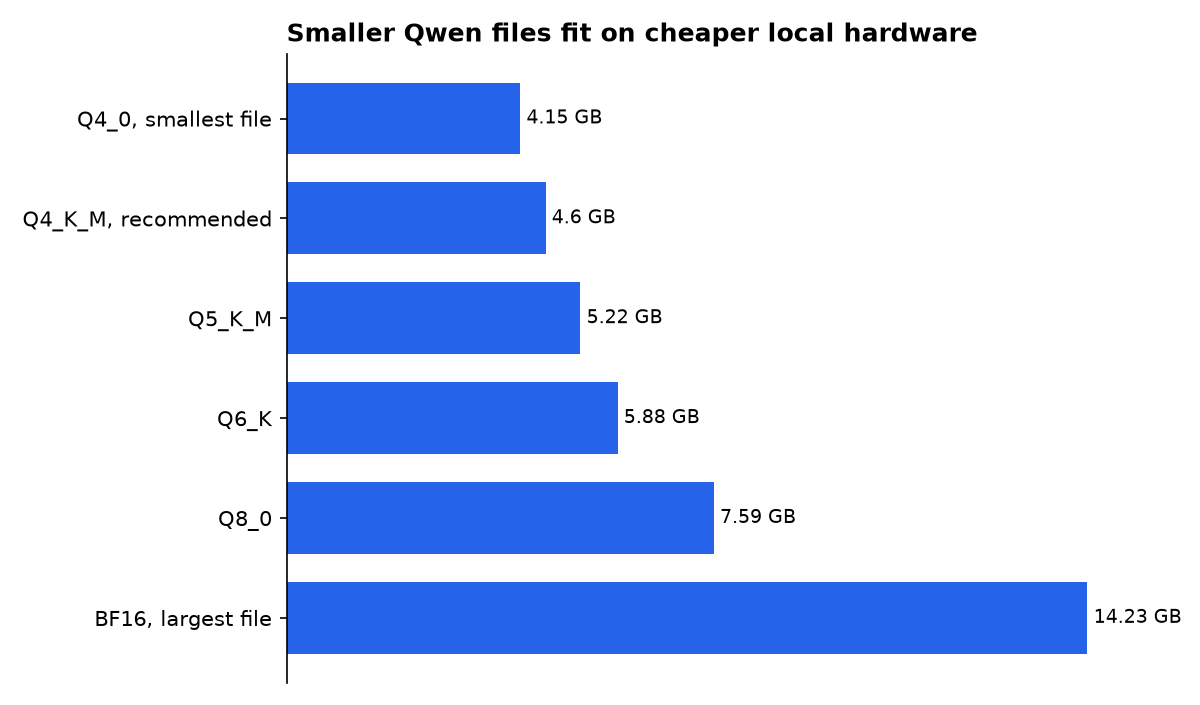
The Q4_K_M GGUF is the sensible first local download for most people who already use ComfyUI. GGUF is a compact model-file format. Quantization is the compression of model numbers into fewer bits, reducing memory use and usually trading away some fidelity. The distributor recommends Q4_K_M as its size-quality balance. Its published file is 4.60 GB.
The table is deliberately about the choice cloud comparison lists usually omit: which Qwen file fits the memory you have. “Planned working memory” below is FuturPulse’s arithmetic from each published file size plus a modest context cache. It is not a speed test or a hardware benchmark.
| Concrete option | Exact download size | Planned working memory | Best use | Evidence tier |
|---|---|---|---|---|
| Q4_0 uncensored GGUF | 4.15 GB | 4.8 GB | Smallest listed local option | Third-party distributor listing; FuturPulse calculation |
| Q4_K_M uncensored GGUF | 4.60 GB | 5.3 GB | Best starting balance | Third-party distributor recommendation; FuturPulse calculation |
| Q5_K_M uncensored GGUF | 5.22 GB | 6.0 GB | More file precision | Third-party distributor listing; FuturPulse calculation |
| Q6_K uncensored GGUF | 5.88 GB | 6.8 GB | Higher-memory local setup | Third-party distributor listing; FuturPulse calculation |
| Q8_0 uncensored GGUF | 7.59 GB | 8.7 GB | Largest listed quantized file | Third-party distributor listing; FuturPulse calculation |
| BF16 uncensored GGUF | 14.23 GB | 16.4 GB | Highest listed precision | Third-party distributor listing; FuturPulse calculation |
Source: published GGUF sizes. FuturPulse working-memory estimate assumes the downloaded model plus a modest context cache. Companion files are additional.
The transformer file is only part of the installation. The same release lists a 9.35 GB INT8 text encoder and a 676 MB image decoder, called a VAE. The text encoder translates words into signals the image model can use; the VAE converts its internal image representation into a normal picture file. The setup guidance suggests keeping the diffusion file in graphics memory and the encoder in system memory.
Does “uncensored” mean better image quality?
No. “Uncensored” describes filtering behaviour, not a proven quality advantage. The abenzerps release says it converts the original upstream Qwen base weights into GGUF files and has no built-in safety checker or content filter. It states that prompts can generate adult, NSFW, and sensitive imagery without refusals or blacked-out results. That is a distributor claim, not an assurance from Qwen.
This distinction matters. The Qwen publisher describes the official release as being under the Qwen Research License Agreement. The GGUF publisher lists the same licence but adds a separate claim about removing filtering. A compressed file can be convenient, but it is still a third-party packaging choice. Verify checksums, read the licence, and keep an unmodified source image if you need a traceable workflow.
“No restrictions” is also a poor buying criterion for ordinary work. It does not solve consent, privacy, copyright, harassment, or workplace-policy questions. If you use a local uncensored package, there is no hosted moderation layer standing between a bad prompt and an exported image. That makes it more important to define internal rules before rolling it out.
Is Qwen Image 2.1 good for image editing?
Yes, Qwen Image 2.1 is unusually well specified for multi-image editing, though published examples are not a substitute for your own task test. Qwen says the model can accept up to 10 reference images, make local edits from circles, painted annotations, or separate masks, and preserve identity for people and products. A mask is a black-and-white selection that tells the model where changes belong. The official model card describes those controls.
For interior design, product images, or social assets, start with one narrow edit. Ask the model to replace a wall finish, alter a garment, or remove a background before requesting many changes at once. The ComfyUI template warns that an edit can shift if its output size differs too much from the resized source image. Its workflow documentation makes the target image the first input and the remaining images references.
Hosted alternatives remain better for many nontechnical users. Midjourney’s official guide says each standard prompt creates a set of four images, and it offers image prompts, style references, an editor, zooming, panning, variations, and upscaling. Midjourney requires a subscription before creating images. That is an easier creative sketchbook, not a replacement for a local file-based workflow.
How do cloud costs change the decision?
Cloud tools cost less effort upfront, while Qwen’s local route has no published per-image tariff in the cited release. For a rough API comparison, FuturPulse calculated OpenRouter list prices using a 1,000-input-token and 500-output-token chat turn. Tokens are the chunks of text an AI reads and bills by. Nano Banana’s listed rates work out to $1.55 per 1,000 such requests, versus $8.00 for Nano Banana Pro.
Those figures are not image counts. They show why a local model and a cloud model answer different purchasing questions. A subscription may be cheaper for occasional creative work. A local installation can make sense when the value is predictable control, repeated edits, or handling images that should not be uploaded to a third-party service.
There is no reliable universal quality ranking. A historical comparison created 795 images across eight generators and five categories, which illustrates the limits of judging from one prompt or one gallery. That test included architecture, interiors, products, portraits, and abstract scenes. Your own reference images, text needs, and revision requirements will decide more than a single leaderboard position.
What should you actually choose?
Choose ChatGPT if you want the least technical friction; choose Midjourney if visual exploration is the job; choose Qwen Image 2.1 if local editing and file control are the job. These are not interchangeable products. The first two begin with an account and a prompt. Qwen begins with downloads, installation, and enough memory.
- Use Qwen Image 2.1 official weights when you want published upstream files, RGBA creation, and an editable local pipeline.
- Start with Q4_K_M if you are deliberately testing GGUF. It is the publisher’s recommended size-quality compromise, but budget for companion files too.
- Use Midjourney when you want four visual directions from a prompt and prefer an integrated web experience.
- Use ChatGPT or another hosted tool when you need one-off images without installing model files or managing a workflow.
Do a small acceptance test before paying or downloading heavily. Use the same three requests: a text-heavy poster, a photo edit with a reference image, and an image with a transparent background. Keep the prompt fixed. Then judge the result on the thing you actually need: correct words, preserved product details, or clean transparency.
What we could not verify?
Qwen has not published a standard generation-time figure for specific graphics cards, so no honest article can promise seconds per image from the listed GGUF sizes. The third-party GGUF page does not publish a controlled quality comparison between its Q4_0, Q4_K_M, Q5_K_M, Q6_K, Q8_0, and BF16 files. Its maintainer could settle that with reproducible prompts, seeds, hardware details, and outputs.
There is also no official Qwen statement confirming the third-party package’s “uncensored” behaviour or explaining every change made during conversion. Qwen and the GGUF publisher could settle that with a signed conversion record, a formal safety statement, and test criteria. Until then, treat the available claim as a package maintainer’s description, not a vendor guarantee.

