
FuturPulse analysis · 13 October 2026
On 13 October 2026, ESP32 iPhone Agent gives an AI model USB mouse-and-keyboard control of an iPhone through a $7 ESP32-S3; it is safe only as a supervised, segregated test rig, not an unattended personal-phone agent.
At a glance
- The project sends AI-selected actions from a computer to an ESP32-S3 over Wi-Fi, then presents the board to the iPhone as a USB mouse and keyboard.
- Its published setup exposes a browser interface on port 8890 and a board connection on port 7300, creating two control surfaces beyond the iPhone itself.
- Apple blocks new wired data connections after one hour of lock time by default, but a connected accessory can remain active after the phone locks.
- Apple remembers previously connected accessories for 30 days, so physical access to an approved board deserves the same care as access to a keyboard.
- Espressif’s Secure Boot and flash-encryption features can protect a production board, but the project’s quick-start path uses an Arduino firmware flow rather than those ESP-IDF protections.
What does the ESP32 iPhone Agent control?
The system does not jailbreak the iPhone or install an agent app. It mirrors the screen to a computer through AirPlay, sends screenshots to a vision model, and uses an ESP32-S3 as a USB Human Interface Device, or HID: the same broad device class as a keyboard or mouse. The project says AssistiveTouch turns pointer clicks into taps and drags into swipes. The project’s published architecture also gives the model actions including typing, scrolling, Home and keyboard combinations.
That distinction is decisive. A conventional app automation interface can limit what an app exposes. HID automation instead works through the visible screen and the active user session. If the phone is unlocked, the AI can press the same on-screen buttons that its owner could press, including buttons inside banking, messaging, shopping and administrative apps.
The board is deliberately simple. The project says the ESP32-S3 holds no planning logic and accepts one line-command at a time from the computer. That reduces model code on the board, but it concentrates trust in the computer, the local network, the browser control panel, the screen-mirroring receiver and the chosen model provider.
Where is the real attack surface?
The highest-risk asset is not the $7 board. It is the unlocked iPhone session. A harmful command can become an approved transfer, a sent message, a changed recovery setting or a downloaded profile without exploiting an iOS bug. The attacker only needs to influence the agent’s goal, its screen interpretation or its control channel.
The project’s stated wiring creates five separate trust boundaries: the task prompt, mirrored screen frames, model API, controller host and Wi-Fi link to the board. Its configuration template accepts a model base URL, model name and API key, while the main setup documents a web interface and board service on ports 8890 and 7300. A user should assume that compromise of the host is compromise of the phone’s HID operator.
The screen is also input. A webpage, chat message or QR code can contain text crafted to steer a model away from its task. This is prompt injection: untrusted content tells an AI to take a different action. A human may read a warning as text; an agent could treat it as an instruction if its prompt and tool rules do not sharply separate page content from operator commands.
AirPlay mirroring widens confidentiality exposure too. The project turns the live display into JPEG frames for the agent and browser interface. The project lists passcode entry, Apple Pay and DRM video as screens iOS does not mirror, but that is not a general privacy barrier. Messages, account names, notifications, medical portals and one-time codes shown elsewhere can still reach the controller or remote vision provider.
Does Apple’s wired-access protection solve this?
No. Apple’s protection limits first connection and unattended physical access; it does not make a trusted HID board safe to delegate to an AI. By default, an iPhone must be unlocked before it communicates with a new USB or Thunderbolt accessory. Apple offers USB-C choices ranging from “Always Ask” to “Always Allow,” with automatic approval while unlocked as the default. Apple’s accessory guidance makes the trade-off explicit.
Apple’s own security guide says a new wired data connection is blocked after more than one hour since the iPhone locked or an accessory connection ended. Previously connected accessories can be remembered for 30 days. Apple Platform Security also says the accessory ecosystem lacks a cryptographically reliable way to identify accessories before data connection begins.
For this project, the practical rule is simple: do not choose “Always Allow” just to avoid reconnect friction. Use “Always Ask” for a temporary laboratory setup, or disconnect the board when it is not actively supervised. Apple says a connected accessory remains connected after the device locks, which means locking the screen alone is not a reliable way to end a previously authorised HID relationship.
Which iPhone setting reduces HID exposure?
“Always Ask” creates the strongest routine checkpoint because every connection requires a deliberate approval. It is less convenient, but the small inconvenience forces the owner to notice the board before it receives input privileges. “Ask for New Accessories” is a reasonable compromise only when the board is inventoried and physically controlled.
| USB-C wired-access setting | Minimum approval events for a first connection | Threat-model result | Use with an AI HID board |
|---|---|---|---|
| Always Ask | 1 every connection | Best defence against unnoticed reconnection | Recommended for testing |
| Ask for New Accessories | 1 per new accessory | Protects initial enrollment, not a known board | Only for controlled hardware |
| Automatically Allow When Unlocked | 0 while unlocked | Fastest accidental approval path | Avoid for agent experiments |
| Always Allow | 0 | Removes the approval checkpoint | Do not use |
Approval counts are FuturPulse’s plain-language count of the choices described in Apple’s wired-access settings; they are not a security benchmark.
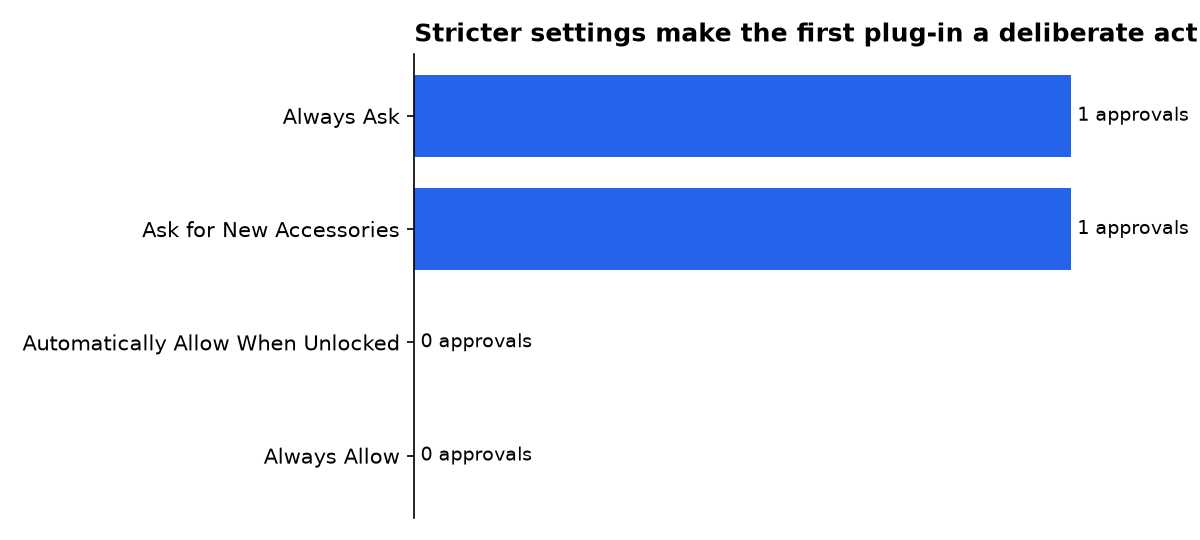
The table measures only the approval gate. It does not measure what happens after approval. Once an agent is operating an unlocked session, an approval prompt cannot distinguish an owner’s intended command from a prompt-injected or misread command.
Can a compromised ESP32 become the attacker?
Yes. A substituted or reflashed ESP32 can still identify as a keyboard and mouse, so the board needs an integrity story. The project’s public instructions focus on flashing firmware, adding Wi-Fi credentials and setting the controller IP address. The setup guide does not present a production Secure Boot or flash-encryption procedure.
Espressif provides those controls for the ESP32-S3. Secure Boot v2 verifies the bootloader and application signatures before execution, preventing unsigned code from running after the feature is configured. Espressif’s Secure Boot documentation says future firmware must match the public-key digest stored in the chip’s eFuse hardware.
Flash encryption is the companion control. Espressif says development mode permits repeated plaintext firmware downloads, while release mode prevents plaintext reflashing without the key. Espressif’s release-mode guidance also warns that encryption alone does not stop firmware modification; Secure Boot must be combined with it.
There is a real deployment cost. Espressif says enabling Secure Boot or flash encryption disables the ROM USB-OTG stack used for serial emulation and DFU updates on that port. That means a production board should have a signed update plan before its USB personality is locked down. It also means a hobby project should not claim hardened hardware simply because its chip supports hardening features.
Why local AI does not remove the main risk?
Running a model locally can reduce exposure of screenshots and prompts to a cloud provider. It does not solve unsafe actions. The published project treats a local OpenAI-compatible server as optional and reports roughly 1.3 seconds per action and 2 seconds per plan for one development setup. Those project figures describe responsiveness, not reliability, security or task success.
An ESP32-S3 can run small on-device vision workloads, but that is not the same as placing the full iPhone-controlling agent on the board. Espressif describes the ESP32-S3 as a dual-core 240 MHz chip with 8 MB of flash and 8 MB of PSRAM in a typical edge-AI setup. Espressif’s workshop says the resource limits require quantized, pruned models.
That matters because the agent in this design still depends on a more capable controller to receive mirrored screens, interpret them and issue HID actions. Local inference changes data flow. It does not create permission boundaries, confirmation steps or protection against a model that clicks the wrong button.
What controls make the design acceptable?
The acceptable deployment is narrow: a spare iPhone, a separate Apple ID without financial accounts, a segregated Wi-Fi network and an operator sitting beside the device. Use a test account with no saved cards, no password manager vault, no authenticator seeds and no access to employer systems. Keep the board unplugged between sessions.
- Set wired accessories to Always Ask, and approve the board only after checking its identity and purpose.
- Keep the controller host off the main household or office network. Do not expose its browser interface through port forwarding, tunnels or public Wi-Fi.
- Use a dedicated, revocable model API key. Limit its spending and delete it after an experiment.
- Require human confirmation before sending messages, changing account settings, installing anything, purchasing, transferring money or entering a one-time code.
- Disable notifications and remove sensitive apps from the test phone. Screen frames should contain no secrets worth copying.
- Use an obvious physical kill switch: unplug the USB board. The project’s software emergency stop is useful, but it depends on the controller remaining responsive.
- For a custom product, move to signed firmware, Secure Boot and flash encryption before field use.
Do not confuse closed-loop calibration with safety. The project checks whether a tap appeared to change the screen, which can reduce geometric errors. It cannot tell whether the selected action was authorised, whether a screen was malicious, or whether a confirmation button carries legal or financial consequences.
Who makes the claims, and what do they sell?
onehumanbeing’s repository makes the central $7, no-jailbreak and broad-app-control claims. It is published under the MIT licence and does not identify a paid product in the repository, but its author has an obvious reputational interest in showing that cheap physical HID control works across iPhone apps.
Apple’s support guidance and its platform-security guide define the iPhone accessory settings and lock-time protections. Apple sells iPhones, accessories and device-management services, so it has a commercial interest in portraying the platform as secure. Its published details are still the primary description of those operating-system controls.
Espressif’s documentation describes the chip maker’s security features and deployment limits. Espressif sells the ESP32 family and its development ecosystem, so secure-boot capability is also a product claim. The documents are useful for identifying what a manufacturer can configure, not proof that any hobby firmware enabled it.
CNX Software’s coverage shows the wider market for ESP32-based HID-style AI controllers, including a BLE vendor-HID implementation. CNX Software discloses affiliate links, giving it a commercial interest when readers buy mentioned hardware. That makes it context, not the basis for this threat model.
What we could not verify?
The project does not publish a formal security assessment, a penetration-test report, a threat-model document, a model-evaluation score for harmful actions, or a supported security-update policy. Public setup material also does not establish a complete authentication, encryption or access-control design for every controller deployment.
The project maintainer could settle the software questions by publishing a versioned security architecture, network-authentication design and disclosure policy. Apple could clarify any iOS-specific HID limits beyond its general accessory guidance. A third-party laboratory could settle the remaining practical question: how often a vision agent takes an unsafe action across a defined set of real iPhone workflows.
Sources
- ESP32 iPhone Agent repository
- ESP32 iPhone Agent configuration template
- Apple Support: Allow USB and other accessories to connect
- Apple Platform Security guide
- Espressif: Secure Boot v2 for ESP32-S3
- Espressif: Flash Encryption for ESP32-S3
- Espressif Edge-AI with ESP32-S3 workshop
- CNX Software: ESP32-based AI controller coverage

