

EasyRead v1.2.6 shipped on 2 October 2026 with an English-original reading mode, per-import model choice and fixes to PDF page alignment. Its useful distinction is not generic translation: it turns an academic PDF into a locally stored, Chinese-first reading workspace.
At a glance
- EasyRead v1.2.6 is the latest listed release, published on 2 October 2026.
- EasyRead can export a single offline HTML file; its project estimates a 27-page paper becomes about 10 MB.
- TeleOCR’s published weight files total 2.8 GB, making it a possible local parsing component rather than a small browser download.
- Swindon’s cloud-based Simply Readable case study puts Easy Read creation at about 1p per page, but it serves a different accessibility task.
What did EasyRead ship on 2 October?
EasyRead v1.2.6 added a useful restraint: readers can import a paper, preserve its layout, and read the English original without calling a translation model. The release notes say a reader can add Chinese later without losing existing highlights and notes. That matters when a researcher wants to inspect terminology before paying for, or trusting, a translation.
The same release lets users select a model during import rather than changing a global setting first. It also addresses failures that directly affect paper reading, including multi-column source-page highlighting and PDFium loading errors. Those are practical changes, not a new language model: they improve the link between a translated paragraph and its source location.
EasyRead’s core offer is a reading environment. The project description promises background, page-by-page translation; rebuilt equations and tables; bilingual comparison; highlights; notes; and question-and-answer panels beside the text. Its Chinese typography and paper-library features make it closer to an annotated research reader than a document conversion service.
How does the local Chinese workflow work?
EasyRead first keeps the PDF as a paper to read, rather than flattening it into a translated text file. A reader imports a PDF or supplies a paper identifier or link, then chooses full translation, a page range, or English-only reading. Translation proceeds page by page, so completed pages are readable while later pages remain in the original.
The key check is visual. The English-language project guide says bilingual mode places English beneath each translated paragraph, while an original-page panel follows the reading position and marks the matching source passage. This is the workflow’s strongest practical feature: a reader can compare a Chinese claim with the surrounding English before citing it.
EasyRead also separates translation from commentary. The translated body is meant to stay faithful to the paper, while explanations and AI answers sit in the margin. That division does not guarantee accuracy. It does, however, make a model’s explanation easier to distinguish from the paper’s own argument.
- For close reading: open bilingual mode and check technical claims against the source page.
- For literature review: highlight passages, add questions, then export notes in reading order.
- For sharing: export an offline HTML file with the translation, source images and annotations.
- For sensitive drafts: use a local model, but remember the PDF itself still needs to be handled safely.
What was promised versus what shipped?
The timeline shows two separate stories. “Easy Read” tools generally simplify information for accessibility. EasyRead, the GitHub paper reader, instead builds a Chinese research-reading workflow around source comparison, local files and selectable AI providers.
- 1 May 2024 — cloud document translation shipped. AWS described an open-source document-translation application developed with Swindon Borough Council. It presented self-service translation as a replacement for a process that could take up to 17 days.
- 3 February 2025 — Easy Read automation was presented as public-service delivery. The Local Government Association case study said Simply Readable could create an Easy-Read document in minutes. The stated goal was accessible resident communication, including pictures, spacing and larger type.
- 7 May 2025 — university guidance drew a boundary. The University of Sydney guidance said official Easy Read follows an exact format and is produced by certified translators. It recommended simpler AI-assisted language, but did not equate that work with certified Easy Read.
- 12 February 2026 — human checking remained part of the service model. My Life My Choice recommended reviewing AI-generated Easy Read material for accuracy, comprehension and appropriate images. Its service offers review by an expert with lived experience.
- 17 August 2026 — document parsing weights became available. TeleOCR’s model card records the release of its weights and technical report under the earlier NaviDC-OCR name. This made local document parsing more accessible to developers, but it did not turn parsing into a finished Chinese paper-reading product.
- 10 September 2026 — NaviDC-OCR became TeleOCR. The TeleOCR team announced the rename and said subsequent iterations would use the new name. Its emphasis is extracting document structure, including tables and formulas.
- 2 October 2026 — EasyRead v1.2.6 shipped reading controls. The release delivered original-language mode, per-import model selection, and PDF-reading fixes. Those shipped features match the project’s practical promise: translated reading with the source still visible.
Can EasyRead keep a paper on your computer?
Yes, with an important qualification. EasyRead stores its library locally by default, and its project guide says the local service listens only on 127.0.0.1. A paper folder can include the original PDF, page images, translations, notes and discussion records. Users can also move the library into a folder synchronized by their own cloud-drive client.
Local storage is not the same as local AI processing. EasyRead sends the relevant content to whichever model the reader selects for translation or questions. The project supports hosted APIs and local servers such as Ollama or LM Studio. A local server can avoid cloud model fees and keep requests on the machine, but it adds installation work and hardware requirements.
Claude Code is one route EasyRead supports, but it is not a free local substitute. Anthropic’s setup guide lists an internet connection and at least 4 GB of RAM as requirements, and says Claude Code requires a Pro, Max, Team, Enterprise or Console account. Readers should treat this as a subscription-backed service, even when EasyRead stores the paper locally.
How much memory could local parsing need?
TeleOCR is relevant because paper translation often fails before translation starts: formulas, two-column layouts and tables must be read correctly. The model card describes TeleOCR as a document-parsing vision-language model, meaning it reads both page images and text structure. EasyRead does not list TeleOCR as its built-in parser, so this is a possible advanced local component, not a documented default setup.
By our calculation from TeleOCR’s published files, the 2.8 GB weight set needs roughly 2.8 GB at 16-bit precision. Halving numeric precision reduces the weights-only figure, but real use also needs memory for the program, the page images and intermediate work. These are storage arithmetic estimates, not a hardware benchmark.
| Precision choice | Estimated weights-only memory | What it means for a local reader |
|---|---|---|
| 16-bit | 2.8 GB | Matches the published safetensors total before runtime overhead. |
| 8-bit | 1.4 GB | Reduces the model-weight burden, but does not include page processing. |
| 4-bit | 0.7 GB | Uses the least weight memory, with quality and software support left to the deployment. |
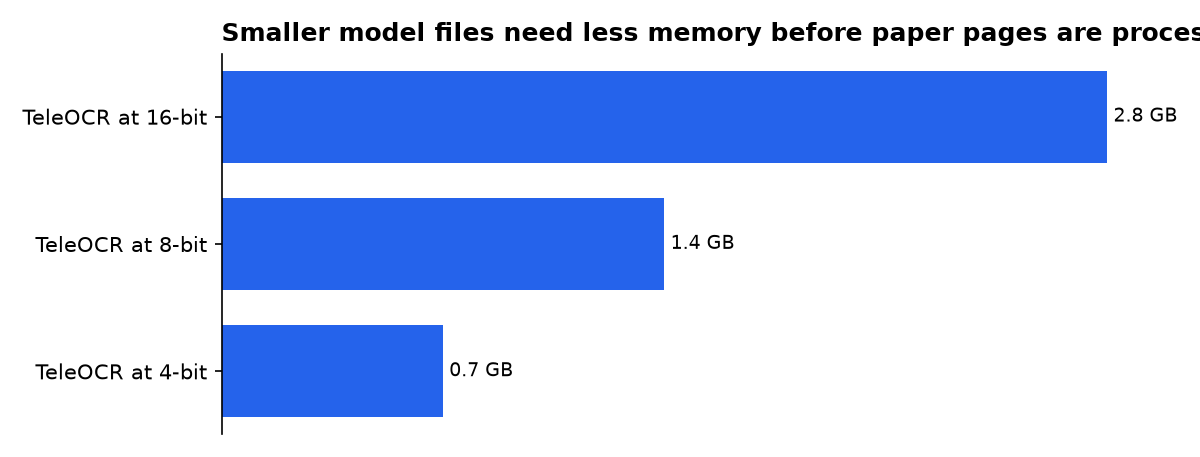
The published TeleOCR page describes the model as roughly 1.2 billion parameters, while the supplied weights calculation uses a declared 1.4-billion-parameter figure. The table therefore reports the published 2.8 GB files and arithmetic derived from them, rather than treating the parameter labels as interchangeable.
Is EasyRead the same as accessibility Easy Read?
No. The names overlap, but the products solve different problems. DIY Easy Read describes Easy Read as short sentences, simple words and pictures that explain meaning. Its aim is accessible communication, especially for people who find complex information difficult to process. DIY Easy Read offers AI-assisted conversion into that alternate format.
EasyRead for papers does include a short-sentence Chinese answer mode inspired by ASD-STE100 writing principles. It says the mode should preserve technical terms, equations, numbers, conditions and the force of words such as “may,” “should” and “must.” That is useful for explanation, but it is not a claim that a translated paper is certified Easy Read.
The distinction protects readers. Academic translation needs fidelity to methods, limitations and uncertainty. Accessibility rewriting needs clarity, audience testing and often images. A tool can assist both tasks, but the output should be reviewed against the standard that applies to its use.
Which option fits a Chinese paper reader?
Choose EasyRead when the job is sustained reading of English academic PDFs in Chinese, with source comparison, notes and reusable exports. The local library and paragraph-level source checking are more valuable than a one-click translation when the reader needs to verify a method, reproduce a result or keep a research archive.
Choose a dedicated Easy Read service when the job is public-facing accessibility. Simply Readable’s reported workflow is designed around readable text, pictures and co-creation with people who have learning disabilities. DIY Easy Read likewise presents a document-to-accessible-format service, not a literature-review environment.
Do not confuse EasyRead with EasyRead.AI, a separate Chrome reading assistant. That product supports bilingual webpage translation, selected-page blocks and local-model connections. It is for browser pages, whereas Edwardxlai’s EasyRead centers on imported academic PDFs and a local paper library.
What we could not verify?
No public EasyRead accuracy evaluation establishes translation quality by subject, language pair or model provider. The project calls Claude Code its recommended route, but it does not publish a controlled comparison against DeepSeek, Qwen, local Ollama models or human academic translators. Model vendors and independent researchers could settle that with a shared paper set, bilingual expert review and error categories for formulas, tables and hedged claims.
No public benchmark shows how often EasyRead’s source-page highlighting remains correct across scanned PDFs, complex multi-column journals or documents with poor OCR. The v1.2.6 release says it fixed several alignment cases, but only reproducible tests across varied papers could establish the remaining error rate. The EasyRead maintainers are best placed to publish those tests and their results.
Sources
- https://github.com/Edwardxlai/easyread/releases
- https://github.com/Edwardxlai/easyread/blob/main/README.en.md
- https://huggingface.co/XingChen-AGI/TeleOCR
- https://docs.claude.com/en/docs/claude-code/setup
- https://aws.amazon.com/blogs/machine-learning/improving-inclusion-and-accessibility-through-automated-document-translation-with-an-open-source-app-using-amazon-translate/
- https://www.local.gov.uk/case-studies/swindon-borough-council-simply-readable-ai-easy-read-solution
- https://educational-innovation.sydney.edu.au/teaching@sydney/simplify-communication-using-ai-easy-read-and-plain-english/
- https://mylifemychoice.org.uk/easy-read/
- https://www.diyeasyread.com/
- https://easyread.ai/

