

GitHub Copilot Memory and VS Code agent memory can both retain context, but they use different storage, audiences and controls.
GitHub Copilot Memory removes unused facts and preferences after 28 days, while Visual Studio Code stores its user, repository and session memories locally. The names overlap, but the products do not share the same storage or visibility rules.
At a glance
- VS Code agent memory has user, repository and session scopes stored on the developer’s machine.
- VS Code loads the first 200 lines of user memory into every new agent session.
- GitHub Copilot Memory stores repository facts and personal preferences for supported Copilot services.
- GitHub validates repository facts against the current branch before using them.
- Repository facts are shared only with eligible Copilot Memory users in the same repository.
Are VS Code memory and Copilot Memory the same?
No. VS Code’s memory tool is an editor feature that saves notes locally. GitHub Copilot Memory is a GitHub service for repository facts and personal preferences used in Copilot interactions. Both can carry context forward, but neither replaces reviewed project documentation.
The distinction matters when an agent says it created a memory file. In VS Code, that usually means the editor’s built-in memory tool created or changed a local note. It does not mean that the agent added a team-visible Markdown file to the repository.
GitHub Copilot Memory has a different role. A repository fact captured by one supported Copilot feature can later be used by another. GitHub gives the example of a cloud agent learning a database convention that code review can then apply to a pull request.
These are separate layers with separate audiences:
- VS Code local memory: local notes for an editor agent, workspace or current conversation.
- GitHub Copilot Memory: GitHub-managed repository facts and user preferences for supported Copilot services.
- Instructions files: deliberate project files, such as
.github/copilot-instructions.md, that a team can review and version with code.
Use that distinction when deciding where information belongs. A preference for tabs can fit user memory. A build command can fit repository memory, but a mandatory security rule should also live in a reviewed, tracked project file.
That final point is practical rather than theoretical. Local memory follows a developer’s editor state. GitHub repository memory follows Copilot access within a repository. A tracked instruction file remains visible to contributors who do not use Copilot at all.
Where does VS Code store Copilot memory?
Visual Studio Code says its user, repository and session memories are stored locally on the machine. The editor presents them through the virtual paths /memories/, /memories/repo/ and /memories/session/. Those paths identify a memory scope, not a documented disk location for scripts or backup jobs.
| Scope | Virtual path | Survives a new chat | Works in another workspace | Best use |
|---|---|---|---|---|
| User | /memories/ | Yes | Yes | Personal coding preferences and recurring commands |
| Repository | /memories/repo/ | Yes | No | Build commands, conventions and local architecture notes |
| Session | /memories/session/ | No | No | Temporary task notes and implementation plans |
Source: Visual Studio Code’s memory-tool documentation.
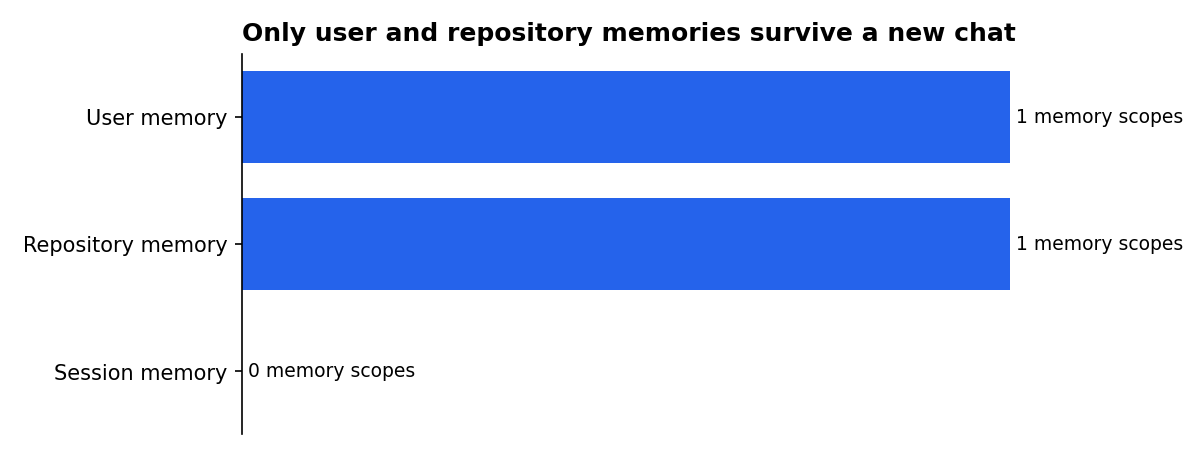
The loading rule deserves attention. VS Code automatically places the first 200 lines of user memory into an agent’s context at the start of each session. Context is the text the model receives while responding, so user memory can affect work in every workspace.
User memory should therefore stay short and general. It can hold durable preferences, such as a preferred code style or recurring command. It is a poor place for credentials, project-specific incident notes or short-lived debugging details.
Repository memory persists across conversations in the current workspace, rather than across every workspace. Visual Studio Code identifies architecture decisions, naming conventions and build commands as suitable examples. Its local scope makes it useful for working context that does not need to become a shared repository document.
Session memory is temporary by design. Visual Studio Code says its Plan agent keeps an implementation plan in a session-memory plan.md file. Closing that conversation ends the scope, so a decision that matters later should be copied into a normal project document.
The practical consequence is simple: VS Code memory is local working context. It can reduce repeated explanations during development. It is not automatically shared with GitHub users, reviewers or colleagues opening the repository elsewhere.
How do you view, edit and clear local memories?
Run Chat: Show Memory Files from the Command Palette to list memory files in all scopes. Visual Studio Code also makes memory-file references in agent replies clickable, so a developer can inspect a file’s contents directly.
Ask the agent to update or delete an individual memory file. To remove all of them, run Chat: Clear All Memory Files. Visual Studio Code says that command removes user, repository and session memory together.
Clear-all is useful when resetting an experiment or preparing a shared machine. It is broad, however, so inspect files first if preferences or workspace notes are worth keeping. A regular project file is safer for material that requires review or long-term retention.
A GitHub Community discussion describes the files as locally managed by VS Code’s built-in memory tool rather than ordinary files in the project tree. The discussion also recommends Chat: Show Memory Files for locating them. It is useful implementation guidance, but not a formal guarantee of a stable internal storage path.
For durable team knowledge, use a tracked file. Instructions, runbooks and architecture decision records can be reviewed, committed and read without depending on one developer’s editor state. Memory works best as a convenience layer around those documents.
There is also a useful behavioural distinction. An agent decides the appropriate scope when a developer asks it to remember something in natural language. Developers who need predictable retention should state the intended scope, then inspect the resulting memory file before relying on it.
How does GitHub’s agentic memory work?
GitHub Copilot Memory stores repository-level facts and user-level preferences. GitHub says repository facts can cover coding conventions, architectural decisions, build commands and project rules. Preferences describe a user’s stated or inferred way of working with Copilot.
Repository facts include citations to supporting code. Before Copilot uses a relevant fact, GitHub checks those citations against the current branch. Only facts that validate are used.
That check matters after code changes. A fact captured from a pull request that closed without merging can remain stored. GitHub says it will not affect Copilot’s behaviour unless the current codebase still substantiates it.
GitHub creates repository facts only in response to activity started by a user with write access who has Copilot Memory enabled. Once saved, the facts are available to users with Copilot Memory access in that repository. GitHub says they can only be used in operations on that same repository.
User preferences have a different boundary. They are available only in the originating user’s later Copilot interactions across repositories. For Copilot Business and Copilot Enterprise, GitHub says an organisation or enterprise administrator can view, export or delete those preferences.
GitHub enables Copilot Memory per user rather than per repository. It is on by default for individual plans. For organisation-managed and enterprise-managed plans, an administrator must first enable the policy, after which users can opt out.
GitHub also says users can view and delete their own preferences regardless of plan. Repository owners can review and manually delete repository-level facts. Those are different controls for two different kinds of stored information.
Which Copilot tools can use shared memories?
GitHub lists Copilot cloud agent, Copilot code review, Copilot CLI and agentic autofix as services that use Copilot Memory. The services do not all use the same types of memory in the same way.
Copilot CLI can apply repository facts and the preferences of the user who started the operation. Copilot code review uses repository facts only. A review can therefore apply a shared project convention without applying a contributor’s personal interaction preference.
This is cross-agent learning, not a single shared notebook. A cloud agent can discover a repository pattern during a task. Code review can later use that repository-level fact when examining another pull request.
The transfer happens through GitHub’s managed memory service. GitHub does not describe VS Code’s local /memories/ files as an input to that service. Developers should not assume that a note saved in the editor becomes a GitHub repository fact.
“Agentic memory” here means stored information can be retrieved and checked before it is applied. It does not mean Copilot keeps every conversation forever. GitHub says an unused fact or preference is automatically deleted after 28 days, although successful validation and use can reset that timer.
What has GitHub announced about Copilot Memory?
GitHub described its cross-agent memory system on 15 January 2026. The post named coding agent, CLI and code review as early parts of that workflow. GitHub’s documentation still describes Copilot Memory as a public-preview feature that can change.
| Date | Published item | What it establishes |
|---|---|---|
| 15 January 2026 | GitHub published its account of a cross-agent memory system. | GitHub described memory across coding agent, CLI and code review. |
| 17 September 2026 | Visual Studio Code dated its memory-tool documentation. | The documentation describes local user, repository and session scopes. |
Sources: GitHub Blog and Visual Studio Code documentation.
The preview label matters for policy decisions. Controls, plan availability and supported surfaces can change. Teams should check GitHub’s current documentation before treating a setting as a permanent organisational requirement.
GitHub’s own management documentation frames memory as stored details from Copilot interactions, including conventions and preferences. That makes regular review a governance task, not merely a debugging task. A memory that was appropriate before a migration may become misleading afterwards.
How should a team manage Copilot Memory?
Start by assigning information to the correct layer. Put non-negotiable rules in versioned instructions. Use GitHub repository memory for patterns learned during Copilot work, and reserve local VS Code memory for editor-specific working context.
Repository owners can review and delete stored repository facts. GitHub’s memory-management guidance covers conventions, preferences and other information Copilot has stored from interactions. Teams should review relevant facts after architecture changes, major migrations or changes to build and deployment rules.
For Copilot Business and Copilot Enterprise, preferences are owned by the billing entity that grants the licence. GitHub also says people with licences from different places must select a default billing entity before they can generate user preferences. Copilot retrieves preferences according to the active billing entity for the session.
A workable setup
- Commit security requirements, test commands and release rules in project instructions.
- Use VS Code repository memory for local workspace discoveries that do not need team review.
- Review GitHub repository facts after substantial codebase changes.
- Delete local memory when handing over a machine or ending an experiment.
- Check the stored scope before accepting an agent’s memory capture.
Planning sessions need special care. VS Code’s Plan agent keeps its current plan in session memory rather than a tracked project file. If that plan matters after the chat closes, save the useful decisions in a normal repository document.
Teams should also distinguish convenience from authority. A Copilot memory can help an agent act consistently. A reviewed repository policy remains the source contributors can inspect, challenge and update through the normal development process.
What can Copilot CLI users control?
Copilot CLI can apply repository facts and the initiating user’s preferences. That makes the origin of a memory important when terminal work touches a repository with strict build, release or data-handling rules.
Memory scope matters when a capture is proposed. A personal preference is tied to one user’s later Copilot interactions. A repository fact can be available to people who have Copilot Memory access in that repository.
Read the scope before approving a capture. “Use tabs” is a personal preference. “Production migrations require two approvals” is a project rule and should also be documented in a reviewed policy that contributors can read without relying on Copilot.
CLI users should not treat stored memory as proof that a rule remains current. GitHub validates repository facts against the current branch before use, but a team still needs a maintained source of record for release and security requirements. Validation checks supporting code; it does not replace human ownership of policy.
What could we not verify?
GitHub and Visual Studio Code do not document an exact operating-system folder for VS Code local memory files. The virtual /memories/ paths are documented, but a stable disk path, backup mechanism and custom storage-location setting are not. A GitHub Community discussion also warns that an internal location could change between updates.
GitHub has not published a complete matrix showing every Visual Studio Code model, agent target and chat surface that can read or write local memory. Visual Studio Code explains the tool and its scopes, but does not provide that compatibility matrix.
GitHub has not published a fixed date for Copilot Memory to leave public preview. Its documentation continues to mark the feature as subject to change. Teams should revisit the documentation and management controls before relying on a preview feature in a formal workflow.
Which sources support this guide?
- GitHub Docs: About GitHub Copilot Memory
- GitHub Docs: Managing Copilot Memory
- GitHub Blog: Building an agentic memory system for GitHub Copilot
- Visual Studio Code Docs: Use memory with agents in VS Code
- GitHub Community: Where exactly would a new memory file be stored from an agent VS Code Copilot session?

