

FuturPulse analysis · 3 October 2026
Viggle Qwen-Image-2.1 Turbo v0.3 is the best Qwen Image 2.1 choice for ComfyUI speed, using 6 steps rather than 40; use Qwen’s base build for deeper edits, or abenzerps’ 4.6 GB Q4_K_M file for the smallest practical local setup.
At a glance
- Viggle Qwen-Image-2.1 Turbo v0.3 says its 6-step workflow is about 5× faster than Qwen Image 2.1’s 40-step base workflow.
- Qwen Image 2.1 supports regular images, transparent RGBA images, local edits and up to 10 reference images.
- abenzerps’ Q4_K_M GGUF build is a 4.60 GB transformer file, but it still needs a text encoder and VAE for ComfyUI.
- Viggle’s documented ComfyUI workflow peaks at about 26 GB of VRAM at 1248 × 832 with its default int8 components and prompt enhancer.
First, a correction that matters when shopping for hardware: Qwen Image 2.1 is not a chat large language model in the usual sense. It is an image-generation and editing model with a 7-billion-parameter visual component, so “local LLM for image generation” is useful search shorthand, but misleading technical language. Qwen describes the model as a unified text-to-image and image-editing system. (huggingface.co)
Which Qwen Image 2.1 build should you choose?
The short answer is simple: choose Viggle if generation time is your priority, Qwen’s original build if edit flexibility matters most, and abenzerps if your main constraint is fitting a quantized transformer into limited memory. Those are different decisions, not three versions of the same experience.
Qwen’s base release is the reference point. It documents 40 inference steps in its examples and supports masks, annotations, transparent layers, subject extraction and up to 10 reference images. That broader editing brief makes it the safer choice for product shots, compositing and identity-sensitive work. The Qwen model card also shows CPU offload, which moves part of the work into system memory when GPU memory is tight. (huggingface.co)
Viggle’s v0.3 release, dated 29 September 2026, is a distilled adaptation: it tries to reach a similar result with fewer denoising passes. Viggle says the trade-off is clearest in tiny dense text and complicated edits, while its newer 9-step mode improves fine detail but is not part of its documented ComfyUI workflow. Viggle’s release notes say the 9-step route remains about 3.5× faster than the base model. (huggingface.co)
Which local Qwen file uses the least memory?
The smallest listed option here is abenzerps’ uncensored Q4_0 GGUF at 4.15 GB, but its own page recommends the slightly larger Q4_K_M file at 4.60 GB as the size-quality balance. GGUF is a packaged quantized model format: it reduces storage and working-memory needs by representing weights with fewer bits. The repository’s file list also offers Q5_K_M at 5.22 GB and Q6_K at 5.88 GB. (huggingface.co)
File size is not the same as a complete ComfyUI requirement. The abenzerps workflow also lists a 9.35 GB int8 text encoder and a 676 MB VAE, the component that converts the model’s internal output into a usable image. The publisher advises placing the transformer in VRAM and offloading the text encoder to system RAM. That configuration note is more useful than treating the 4.60 GB download as a whole-machine requirement. (huggingface.co)
| Concrete local option | Exact published file size | Our planning figure | ComfyUI and offline-editing fit | Evidence tier |
|---|---|---|---|---|
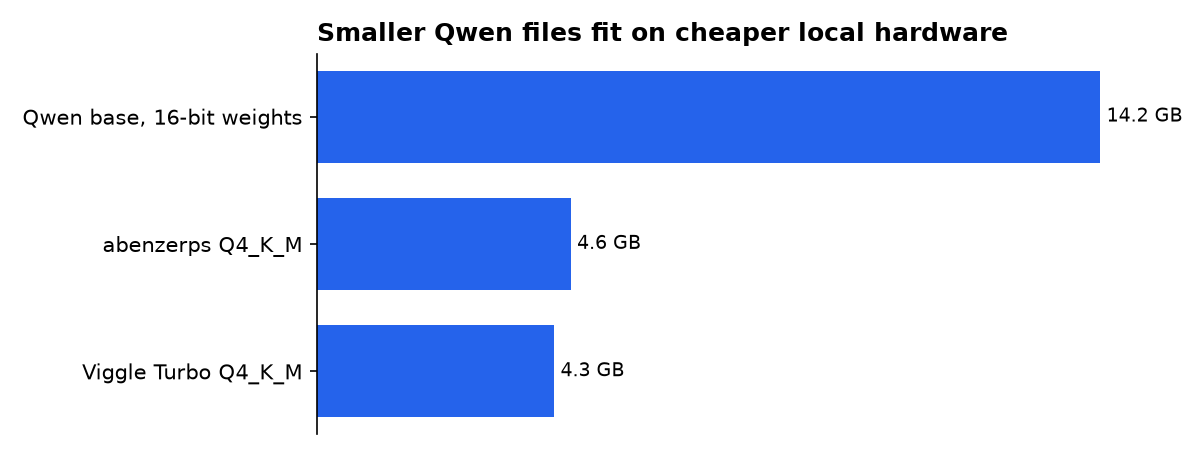
| Qwen Image 2.1 base, BF16 | 33.1 GB safetensors total | 14.2 GB for 16-bit visual weights | Best documented editing range; official page demonstrates Diffusers, not a specific ComfyUI workflow. | OUR CALCULATION Published files and 7.1B parameters. |
| abenzerps Uncensored, Q4_K_M GGUF | 4.60 GB | About 5.3 GB for the transformer plus a modest context cache | Explicit ComfyUI-GGUF instructions; no built-in safety checker or content filter. | PUBLISHED REPOSITORY OUR CALCULATION |
| Viggle Turbo v0.3, Q4_K_M GGUF | 4.3 GB | About 5.0 GB for the transformer plus a modest context cache | Tested by Viggle with ComfyUI 0.37.0; use its supplied sigma schedule rather than a normal scheduler. | PUBLISHER CLAIM OUR CALCULATION |
Our planning figures add a modest context cache to each published transformer file. They are arithmetic from file sizes, not a hardware test, and do not replace the text encoder, VAE, image buffers or ComfyUI overhead.
Can I run LLM models locally?
Yes, but running Qwen Image 2.1 locally means downloading model files and running generation on your own GPU or, more slowly, through mixed GPU and system-memory use. The model does not need a cloud API for its documented Diffusers examples. Qwen’s setup calls for PyTorch, Transformers, Diffusers, Accelerate and Pillow. (huggingface.co)
“Local” does not mean “small.” Viggle’s default ComfyUI configuration combines a 7.3 GB int8 diffusion model, a 9.4 GB int8 text encoder, a 0.7 GB VAE and a 0.7 GB LoRA. Its publisher reports about 26 GB peak VRAM at the listed 1248 × 832 workflow size. The Viggle ComfyUI notes make clear that the complete pipeline, rather than the 4.3 GB GGUF alone, sets the practical hardware bar. (huggingface.co)
For a smaller machine, abenzerps explicitly suggests running the text encoder in system RAM because it runs once per prompt. That can preserve GPU memory for the repeated image-generation stage, although it does not guarantee a given laptop will complete a workflow. The repository’s memory guidance also suggests ComfyUI’s --lowvram mode when VRAM runs out. (huggingface.co)
What’s the best LLM I can run locally?
For local image generation, the best option is not automatically the fastest or smallest one. Qwen Image 2.1 base is the best fit among these three when you need transparent output, masked changes or many reference images. Qwen says the base model supports up to 10 references and regular or RGBA images in one pipeline. (huggingface.co)
Viggle Turbo is the best fit when many drafts matter more than maximum edit tolerance. Its 6-step setup uses no classifier-free guidance, a prompt-control technique common in diffusion workflows, and asks users to retain Viggle’s supplied schedule. Viggle warns that ordinary step-count changes, default schedules and negative prompts do not improve this model’s results. (huggingface.co)
abenzerps is the best fit only for a specific buyer: someone who accepts the “uncensored” behavior and wants a pre-quantized ComfyUI route. The publisher says that build contains no safety checker or content filter, so users remain responsible for prompts, outputs and local-use rules. That behavior is stated plainly on the model page. (huggingface.co)
What LLM is best for generating images?
No local Qwen build is universally best for images because the answer changes with privacy, editing control, hardware and licensing needs. Qwen Image 2.1 is a strong local candidate when you need offline control of source files and prompts. Its license is the Qwen Research License Agreement, so commercial teams should read the terms before building it into a product. The official card identifies that license. (huggingface.co)
Cloud services still reduce setup work. OpenAI’s current model directory lists GPT-Image-2.5 Sunburst, GPT-Image-2.5 Flare and GPT-Image-2 as image-generation and editing models, while its older chatgpt-image-latest documentation lists 1024 × 1024 image prices from $0.009 at low quality to $0.133 at high quality. Those are API economics, not an alternative to offline privacy. (developers.openai.com)
For polished web-first image work, Midjourney’s current default is V8.2, which became the default model on 24 July 2026. Adobe Firefly, meanwhile, says eligible subscribers can make unlimited generations with selected partner and Firefly models under its stated offer terms. Midjourney’s version guide and Adobe’s announcement describe managed creative workflows, not local installations. (docs.midjourney.com)
How should you set up ComfyUI offline?
Use one build path at a time. Mixing a base model, an unrelated scheduler and a turbo LoRA is the quick route to unclear failures. The abenzerps path uses ComfyUI-GGUF and a GGUF loader; the Viggle path supplies custom nodes and ready-made text-to-image and edit workflow files. abenzerps’ instructions specify file placement, while Viggle’s card specifies the turbo nodes. (huggingface.co)
- For the original model: use the official Qwen pipeline and begin with its 40-step examples.
- For low-memory ComfyUI: choose the abenzerps Q4_K_M file, the int8 text encoder and the supplied VAE.
- For speed: use Viggle’s v0.3 workflow, its 6-step sigma list and a LoRA strength of 1.0.
- For photo editing: save the input, mask and prompt together so an edit can be repeated later.
Viggle says its 9-step option can produce finer detail and improve small text more often, but it works in Diffusers and the demo space only. Do not assume that a feature shown in code is already supported by a drag-and-drop ComfyUI workflow. The release notes draw that distinction. (huggingface.co)
What should you actually do?
Buy no hardware from the 4.3 GB or 4.6 GB numbers alone. First install the abenzerps Q4_K_M setup if you need to learn what your current machine can handle, then test a simple 1024-pixel square image and one edit. That gives you a realistic baseline before a larger download or a GPU purchase.
Move to Viggle Turbo if generation speed is your recurring pain and you can meet its much higher complete-workflow memory demand. Stay with Qwen’s base release if your work depends on transparent assets, several reference images or careful local editing. The decisive fact is workflow fit, not the headline model-file size.
Keep local outputs labeled in your own asset library. A study of 10,217 self-reported GPT-Image-2 images found that Twitter’s CDN stripped C2PA content credentials after upload, making later cryptographic provenance checks infeasible for those social-media copies. The researchers’ May 2026 paper is a reminder that local records can matter after an image leaves your machine. (arxiv.org)
What we could not verify?
There is no public, independent hardware test that establishes identical generation time, image quality or peak memory across these three builds on the same GPU. Viggle’s “about 5× faster” figure is its publisher claim, not a neutral benchmark, and abenzerps’ file-size guidance is not a guarantee of successful generation on every computer.
Qwen’s base page documents its pipeline but does not publish an official ComfyUI compatibility matrix. Qwen, Viggle and the ComfyUI project could settle that with maintained versioned workflows, repeatable memory measurements and side-by-side output tests using identical prompts.

