
FuturPulse analysis · 4 October 2026
Best AI for logo design is a design skill paired with Qwen-Image-2.1: the skill produces tested SVG directions, while Viggle’s v0.3 turbo cuts Qwen’s 40-step image workflow to six. (github.com)
At a glance
- Logo Design Skill starts with 8–12 concept lines, then builds three SVG concepts before a decision checkpoint. (github.com)
- Qwen-Image-2.1 supports transparent RGBA output, native 2K images and up to 10 reference images. (github.com)
- Viggle Qwen-Image-2.1-viggle-turbo v0.3 uses six steps and claims about 5× the base model’s end-to-end speed. (huggingface.co)
- Our calculation from Viggle’s published files puts the smallest listed Q4_K_M turbo file at 4.3 GB on disk and about 5.0 GB including a modest cache. Viggle’s file listing is the underlying evidence. (huggingface.co)
What is the best AI for logo design?
The best choice is not one image generator. It is a workflow: use Logo Design Skill to make the actual logo system, then use Qwen-Image-2.1 or Viggle Turbo for visual exploration, mock-ups and supporting brand images.
A logo is a mark that must survive tiny sizes, one-colour printing and awkward contexts. A generic image prompt can produce an appealing picture of a logo, but it does not reliably produce clean paths, tested spacing, alternate lock-ups or a usable favicon.
Logo Design Skill’s process is the differentiator. It covers the brief, mark type, geometry, optical corrections, type, colour, testing and delivery. It also stops after showing concepts, so a person chooses a direction before the larger brand kit is made. (github.com)
Fast recommendation
- Need a real identity: start with Logo Design Skill and ask for SVG concepts.
- Need many rough visual directions: use Viggle Turbo v0.3 at six steps.
- Need a difficult edit or readable small lettering: use Qwen-Image-2.1 base at 40 steps, or Viggle’s nine-step mode.
- Need a browser-first editor and exports: compare dedicated services, but inspect their licensing and originality terms before publishing.
Why start with a design skill?
A design skill gives an AI agent rules and tools for identity work. Here, that means turning a loose request into deliberate concepts rather than asking an image model to guess a finished brand from one sentence.
The skill’s reference library contains more than 1,400 visually classified real-world SVG logos. Its stated purpose is to study category conventions and avoid look-alikes, not to copy marks. That is more useful than a generic “minimal modern logo” prompt, which often repeats category clichés. (github.com)
The practical tests matter most. The skill can audit an SVG, make a 16 px pixel test, make one-colour and reversed versions, and show a competitor shelf test. Those checks answer whether a logo still works where customers will actually see it. (github.com)
Use Qwen after this design step. Ask it for packaging, a storefront sign, app-screen context or a campaign image that uses an approved direction. Do not treat its first raster output as the master logo file.
Which Qwen model fits logo work?
Choose Qwen-Image-2.1 base when accuracy matters more than iteration speed. The base model is a unified generator and editor with a 7B visual component, native transparency and support for up to 10 reference images. (huggingface.co)
That makes Qwen-Image-2.1 useful when a founder has a hand-drawn mark, product photos, a colour reference and an existing wordmark. You can use several references to direct a composition, then ask for a specific local edit with a mask or marked region.
The official workflow defaults to 40 denoising steps. Denoising steps are the repeated passes an image model uses to turn visual noise into an image. Qwen also recommends a specific transparency prompt format when the output needs an alpha channel, the invisible background layer used by PNG logos. (huggingface.co)
Viggle Qwen-Image-2.1-viggle-turbo v0.3 is the iteration choice. It is a distilled version of Qwen-Image-2.1, meaning it was trained to approximate the slower process in fewer steps. Viggle specifies one to three reference images, six steps and no classifier-free guidance in its standard path. (huggingface.co)
For logo exploration, six steps can be enough to compare silhouettes, colour directions and packaging scenes. But Viggle identifies small, dense text and complicated edits as its clearest gaps. That limitation makes it a poor final renderer for a wordmark that must spell a company name perfectly. (huggingface.co)
Can Qwen make a transparent logo?
Yes, Qwen-Image-2.1 can natively generate transparent RGBA images. RGBA means red, green, blue and alpha, with alpha storing transparency rather than a coloured background. (github.com)
This is valuable for a logo concept because it avoids cutting a subject from a flat background after generation. It is also useful for producing a sticker, mascot or decorative emblem to test beside a logo.
Transparency is not vector output. An RGBA PNG can have a transparent background yet remain a grid of pixels. Use it as reference material, then redraw approved shapes as SVG paths if the mark needs to scale from a browser tab icon to a sign.
Qwen-Image-2.1 supports a native 2048 × 2048 square output and listed landscape and portrait sizes. Those are useful for campaign and mock-up imagery, but a logo’s production quality comes from its construction and testing, not from a high pixel count. (huggingface.co)
How much memory does local logo AI need?
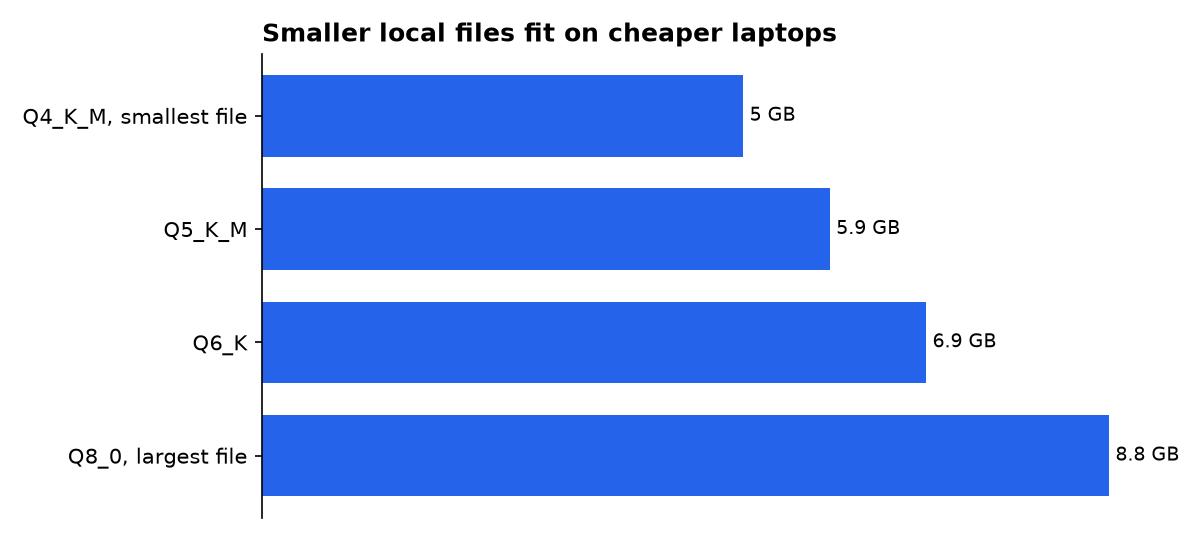
The smallest practical local Viggle Turbo download is the Q4_K_M file. By our calculation from the published file sizes, it needs about 5.0 GB of RAM or VRAM with a modest context cache, while the Q8_0 option needs about 8.8 GB. These are planning figures, not hardware benchmarks. Viggle publishes the four GGUF files. (huggingface.co)
| Concrete local option | Published file size | Our planning estimate | Best decision use | Evidence tier |
|---|---|---|---|---|
| Viggle Turbo v0.3 Q4_K_M GGUF | 4.3 GB | 5.0 GB RAM or VRAM | Smallest listed local starting point | Our calculation; published file size |
| Viggle Turbo v0.3 Q5_K_M GGUF | 5.1 GB | 5.9 GB RAM or VRAM | Middle ground for a roomier machine | Our calculation; published file size |
| Viggle Turbo v0.3 Q6_K GGUF | 6.0 GB | 6.9 GB RAM or VRAM | Higher-size local option | Our calculation; published file size |
| Viggle Turbo v0.3 Q8_0 GGUF | 7.7 GB | 8.8 GB RAM or VRAM | Largest listed option in this comparison | Our calculation; published file size |
Assumption for the planning estimate: published model-file size plus roughly 0.7–1.1 GB for a modest context cache. It excludes the wider application stack and is not a promise that a given laptop will run the workflow.
GGUF is a compact model-file format used by some local tools. ComfyUI-GGUF adds a GGUF loader for ComfyUI and says transformer-based image models can be less affected by quantization than older convolutional image models. Quantization means storing model weights with fewer bits to reduce memory use. (github.com)
The base Qwen model is larger in its standard form. Qwen lists a 7B visual component, and our calculation from that declared parameter count puts the weights alone at about 14.2 GB at 16-bit precision, 7.1 GB at 8-bit and 3.6 GB at 4-bit. The published safetensors weights total 33.1 GB on disk. Qwen’s model card supplies the declared model size. (huggingface.co)
Are online AI logo makers enough?
They can be enough for a low-stakes draft, especially when you need an editor, exports and fast iterations in one browser tab. But their claims should not be confused with proof that a mark is distinctive, legally clear or well constructed.
Canva’s AI Logo Generator says it can turn prompts into logo designs and lets users continue editing in Canva. Canva also warns that commercial users may not have exclusive rights to AI-generated designs and remain responsible for checking suitability, including trademarks and logos. (canva.com)
Design.com advertises vector downloads including SVG and EPS, commercial-use licensing, and optional exclusivity-related licenses. Those are vendor claims, not a substitute for an independent trademark search or a professional legal opinion before a major launch. (design.com)
Designlab’s 2026 review makes the useful distinction: image models can now render lettering more reliably, but most create an image of a logo rather than a production-ready logo system. It identifies real SVG output as an important dividing line. Designlab’s comparison supports that practical warning. (designlab.com)
How should you use Qwen for a logo?
Use Qwen and Viggle as directed visual tools, not as the final authority on brand identity. Start with the brand brief: audience, category, promised feeling, forbidden clichés, name, reading language and real places the mark must appear.
- Ask Logo Design Skill for 8–12 one-line concepts and three SVG directions.
- Reject any direction that fails at 16 px or in one colour.
- Use Viggle Turbo to generate rapid mock-ups of the shortlisted directions on a product, website or sign.
- Use Qwen-Image-2.1 base for hard edits, transparent supporting assets and reference-heavy compositions.
- Redraw and audit the chosen mark as SVG before treating it as a business asset.
For Viggle, follow its supplied settings rather than changing sliders at random. The six-step workflow uses a fixed sigma schedule, no negative prompt and a guidance scale of 1.0; Viggle says changing the low-noise schedule makes results softer. (huggingface.co)
If six-step output loses a letter or muddles a fine symbol, use Viggle’s nine-step mode or return to Qwen base. Viggle says nine steps runs about 1.4–1.5× as long as its six-step mode and improves fine detail and small text more often, though not every time. (huggingface.co)
What should you actually do?
For a company that needs a logo this month, use Logo Design Skill first. Its value is the disciplined brief, concept checkpoint and SVG testing. That is the work a generic prompt leaves undone.
Then install Viggle Qwen-Image-2.1-viggle-turbo v0.3 if you need fast visual exploration on a capable local machine. Start with Q4_K_M only when the roughly 5.0 GB planning figure fits your available memory; otherwise use a hosted image workflow or skip local generation.
Use Qwen-Image-2.1 base for a final round when the job depends on transparency, exact local edits or several references. Keep it away from the final legal and technical decision: inspect the SVG, test it at small size, search for conflicts and get an experienced designer involved before committing to signage, packaging or a trademark filing.
What we could not verify?
No public material here establishes that any generated logo is trademark-clear, exclusive in every jurisdiction or ready for registration. A trademark attorney and the relevant trademark office could settle those questions.
Public model pages also do not provide repeatable logo-specific accuracy scores for spelling, vector cleanliness or similarity risk. Qwen, Viggle or independent evaluators could settle that with a disclosed test set of wordmarks, small-size checks and SVG-output audits.

