

FuturPulse analysis · 28 October 2026
As of 28 October 2026, agent-purge version 0.2.3 can put one locally stored persona into at least 12 coding-agent integrations. That makes it a security decision: one unsafe instruction, broad tool permission, or secret-handling rule can now reach several agents at once.
At a glance
- agent-purge 0.2.3 declares Node.js 20 or later as its only runtime requirement.
- The project documents four modes:
off,append,replace, andstrict. - Its published test matrix lists 12 named harness entries, including Codex, Claude Code, Grok, OpenCode, pi, dsh, and CodeBuddy.
- The project’s matrix claims Codex system text fell from 21,026 characters to 24 characters in one tested configuration.
- agent-purge is not a GitHub deletion tool and does not perform the workflow-run or cache purges associated with similarly named GitHub Actions.
What is agent-purge on GitHub?
agent-purge is a local command-line prompt-routing tool, not a GitHub App, GitHub Action, repository deletion command, or cache cleaner. Its stated job is to keep a single “persona” file and apply that text to multiple coding-agent command-line tools.
A system prompt is the instruction text that tells an AI tool how to behave before it reads a developer’s request. agent-purge can add a persona before that text, try to replace parts of it, or remove the host prompt entirely. That last option changes more than tone: a host prompt can include tool-use rules, safety limits, and instructions for handling files.
The repository says it stores its state and persona files locally, by default under ~/.agent-purge/, and starts a browser-accessible console on 127.0.0.1:7788. The package manifest lists no runtime dependencies, but “zero dependencies” is not the same as a security review of its own code or of the coding agents it changes.
Is agent-purge a GitHub purge command?
No. agent-purge does not purge a GitHub repository, erase commit history, remove GitHub Actions logs, or clear GitHub image caches. The word “purge” refers to removing or overriding an AI agent’s built-in prompt text on the local machine.
That distinction matters because existing GitHub purge projects operate on remote GitHub resources. For example, purge-deprecated-workflow-runs removes workflow runs based on states such as obsolete, cancelled, failed, skipped, or older than a chosen period. It accepts an authentication token, usually github.token.
GitHub warns that an Action can access GITHUB_TOKEN through its context even if a workflow author did not explicitly pass it in. GitHub’s guidance is to set only the minimum required permissions. That risk model concerns remote repository automation; agent-purge’s central risk is instead local prompt and tool-policy centralisation.
| Tool | What it changes | Where it acts | Main security question |
|---|---|---|---|
| agent-purge | System-prompt text and launch or plugin configuration | Local coding-agent installs | Which instructions and tools are inherited across agents |
| purge-deprecated-workflow-runs | GitHub Actions workflow-run records | Current GitHub repository | What can its token delete or read |
| GitHub cache purge actions | Cached rendered images or related GitHub cache entries | GitHub-hosted repository content | Which repository and branch does the Action target |
Comparison based on the agent-purge repository and the workflow-run Action’s published README. A cache-oriented example, Hub Purge Action, describes itself as clearing GitHub image caches.
What did agent-purge promise, and what shipped?
agent-purge moved quickly from a narrow prompt experiment into a multi-agent wrapper. The dated record below separates the project’s stated scope from the functionality it publicly described as implemented.
-
A repository snapshot described agent-purge as a new JavaScript project that maintained one persona file and delivered it through persistent configuration, command shims, or session controls. The promise was one prompt across several harnesses, with a reversible off switch.
-
A project profile described a local console and support for Codex, Claude Code, and other installed agents. It also recorded the practical limit: server-side or closed desktop clients could not necessarily have their prompts changed.
-
The author announced dsh support alongside CodeBuddy, Codex, Claude Code, Grok, OpenCode, omp, and others. The current package manifest identifies the release as version 0.2.3 and lists support for Codex, Claude, OpenCode v1 and v2, Grok, omp, Hermes, pi, zcode, and dsh.
The important gap is between “one persona” and “identical behaviour.” The project’s own matrix lists different mechanisms per harness: command flags, configuration blocks, plugins, hooks, a temporary home directory, and one binary-patching approach. A shared prompt can create a shared policy, but it cannot make different tools enforce that policy in the same way.
How much host instruction does it remove?
The project publishes unusual before-and-after prompt lengths from its own local-provider tests. By FuturPulse’s calculation from the published character counts in its matrix, the reported reduction ranges from 70.7% for omp to 99.9% for Codex in the listed test setups.
| Harness | Published default system text | Published text after purge | FuturPulse calculated reduction |
|---|---|---|---|
| Codex | 21,026 characters | 24 characters | 99.9% |
| Claude Code | 6,379 characters | 156 characters | 97.6% |
| Grok | 5,146 characters | 21 characters | 99.6% |
| omp | 34,511 characters | 10,106 characters | 70.7% |
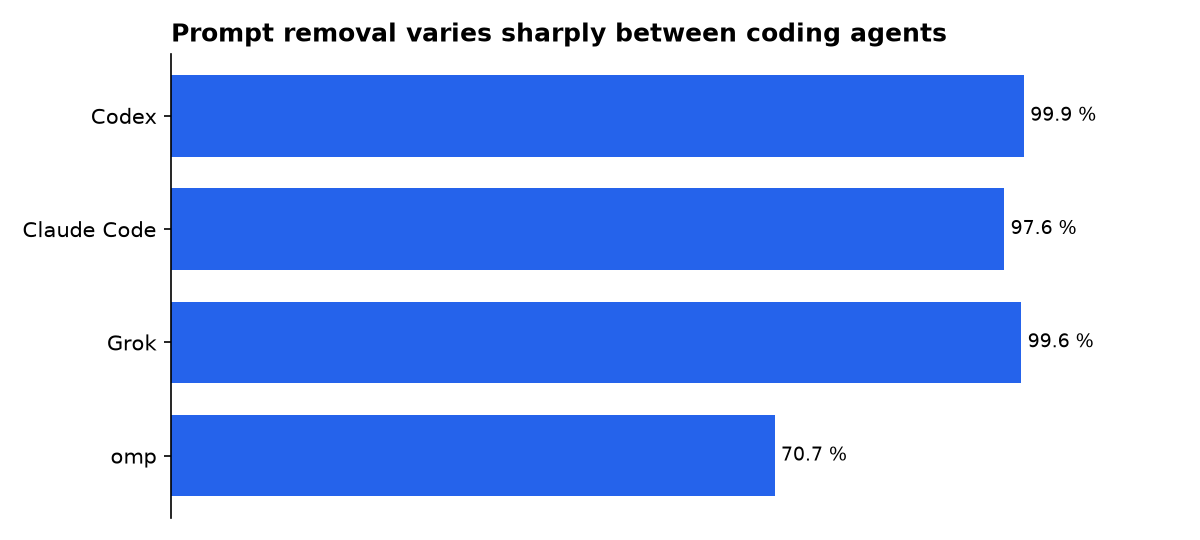
FuturPulse calculation: (published default characters minus published post-purge characters) divided by published default characters. These are the project’s claimed captures, not an independent benchmark or a measure of model quality.
For a developer, those numbers mean that strict or aggressive replacement can remove nearly all vendor-provided instructions in some tools. That may be useful for controlled prompt research. It can also discard instructions that explain available tools, constrain actions, or set safe defaults.
Which mode is the safer default?
append is the safer starting point for routine use because it leaves the host system prompt in place and adds the shared persona before it. The project says strict replaces the whole system prompt, including tool instructions, while replace uses a narrower attempt to strip identity lines.
Security recommendation: do not use strict as a team-wide default until each target harness has been tested with the permissions, repositories, credentials, and tools it will actually use.
- Use
offas the baseline for comparison. - Use
appendfor shared style and workflow guidance. - Reserve
replaceandstrictfor isolated experiments. - Keep the persona file free of access tokens, private URLs, customer data, and operational secrets.
This is an inference from the published modes and mechanisms, not a claim that agent-purge is malicious. The risk is policy removal at scale: a harmless-looking shared prompt can weaken several coding environments at once, while a malformed prompt can make several agents act inconsistently.
Why does one prompt become a security boundary?
A shared persona can tell every agent what it may read, write, run, or send. It can require confirmation before edits, prohibit reading secret files, restrict shell commands, or forbid deployment. It can also accidentally do the opposite when one broad instruction reaches an agent with more capable tools than expected.
GitHub’s security guidance makes the same underlying point for Actions: token permissions should be minimal, untrusted code should not be checked out in privileged contexts, and third-party code must be audited for unintended network destinations. A prompt is not an access-control system, but it becomes part of the control plane when it steers tools that already hold credentials or repository access.
The risk increases when a coding agent works in a repository containing secrets, cloud credentials, production configuration, or a GitHub token. GitHub advises users to rotate exposed secrets because log redaction is not guaranteed in every transformation path. The practical equivalent here is simple: do not assume a prompt instruction alone prevents a tool from reading a file it can access.
How should teams install it without widening access?
Teams should treat agent-purge as local developer tooling, not as centrally enforced governance. Its install, shim, and slash channels have different persistence: an install writes managed configuration, a shim takes over a bare command through the system path, and slash controls a running session.
Start with one developer machine and one disposable repository. Confirm which harness was detected, which channel is active, and whether the host prompt remains present. Then test basic limits: reading a normal source file, encountering a fake secret, invoking a shell command, and attempting an edit outside the intended folder.
Use a network inspection tool if a coding agent’s data handling matters to your organisation. mitmproxy documents its ability to intercept and save HTTP and HTTPS conversations, enabling a controlled review of what a local client sends. That inspection should occur only on traffic and systems your organisation is authorised to test.
The caution is not theoretical. A July 2026 wire-level analysis of Grok Build claimed that a tested client uploaded a tracked repository bundle and history independently of the files requested by the user. The researcher’s published capture and reproduction notes do not establish behaviour for every coding agent, but they show why local file permissions, outbound transmission, and retention must be assessed separately.
Should agent-purge receive GitHub credentials?
agent-purge itself is not presented as a GitHub OAuth integration, and its core use case does not require a GitHub credential. Avoid placing a personal access token, OAuth client secret, or GitHub App private key in a persona file or in prompts that may be copied into several agents.
If an agent must work with GitHub, prefer a GitHub App with narrow repository selection and specific permissions where the workflow permits it. GitHub says Apps can be installed on selected repositories with narrow, specific permissions, unlike broad user-level access patterns that can spill across unrelated projects.
For cloud deployment tasks, use short-lived, scoped credentials rather than long-lived values embedded in local instructions. GitHub’s secure-use guidance recommends OpenID Connect for cloud authentication where supported, so workflows can avoid storing long-lived cloud credentials as repository secrets.
A separate identity layer can help where agents legitimately need external tools. Amazon Bedrock AgentCore Identity describes per-agent identities, token storage, and credentials bound to specific agent-user combinations. That approach does not secure agent-purge by itself, but it illustrates the missing control: the prompt should not be the only barrier between an agent and a credential.
What we could not verify?
There is no independent public audit establishing that agent-purge’s local-only and reversible-operation claims hold across every supported harness, operating system, version, or plugin channel. The project publishes its own measurements, but a security firm, maintainers of the affected coding agents, or reproducible third-party tests could settle whether each integration preserves tool limits and restores configuration byte-for-byte.
Public information also does not establish how each coding-agent vendor handles prompts after they leave a developer’s machine. Each vendor could clarify its transmission scope, retention rules, redaction behaviour, and the effect of local prompt overrides. Until then, agent-purge should be treated as a convenient shared-configuration layer, not as a substitute for least-privilege credentials, repository controls, or network policy.
Sources
- ZiChuanLan/agent-purge repository
- agent-purge published harness matrix
- HotRepo project snapshot
- Arsentev.ai project profile
- agent-purge dsh support announcement
- purge-deprecated-workflow-runs Action
- GitHub Apps documentation
- mitmproxy documentation
- Grok Build wire-level analysis
- Amazon Bedrock AgentCore Identity overview

