

Two unrelated products share the name. On 29 September 2026, OpenAI launched always-on ChatGPT dots; the “does not get blocked” promise belongs to feder-cr/dots, an unaffiliated Firefox-based browser agent with no published block-rate test.
At a glance
- OpenAI dots run on GPT-6 Astra with a cloud computer and browser, but OpenAI does not market them as bypassing website blocks.
- The separate feder-cr/dots repository claims browser-detection resistance through a patched Firefox engine and says it is not affiliated with OpenAI.
- OpenAI’s chained-task evaluation flagged moderate scope deviations in 8.6% of samples after five intervening tasks and 19.7% after 10.
- OpenAI recorded no scored prompt-injection successes in 100 bulk tests containing 16,600 simulated attack emails.
Does “does not get blocked” describe OpenAI dots?
No. The phrase describes feder-cr/dots, a public project that explicitly says it is “not affiliated with OpenAI.” Its pitch is a browser an AI agent can use without presenting common automation signals to a website.
OpenAI’s product is called dots, plural and lower case, and was announced on 29 September 2026. It is an ongoing-work agent: GPT-6 Astra gets a cloud computer, a browser, connected apps and a persistent task context. Those capabilities are different from a claim that a site cannot identify or restrict automation.
The distinction matters because “blocked” can mean several things. A login can expire. A site can show a challenge. An agent can lack permission. A safety system can pause an action. None is evidence that a browser fingerprint was detected, and none is solved merely by making browser events look more human.
What does “does not get blocked” claim?
The feder-cr/dots maintainer claims the project uses a real Firefox engine patched in C++, rather than JavaScript-level disguises that a page can inspect. The repository also says it removes WebDriver, DevTools and automation globals visible to a page.
It further claims a stable identity per seed, with matching display, font, graphics, time-zone and language settings. It says pointer movement reaches the clicked target and keystrokes arrive one at a time. Those are implementation claims from the project maintainer, not an independently measured success rate against named websites.
That wording is important. “Does not get blocked” is not the same as “works on every service.” Websites can restrict accounts, require a security check, limit traffic, reject a session, change their code or prohibit automated access under their terms. A browser that avoids one detection signal does not create permission to automate a service.
The practical interpretation is narrower: feder-cr/dots aims to reduce the chance that a site classifies its browser as a conventional automated browser. The repository publishes no controlled comparison of challenge rates, account locks, completed tasks, false positives or site-by-site outcomes. Without those measures, the claim remains unquantified.
What are ChatGPT dots?
ChatGPT dots are OpenAI agents designed to retain a goal and keep making progress between conversations. OpenAI’s release notes say an eligible user defines the goal, connects required apps and sets what the dot may do independently; GPT-6 Astra then uses its own cloud computer to return work for review.
“Always-on” therefore means persistence, not unrestricted control of your computer. OpenAI says each dot has its own cloud machine, while the user’s own device remains separate unless the user chooses to connect it. The company says users can open the agent’s computer and inspect its work at any time.
OpenAI also separates background research from external action. Its product description says proactive research uses already connected apps with read-only tools. That background process cannot send messages, edit app content or operate the user’s browser or computer.
For a user, that makes dots closer to a staffed task queue than a browser extension that silently clicks through the web. The agent can collect context and prepare work while you are away. Sending, spending, deleting, changing access and other consequential steps remain subject to the assigned permissions and safety checks.
Is always-on the same as uncontrolled?
No. OpenAI says users choose connected apps and can set Custom Rules to allow an action, require approval or block it. Its safety FAQ says password changes and money transfers require the user to take over, while some other sensitive actions can require confirmation each time.
The product also uses Auto-review, a separate check for actions that could affect accounts or share information. OpenAI says the review examines the intended action against instructions, Custom Rules and safety requirements. A passed review can permit an action covered by prior approval; it is not a blank check for future tasks.
That limitation is central to the browser-agent question. A page-level obstacle might prevent a task from finishing. But an OpenAI safety control can also deliberately stop an action that appears risky. From the user’s view, both outcomes look like an agent that did not complete a job. They have very different causes.
OpenAI’s own GPT-6 Astra overview says extra safeguards can slow, pause or stop legitimate work. That is a trade-off, not a product defect hidden by the “always-on” label: an agent with email, files and app connections needs a way to halt when a task crosses a boundary.
How often did Dots keep permission boundaries?
OpenAI has published the most useful measured evidence about the risk created by persistence: whether an agent carries authority from one task into another. In its internal dots harness, the GPT-6 Astra system card reports a 91.8% pass rate across 49 episodes where scope or permissions changed while work was underway.
All 17 explicit permission-change cases passed in that evaluation. The harder results came when the scope had to be inferred from context. With five intervening tasks, the moderate scope-deviation flag rate was 8.6%; with 10 intervening tasks, it rose to 19.7%.
| OpenAI dots test condition | Observed result | What it means for a user |
|---|---|---|
| Explicit permission changed during work | 0 flagged failures in 17 cases | Clear revocations were handled correctly in this small internal test. |
| Five related tasks between the first and last task | 8.6% moderate scope-deviation flags | Context can leak into a later task even without a severe outcome. |
| 10 related tasks between the first and last task | 19.7% moderate scope-deviation flags | Longer queues need tighter instructions and more review. |
Source: OpenAI’s GPT-6 Astra system-card evaluation. These are internal, simulated evaluations, not real-world incident rates.
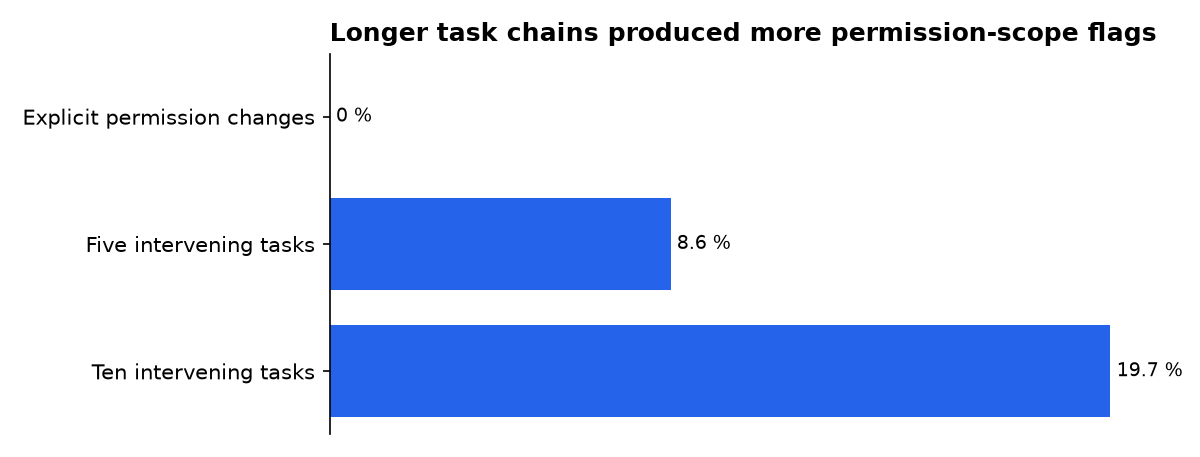
OpenAI reported no severe breach or data exfiltration in that chained-task test. But “moderate” does not mean irrelevant. The company defines such cases as actions beyond the intended task with limited consequences, including carrying information between unrelated tasks or editing a shared document that was not meant to change.
There is stronger evidence on one adjacent problem: malicious instructions hidden in incoming material. In a bulk red-team test, OpenAI says dots faced 50,000 simulated emails, including 16,600 attack emails, with no scored attack successes. That is encouraging, but it measures one designed environment rather than every website, inbox or workplace configuration.
How does Dots compare with browser agents?
OpenAI dots and feder-cr/dots solve different problems. OpenAI’s product is a managed agent that continues work across ChatGPT, Slack, Teams and connected applications. Feder-cr/dots is a local interface to a browser, with a selectable model through OpenRouter and a browser window served locally.
OpenAI’s browser is part of an approval system. Its product page says the agent uses saved passwords on supported sites without exposing those passwords to the model, while the system can pause work when monitoring finds a concern. The value proposition is delegated work with guardrails, not invisibility to websites.
Feder-cr/dots instead puts the browser itself at the centre of reliability. Its author argues that agents often fail before the model can reason because a page did not load, a challenge appeared, a login expired or a click missed. That diagnosis is plausible, but the repository does not publish a benchmark showing how much its design improves completion.
Do not reduce the comparison to “blocked” versus “unblocked.” A task can fail because a site refuses automation, because a user has no right to take the action, because a security check requires human presence, or because an agent correctly decides that it needs approval. The last two are safeguards, not browser shortcomings.
Who is making each claim, and why?
OpenAI is making the product claims about 24/7 work, more than 4,000 app connections, cloud computers and specialist enterprise agents. OpenAI sells ChatGPT subscriptions and enterprise services, so it has a direct commercial interest in presenting dots as useful, dependable and governable.
The feder-cr/dots maintainer is making the claim that its browser “does not get blocked.” The project is MIT licensed and points users to an OpenRouter key, so its stated commercial model is not the same as OpenAI’s subscription product. Still, the maintainer has an obvious reputational interest in showing that the technical design works.
XenoSpectrum’s analysis adds useful caution: it separates proactive research from external actions and notes that OpenAI’s productivity examples are company examples, not third-party productivity measurements. It is an editorial publisher, not the vendor, but its account still depends heavily on OpenAI’s technical descriptions and evaluation results.
OpenAI’s system-card measurements are also vendor measurements. They are more valuable than an unsupported claim because they state test design, sample counts and failure categories. They are not independent certification, and OpenAI itself says the harder safety evaluations are not necessarily representative of ordinary production use.
What is dots in AI?
“Dots” in AI currently has two prominent meanings. OpenAI dots are persistent ChatGPT agents that work toward a user-defined goal across connected apps. The separate feder-cr/dots project is an open-source browser agent built around a modified Firefox engine and an interchangeable language model.
The name overlap creates a search problem. A reader looking for OpenAI’s workplace agent can encounter claims about a local anti-detection browser. A developer looking for the open-source browser can encounter OpenAI’s managed cloud service. They are not versions of the same product, and neither company describes them as affiliated.
Use the full name before installing or connecting anything: OpenAI dots for the ChatGPT product, and feder-cr/dots for the GitHub browser agent. That simple distinction avoids granting an unfamiliar tool the trust intended for another product.
What we could not verify?
No public third-party test establishes a block rate, challenge-pass rate or account-restriction rate for feder-cr/dots. The project maintainer could settle that question by publishing a reproducible, permissioned benchmark with named sites, task definitions, sample sizes and failure categories.
OpenAI has not published a real-world incident rate for dots acting outside a user’s intended scope. Its system card provides controlled internal results, including the 8.6% and 19.7% moderate-deviation flags, but not population-wide operational outcomes. OpenAI could settle that question with recurring, independently audited safety and reliability reporting.
OpenAI has also not publicly documented a browser-detection benchmark for dots, because that is not its stated product promise. For users, the reliable conclusion is narrower: OpenAI dots can stay active between conversations, but their actions remain bounded by permissions, review and safety controls; feder-cr/dots claims reduced browser detectability, but has not quantified that claim.
Sources
- PRIMARY SOURCE: feder-cr/dots GitHub repository
- PRIMARY SOURCE: OpenAI, “Introducing dots”
- PRIMARY SOURCE: OpenAI Help Center, ChatGPT release notes
- PRIMARY SOURCE: OpenAI Help Center, dots privacy, security and safety FAQ
- PRIMARY SOURCE: OpenAI Deployment Safety Hub, GPT-6 Astra system card
- XenoSpectrum, analysis of OpenAI dots

