

Hermes Voice 0.1.0, released on 5 November 2026, connects Home Assistant Assist to one Hermes Agent profile without automatically granting it Home Assistant device controls. It requires Home Assistant 2026.10 or newer; start with the safe tool preset and local Assist handling to add speech without handing an agent the house.
At a glance
- Hermes Voice sends each new spoken request to a selected Hermes profile while Hermes retains the session history.
- The default conversation session resets after 5 minutes of silence, while the device session mode defaults to a 30-minute idle window.
- A dedicated voice profile needs an API key of at least 16 random characters, according to the project’s voice-profile setup guide.
- The first release lists 81 tests, streamed replies, speech cleanup and spoken error fallbacks in its 0.1.0 release notes.
How does Hermes Voice avoid controlling the house?
Hermes Voice is a Home Assistant conversation agent, not a direct smart-home controller. Home Assistant takes the spoken sentence, passes it to its chosen conversation agent, then receives a response through the same conversation layer, as the Home Assistant Conversation API describes.
The important boundary is deliberate: Hermes Voice 0.1 gives Hermes no Home Assistant tools. The integration can talk, remember the thread, clean a reply for speech and stream it early, but it does not itself give the agent permission to switch lights, unlock anything or alter automations.
That is the useful distinction from many “voice agent” demonstrations. A language model can answer a question over a speaker without receiving the credentials or tools that make physical changes. Device access appears only if the operator separately gives the Hermes profile Home Assistant’s MCP server, a tool connection that exposes Home Assistant functions.
What do you need before connecting it?
Use a working Hermes Agent installation, a model provider, Home Assistant 2026.10 or newer, and a voice endpoint. The project has tested an Echo Dot second generation and an Echo Show 5 first generation through echo-dot-assist, while other Assist satellites are listed as expected to work but untested.
Home Assistant needs a speech pipeline: speech-to-text converts speech into text, while text-to-speech reads the answer aloud. A fully local Assist setup can keep spoken commands on home hardware by using local speech engines, according to Home Assistant’s local voice guide.
For this project, the practical local pairing is Wyoming Whisper for transcription and Piper for spoken replies. The integration can also work with Home Assistant Cloud speech services, but local services give a clearer privacy boundary because the speech processing stays inside the home network.
Do not start by modifying an old Echo. The project warns that echo-dot-assist setup can brick an Echo, and its tested Echo Show route requires a Linux computer and a 16 GB drive. Use an existing Assist satellite first if the goal is a secure voice layer rather than a hardware restoration project.
How do you create a low-risk voice profile?
Create a separate Hermes profile instead of pointing a living-room microphone at the profile you use for coding or administration. The project warns that cloning a main profile also copies its provider login, skills, MCP servers and long-term memory, so review every inherited capability before exposing it to voice.
Start with the project’s safe tool preset. It enables web, search, memory and to-do functions; it does not include Home Assistant control, browser automation, terminal access, files or code execution.
hermes profile create voice --no-alias
hermes -p voice setup

# Create a narrow voice policy
python3 skill/hermes-voice-setup/scripts/voice_profile.py \
  --profile voice --tools safe

# Check the effective tool list for voice requests
hermes -p voice tools list --platform api_server
Then enable the profile’s API server with a dedicated key. Keep API_SERVER_HOST=127.0.0.1 when Home Assistant and Hermes run on the same machine; use a reachable local address only when the two services must communicate across the LAN.
API_SERVER_ENABLED=true
API_SERVER_KEY=<at least 16 random characters>
API_SERVER_PORT=8650
API_SERVER_HOST=127.0.0.1
Also disable session_search for the voice profile. Hermes Voice already supplies a stable session identifier, so conversation continuity does not depend on a tool that can search every old transcript from that profile.
How do you connect Hermes Voice to Assist?
Install Hermes Voice manually for now. Its intended skill installation route is currently blocked by Hermes’ security scanner, and the project explicitly says not to disable scanning or force an override for an unverified community skill.
- Add the repository to HACS as an Integration, install Hermes Voice, then restart Home Assistant. A release ZIP can also be unpacked into
custom_components. - Open Settings → Devices services → Add integration, choose Hermes Voice, then enter the gateway URL, API key and a display name.
- Use
http://HOST:8650/v1for a standalone voice gateway, or the multiplexed routehttp://HOST:8642/p/voice/v1for a profile calledvoice. - Open Settings → Voice assistants, select the desired pipeline, and choose the new Hermes Voice entity as its conversation agent.
- Select speech-to-text and text-to-speech in that same pipeline, then test one harmless question before adding a wake word.
The integration validates the gateway with GET /v1/models, rather than sending a model request during setup. That makes a bad URL or key easier to diagnose without first producing an agent response.
One Home Assistant entry maps to one Hermes profile. That design is useful for homes with separate boundaries: a “kitchen answers” profile can remain safe while a separate, non-voice profile retains work tools and private files.
Which settings keep device commands local?
Turn on Prefer handling commands locally in the Assist pipeline. Home Assistant then answers its own phrases for time, timers and device commands, while other requests go to Hermes; Hermes does not receive those local turns.
This setting is the central safety control for a no-device-access deployment. It keeps ordinary house commands inside Home Assistant, while Hermes handles general questions or web research through the restricted voice profile.
Use these starting options for a shared room:
- Tool policy:
safe. - Local command preference: enabled.
- Session mode:
per_conversationfor shorter, less persistent exchanges. - Memory scope key: leave empty unless each speaker has an intentional identity boundary.
- Voice cleanup: leave enabled so code, links and tables are not read aloud.
- Working phrase: enable it if web searches feel silent, but keep answers short.
The integration’s defaults matter. Reply cleanup, streamed replies and a spoken fallback are enabled, while the timeout defaults to 30 seconds. Its changes-and-undo guide also says date and time are passed to Hermes by default because Hermes has no clock of its own.
If a device is shared, remember that memory is per profile, not per speaker. A family member can therefore cause information to be remembered for later users of the same voice profile unless the operator creates separate profiles or a carefully designed memory scope.
How should you secure the Home Assistant side?
Use a strong unique password, enable multi-factor authentication, restrict administrator accounts and update Home Assistant regularly. Those are the measures in Home Assistant’s security checklist, and they matter more once a voice device can trigger any service on the network.
Keep the Hermes gateway and Home Assistant administration interface off the public internet. If remote access is needed, Home Assistant recommends a secure remote-access method instead of direct exposure, including Home Assistant Cloud, a VPN or an SSH tunnel.
Audit the API key like a password. Store it as a secret, avoid copying it into a dashboard or screen page, and revoke it if a Home Assistant backup or configuration folder is shared outside the household.
Finally, test the boundary aloud. Ask for the current time, set a timer and control an ordinary light. Then ask Hermes to operate that same light. With local handling enabled and no Home Assistant MCP tools in the Hermes profile, the former should remain a Home Assistant action and the latter should not become an agent action.
What was promised, and what shipped?
Hermes Voice is a first release, not a mature Home Assistant add-on with a long support record. The timeline separates the project’s stated capability from the features actually released and the installation path that remains blocked.
| Date | Promised or shipped | What it means for a secure setup |
|---|---|---|
| 4 November 2026 | Hermes Voice 0.1.0 changelog says “First version”. | The release includes the Home Assistant integration, session modes, redacted diagnostics, streamed replies and spoken error fallbacks. |
| 5 November 2026 | Version 0.1.0 was published. | The project’s initial security model shipped with tool presets, including safe, home and full, rather than treating every spoken request as equally trusted. |
| 7 November 2026 | The intended setup skill remains blocked by Hermes’ security scanner. | Manual installation is the supported route. Do not bypass the scanner merely to automate setup. |
The practical gap is clear: the project ships Home Assistant integration, but it does not ship automatic device control. That omission is an advantage for a first deployment, because the agent’s permissions stay separate from Home Assistant’s voice features.
How much could Hermes voice use cost?
Speech services and a model provider can each add cost. For the language model alone, our estimate from OpenRouter list prices assumes Nous Hermes 4 405B at $1.00 per million input tokens and $3.00 per million output tokens; tokens are the chunks of text a model reads and bills by.
| Voice-agent activity | Assumed request size | Our cost per 1,000 requests | What it resembles |
|---|---|---|---|
| Short spoken question | 1,000 input + 500 output tokens | $2.50 | A brief answer or status check |
| Research-backed answer | 8,000 input + 500 output tokens | $9.50 | A question that includes retrieved context |
| Long agent step | 30,000 input + 2,000 output tokens | $36.00 | A tool-heavy task with substantial context |
Our calculation assumes the published list prices above and does not include transcription, speech generation, hosting or provider-specific discounts.
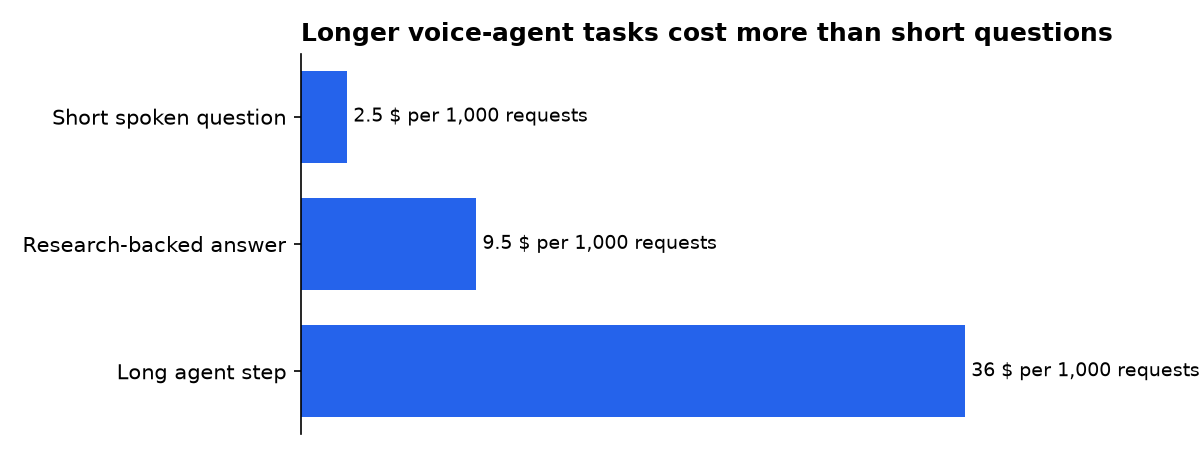
The table is not a forecast of a household bill. It shows why tool access should be narrow: a local timer answer is cheap and immediate in Home Assistant, while sending more context through an external model can cost more and disclose more.
What we could not verify?
Public information does not establish an identity-verification system for Hermes Voice speakers. A wake word starts a request, but the published integration details do not show voice biometrics, household member permissions or a confirmation layer for sensitive actions.
Public information also does not confirm a release date for unblocked installation through the Hermes skill scanner. Hermes and the skill-scanner maintainers could settle that by publishing an approval decision or a signed release path.
Home Assistant MCP permissions are also outside Hermes Voice’s default integration boundary. Anyone planning to add them should verify the exact tools, service permissions and confirmation rules in their own MCP server before permitting physical-device actions.
Sources

