
FuturPulse analysis · 7 November 2026
Vision AI testing should run beside, not replace, scripted iOS and Android release checks: screen-reading agents can explore changed interfaces, while XCUITest, Espresso or Appium should decide fixed pass-or-fail gates. On 7 November 2026, the practical setup is a simulator and emulator run on relevant pull requests, then real-device validation before release.
At a glance
- Pie’s April 2026 study found that 481 of 4,518 open-source Android repositories with CI ran instrumentation tests.
- GitHub bills standard Linux runners at $0.006 per minute in its published example, while private-repository use draws from a shared monthly compute allowance.
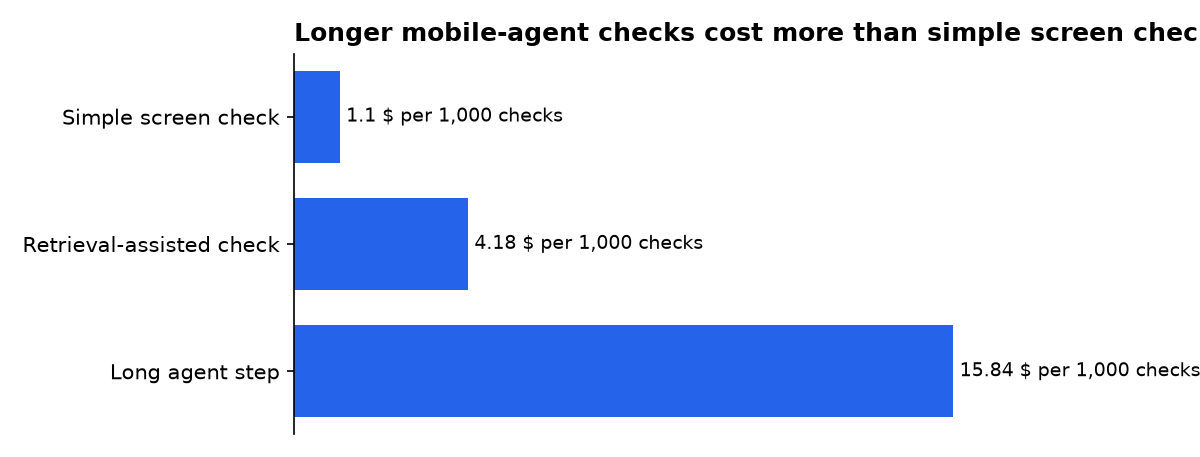
- Our calculation from OpenRouter list prices puts 1,000 simple visual checks at $1.10 for DeepSeek V4 Flash Vision Exp under the stated token assumption.
- Apple says simulators do not replicate physical-device performance or features, so a release still needs selected hardware checks.
How does Vision AI fit mobile testing?
Vision AI, here, means a model that reads a screenshot and chooses an action from what is visibly on screen. It is useful when a button moved, a React Native accessibility tree is incomplete, or a new screen needs quick exploration. It is not proof that a payment completed, a server returned the right record, or an accessibility requirement was met.
Pie’s mobile automation guide describes the core weakness of conventional mobile checks: many depend on resource IDs, XPath expressions or accessibility identifiers. Those selectors are fast and precise when maintained, but UI changes can make a valid user flow fail before the app itself has broken.
The answer is not to hand every release decision to an agent. Use visual exploration to find changed paths and visual defects. Keep deterministic checks, meaning tests with fixed inputs and unambiguous expected results, for login, checkout, account deletion, permissions and regulated flows.
What was promised and what shipped?
AI mobile testing moved from broad claims about smarter coverage toward documented workflows that build an app, boot virtual devices and preserve evidence. The important change is operational: a vision system has become a possible test layer in CI, not a replacement for the build, device and reporting layers underneath it.
| Date | Promise or published position | What is documented as shipping or workable |
|---|---|---|
| 22 December 2025 | Kobiton described AI as a way to generate tests, rank risk and heal routine locator changes. | The guidance still places AI around functional, regression, visual and compatibility testing rather than presenting it as a replacement for human usability judgment. |
| April 2026 | Mobile CI should run a fixed sequence: check out, cache, build, sign where needed, boot, test and report. | The published Android and iOS examples separate platform jobs, preserve test artifacts and skip device signing for simulator-focused pull-request checks. |
| 19 October 2026 | AI could write, explore and analyse mobile tests across device infrastructure. | The comparison drew a firm line between visual exploration and deterministic release gates, with real-device clouds used for broad compatibility coverage. |
| 30 October 2026 | Vision-based and agentic tools promised less selector maintenance for changing interfaces. | The documented limitation remains that an agent’s findings need review, and a redesign can still require test editing or regeneration. |
Timeline dates refer to publication dates on the linked pages. “Promise” means a vendor or guide’s stated capability, not an independently measured outcome.
Which mobile test tool should lead the workflow?
Appium is the broadest baseline when one engineering team needs a common automation interface across iOS and Android. Appium’s official drivers include UiAutomator2 and Espresso for Android, plus XCUITest for Apple platforms, so it is suitable for native, hybrid and web-driven mobile work.
Native frameworks are the tighter option when separate Android and iOS teams own their own suites. Apple’s testing documentation says XCTest includes UI automation through XCUIAutomation, while its test-pyramid guidance places slower UI tests above a larger base of unit and integration tests. Apple’s Xcode guidance therefore supports using UI tests selectively rather than making every assertion a screen-level test.
| Approach | What it does best | Vision AI role | Release-gate suitability |
|---|---|---|---|
| Appium | One cross-platform test interface | Use image or agent layers for changed screens | High, if selectors and assertions are maintained |
| Espresso and XCUITest | Platform-native checks | Use vision for exploration around native suites | High, with separate Android and iOS ownership |
| Vision-based agent | Exploring changing screens and finding visual breaks | It is the primary execution method | Medium, pending human review and stable assertions |
| Real-device cloud | Hardware, carrier and device-matrix coverage | Use AI to prioritise and classify failures | High for the selected release matrix |
The comparison matters because no single vendor category removes the need for the others. Vision tools reduce selector repair. Native and Appium suites provide repeatable proof. Physical devices expose hardware behaviour that a simulator cannot reproduce.
How should CI/CD run on every pull request?
Start with two platform jobs, but only trigger them when code can affect the app or tests. The Android job builds an APK, boots an emulator and runs instrumented tests. The iOS job builds for testing on a macOS runner, then starts a simulator and runs the prepared test bundle.
Pie’s CI guide recommends keeping Android and iOS separate because Android can use lower-cost Linux runners, while an iOS build requires macOS and Xcode. It also recommends collecting logs, screenshots and platform result files even when a job fails, so a developer can inspect the failure without an immediate rerun.
pull request touching app code
  ├─ Android: build APK → boot emulator → Espresso/Appium → artifacts
  ├─ iOS: build-for-testing → boot simulator → XCUITest/Appium → artifacts
  └─ Vision lane: inspect changed journeys → attach screenshots and findings

release candidate
  ├─ selected real iPhones and Android hardware
  ├─ hardware-dependent checks: camera, biometrics, notifications
  └─ human review of vision findings and final release gate
For Expo or React Native projects, an over-the-air preview can shorten review for JavaScript-only changes. Expo’s GitHub Actions guide shows a pull-request workflow that runs eas update --auto, then comments on the pull request with update details and a QR code. Native-code changes still need a new build.
Use secrets sparingly. Expo requires an EXPO_TOKEN for that GitHub workflow, while iOS device builds require separate signing management. Keep production credentials out of a per-pull-request simulator lane whenever possible.
Where should vision checks run?
Run vision checks after a build is installed, not against a design file or source diff. A screenshot can reveal clipped text, missing controls, broken spacing and flows that look right in code but fail after platform rendering. It cannot reliably tell you that a backend transaction, push token or privacy permission policy is correct.
Use an Android emulator and iOS simulator on pull requests because they are repeatable. Android’s emulator documentation says snapshots can resume a previous device state instead of executing a full boot, which is useful for faster repeated CI runs. Reset account state and test data, however, because restoring a snapshot also restores its stored device contents.
Use physical devices before release when the change touches device-specific behaviour. Apple explicitly warns that simulated devices do not reproduce the performance or features of hardware, and advises physical-device testing to verify an app works as intended.
- Good simulator and emulator targets: navigation, copy, layout, standard forms, core login flows and regression smoke tests.
- Good real-device targets: camera, biometrics, Bluetooth, GPS, payment handoffs, low-memory behaviour and carrier-network interruptions.
- Good vision targets: changed screens, visual regressions, selector-poor interfaces and exploratory paths after major UI edits.
How much can a Vision AI test lane cost?
Model calls are often smaller than mobile-runner and device costs, but they need a budget cap. Tokens are the chunks of text or image-derived context a model reads and bills for. Our calculation from OpenRouter list prices assumes a simple screen check uses 1,000 input tokens and 500 output tokens.
| Vision model | 1,000 simple screen checks | 1,000 retrieval-assisted checks | 1,000 long agent steps |
|---|---|---|---|
| DeepSeek V4 Flash Vision Exp | $1.10 | $4.18 | $15.84 |
| Relace Apply 3 | $1.47 | $7.42 | $28.00 |
Our calculation assumes, respectively: 1,000 input plus 500 output tokens; 8,000 input plus 500 output tokens; and 30,000 input plus 2,000 output tokens. It excludes runner time, device-cloud charges, storage and engineering labour.
GitHub Actions costs are separate from model usage. GitHub’s billing guide gives a 10-minute Linux example costing $0.06 and says public repositories receive standard GitHub-hosted runner use free of charge. Private repositories draw from a monthly included compute amount, and artifacts have separate storage allowances.
The practical control is a per-pull-request cap. Run a small vision smoke journey after screen changes, reserve broad exploration for nightly builds, and send only failed or materially changed screenshots for deeper analysis. That prevents an agent from repeatedly re-reading identical screens.
What should a release gate actually decide?
A release gate should decide a narrow question: can this build ship to the selected users and devices That demands explicit test accounts, known backend states and assertions that can be audited later. A natural-language instruction is useful input, but it is not itself an acceptance criterion.
Build the gate around a small set of revenue, safety and account-control journeys. Then let vision testing search around those journeys for unexpected visual or navigational breaks. This makes the AI layer useful without allowing it to silently redefine what “passed” means.
- Write a fixed acceptance rule, such as “a valid user can complete checkout and see the confirmation state.”
- Implement a deterministic assertion in Appium, Espresso or XCUITest.
- Run a vision check against the same flow to catch visible changes that selectors miss.
- Attach screenshots, logs and result bundles to the pull request.
- Require a reviewer to classify agent findings before release.
What we could not verify?
Public pages do not establish a common accuracy rate for vision agents across iOS and Android apps. They also do not show a standard definition of a “self-healed” mobile test, nor a comparable failure rate after a major app redesign. Vendors could settle that gap by publishing reproducible suites, device matrices, model versions and reviewed false-positive results.
Pricing for real-device access, private-device reservations, parallel sessions and enterprise data controls often depends on contracts. A buyer should ask the provider for retention rules covering uploaded builds, screenshots, video, logs, test accounts and any model prompts before sending a production-like app to a hosted service.
Sources
- Pie — How to Run Mobile App Tests in CI/CD
- Pie — Mobile Application Test Automation
- Kobiton — How to Use AI in Mobile Testing
- FuturPulse — AI mobile device testing
- Appium — Drivers documentation
- Apple Developer — Testing in Xcode
- Apple Developer — Simulated and physical devices
- Android Developers — Emulator command-line options
- Expo — EAS Update with GitHub Actions
- GitHub Docs — GitHub Actions billing
- OpenRouter — Models and list prices

