
On 7 November 2026, Sandbox MCP v1.2.0 made Windows Sandbox usable as a fresh, agent-driven Windows test machine. It is the better choice for testing Windows installers, desktop apps and MSIX packages on a clean guest. It is not a replacement for lightweight workspace restrictions around an agent’s normal coding loop.
At a glance
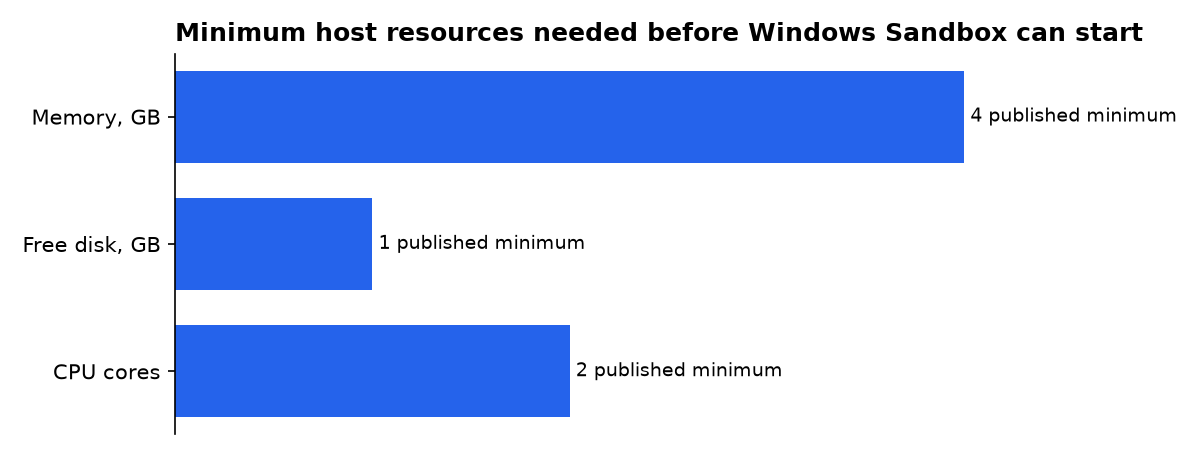
- Microsoft lists 4 GB of RAM, 1 GB of disk space and two CPU cores as Windows Sandbox minimums.
- Windows Sandbox starts with networking and clipboard sharing enabled, while custom
.wsbfiles can disable both. - Sandbox MCP’s documented limit is one active Windows Sandbox at a time, so it is for serial validation rather than a large parallel test farm.
- GitHub Copilot local sandboxing is included with a Copilot seat, but it is process containment, not a separate VM.
What is Sandbox MCP for Windows?
Sandbox MCP is an MCP server and command-line tool that automates Windows Sandbox. MCP, short for Model Context Protocol, is a way for a coding assistant to discover and call external tools. Sandbox MCP lets that assistant copy an app into a newly created Windows guest, run it, inspect its interface and return screenshots or structured results.
The project’s v1.2.0 release adds interactive desktop capture, bounded recordings, warm deployment, package handling for MSIX and Appx files, and host-to-guest transport. Its important distinction is architectural: the agent is not merely constrained on the host. The application under test runs in a disposable Windows virtual machine.
That makes the tool useful where “it builds on my laptop” is not enough. A clean guest can reveal a missing runtime, an installer that leaves services behind, a failed first-run window, or a package activation error. Those are Windows product problems that a filesystem policy around the agent cannot reproduce.
How does it differ from Windows Sandbox alone?
Windows Sandbox is the Microsoft feature underneath Sandbox MCP. It launches a temporary Windows desktop and discards its ordinary state when closed. Microsoft supports it on Windows 10 version 1903 or later and Windows 11, provided the hardware and virtualization requirements are met.
By itself, Windows Sandbox is a manual test room. You open a window, copy in an installer, click through the interface and close it. Sandbox MCP adds the agent-facing layer: commands, file movement, screenshots, UI automation, reports and a lifecycle an agent can call repeatedly.
That layer also changes what “disposable” means in practice. Sandbox MCP keeps reports and media on the host after the guest is destroyed. The guest is erased, but the test evidence survives. That is useful for a pull request review, because a failed clean-machine test has something more useful than a chat message saying “it failed.”
Windows Sandbox host requirements
Windows Sandbox needs hardware virtualization, and Microsoft recommends more capacity than its floor. These are host requirements, not a promise that a large build or an Electron application will be comfortable inside the guest.
| Host requirement | Published minimum | Published recommendation or condition | What it means for an agent test |
|---|---|---|---|
| Memory | 4 GB | 8 GB recommended | A host near the minimum has little room for an IDE, an agent and a guest at once. |
| Storage | 1 GB free | SSD recommended | This is the entry condition, not a working budget for a large dependency install. |
| Processor | 2 CPU cores | 4 hyper-threaded cores recommended | Parallel builds and UI checks will compete with the host machine. |
Microsoft publishes those figures in its Windows Sandbox installation guidance. Windows Sandbox also needs an AMD64 host, or Arm64 on supported Windows 11 releases.
Which disposable test-machine option should you buy?
Choose Sandbox MCP if your release must work on a fresh Windows desktop. Choose Windows Sandbox directly for occasional manual checks. Choose an operating-system sandbox when the agent should work in your existing repository but must not gain broad host access.
| Concrete option | Exact published figure | Best fit | Security boundary | Evidence tier |
|---|---|---|---|---|
| Sandbox MCP v1.2.0 on Windows Sandbox | 1 active Sandbox guest | Clean installs, native Windows UI, EXE, MSI, MSIX and Appx checks | Disposable Windows VM, with host-shared folders used for inputs and evidence | Primary project release and repository documentation |
| Windows Sandbox without an agent adapter | 4 GB default maximum memory | Manual testing of a download, installer or suspicious file | Disposable Windows VM, but default networking and clipboard can widen exposure | Primary Microsoft documentation |
| GitHub Copilot local sandboxing with MXC | 0 extra charge | Daily agent shell commands inside a checked-out workspace | OS-level restrictions on files, network and credentials; no separate VM | Primary GitHub documentation |
| GitHub Copilot cloud sandbox | 1 ephemeral Linux session | Remote Linux coding tasks and parallel work away from the laptop | Fully isolated GitHub-hosted Linux environment; usage is billed | Primary GitHub announcement and documentation |
| devvm 0.1.0 | macOS 13 minimum | Per-project Linux VMs for macOS and Linux development | VM per project folder, with configurable proxy network tiers | Primary project release notes |
The $0 figure for GitHub Copilot local sandboxing is not a free Copilot subscription. GitHub says local sandboxing has no extra charge; the reader still needs an applicable Copilot seat. GitHub separately describes cloud sandboxing as usage-billed.
devvm belongs in the comparison because it makes a stronger “one machine per project” argument. But its first release supports macOS 13 or newer and Linux, not Windows. A Windows desktop team deciding between Sandbox MCP and Windows Sandbox should not treat it as a substitute today.
What security settings matter most?
Start by turning networking off. Windows Sandbox enables networking by default through the Hyper-V default switch, and Microsoft warns that this can expose an untrusted application to an internal network. A test guest that only needs to launch a local installer should not receive network access.
Next, share the smallest possible host folder and make it read-only. Microsoft says write-enabled mapped folders persist after the guest is disposed, and a guest application can compromise exposed files. That means a broad mapping such as a developer profile is not a sandbox boundary. It is a hole through one.
Finally, treat clipboard, microphone, webcam and virtual GPU as capabilities rather than harmless convenience features. Windows Sandbox permits configuration of all of them. Microsoft also says enabling virtual GPU can increase the sandbox’s attack surface.
<Configuration>
  <Networking>Disable</Networking>
  <ClipboardRedirection>Disable</ClipboardRedirection>
  <VGpu>Disable</VGpu>
  <MappedFolders>
    <MappedFolder>
      <HostFolder>C:\agent-input</HostFolder>
      <SandboxFolder>C:\input</SandboxFolder>
      <ReadOnly>true</ReadOnly>
    </MappedFolder>
  </MappedFolders>
</Configuration>
This pattern follows Microsoft’s configuration model for networking, mapped folders, clipboard and vGPU. It is a good default for running an installer or a generated desktop app. Add a separate writable output folder only when the test must export logs or artifacts.
Can an MCP server itself still harm the host?
Yes. A Windows guest only contains work that actually happens in the guest. The MCP server process, its configuration, its credentials and any host-side setup remain part of the host attack surface. This is the key detail missed by simple “run it in a sandbox” advice.
GitHub Copilot’s local sandbox can run local MCP servers inside its policy by default. Its controls can limit filesystem paths, outbound and local-network access, and use of Git or GitHub CLI credentials. Remote MCP servers are not sandboxed by that local feature.
That gives teams two distinct layers. Put the agent’s ordinary shell work and local MCP processes inside a restrictive policy. Then hand the Windows executable, installer or package to Sandbox MCP for a clean-guest test. One layer restricts authority; the other supplies an independent Windows machine state.
Do not let an agent automatically escape its policy because a command fails. GitHub’s settings allow sandbox bypass by default, but an organization can disable it. On supported Windows hosts, an approved retry can first relax file and process limits while retaining network limits before a fuller bypass is considered.
Those details come from GitHub’s local sandbox settings. For an unattended coding agent, the safer choice is to turn bypass off and require a human to widen policy through a deliberate change.
Why not use only an operating-system sandbox?
An operating-system sandbox is often faster and better for the inner loop. GitHub describes its MXC-backed local sandbox as a lighter-weight boundary that restricts files, network and system capabilities, rather than putting commands in a virtual machine or container. That is appropriate when the agent must edit the real workspace quickly.
It is not an equivalent test for a Windows app release. The real workspace already has installed SDKs, cached packages, user settings and perhaps a permissive PATH. A fresh Windows guest tests the absence of those accidental dependencies. Sandbox MCP’s release notes specifically frame that clean-machine loop around application testing.
There is also a kernel-boundary difference. NVIDIA’s AI Red Team recommends virtualization, such as a full VM or microVM, when agentic tools execute arbitrary code. The stated reason is that process sandboxes and many containers share the host kernel, leaving kernel flaws in scope.
That does not make a VM invulnerable. It changes the boundary and reduces what a bad test program can touch directly. NVIDIA’s guidance still calls for default-deny network access, workspace-only writes, protected agent configuration files and controls over secrets.
How should a coding agent use Sandbox MCP?
Keep the fast loop on the host or inside a local agent sandbox. Build, lint and unit-test there. Trigger Sandbox MCP only at the point where fresh-machine facts matter: before distributing an installer, after changing a Windows runtime dependency, or when validating an interactive desktop workflow.
- Give the agent a narrow workspace and no automatic access to unrelated directories.
- Build the app in that workspace, then place only the test artifact in a dedicated input folder.
- Start Sandbox MCP with networking off for offline application checks.
- Run the installer or package, then request a screenshot and an exit result.
- Keep host-side reports as CI artifacts, then destroy the guest.
- Use a new guest for a final release check, even if a warm guest sped up development.
Sandbox MCP supports a warm loop as well as pristine runs. Its repository describes starting a guest, deploying changed files, restarting an app and capturing a screenshot. That is valuable during UI work, but it must not become the final acceptance test because a warm guest has state.
The project also offers an optional MCP adapter. Its own documentation says the CLI works without MCP, which is worth using as a security design choice. A shell-capable agent can invoke a tightly scoped command rather than receiving a broad tool catalogue and a larger configuration surface.
How does this compare with Copilot and Codex?
GitHub Copilot local sandboxing and Sandbox MCP solve different points in the workflow. Copilot’s sandbox contains commands initiated by the agent and can also contain supported local MCP and language servers. Sandbox MCP gives the agent a separate Windows desktop to validate the result.
GitHub’s cloud mode is another distinct option. The company describes an ephemeral Linux sandbox launched with copilot --cloud. It is useful for moving compute away from a laptop, but it cannot replace Windows-specific installer, MSIX or desktop UI testing.
OpenAI’s own Codex deployment guidance makes the same layered argument in a different form. It combines bounded sandbox modes with network allowlists, approval controls and secure credential storage. A sandbox decides where code can write and connect; approval policy decides when activity can cross that boundary.
OpenAI’s published Codex configuration examples restrict allowed modes to read-only or workspace-write and avoid unrestricted outbound access. That is the right model for Sandbox MCP too: the clean Windows guest is one control, not permission to expose every credential and host folder around it.
Cursor’s Windows implementation shows why Windows remains awkward for developer-tool containment. Cursor says it runs its Linux sandbox in WSL2 on Windows because native Windows primitives are difficult to apply to general-purpose developer tools. Windows Sandbox is valuable here because it offers a supported, disposable Windows desktop rather than asking every agent vendor to invent that desktop boundary.
Cursor reports 40% fewer agent stops with its sandboxing approach. That is a vendor-reported operational result, not an independent benchmark. It does illustrate the desired outcome: a narrow environment where ordinary work proceeds, while boundary-crossing actions remain visible.
What should Windows teams actually do?
Use both layers, but for different jobs. Enable a restrictive local sandbox for the coding agent first. Give it workspace access, explicit network rules and no automatic bypass. Then add Sandbox MCP for release-adjacent tests that require an untouched Windows machine.
- Individual Windows developer: enable Windows Sandbox, use Sandbox MCP for installer and UI smoke tests, and run those checks with networking disabled.
- Team shipping EXE, MSI or MSIX files: make a fresh Sandbox MCP run a release gate and retain screenshots, reports and uninstall evidence.
- Team using Copilot: keep local MCP servers inside MXC policy where supported, then call Sandbox MCP only for the Windows artifact test.
- High-risk repository or untrusted sample: avoid host folder mappings beyond a read-only input directory, with clipboard and networking disabled.
- Need many parallel jobs: do not expect one Windows Sandbox host to be a farm. Sandbox MCP documents one active guest, so use separate runners or a managed VM approach.
The important discipline is to distinguish agent containment from product validation. A local policy protects your working machine from an agent’s ordinary commands. A disposable Windows VM tells you whether the built product works without your working machine’s hidden advantages.
What we could not verify?
No public price is stated for Sandbox MCP itself, beyond its MIT-licensed repository and the Windows licensing prerequisites of the host. Microsoft’s public Windows Sandbox pages do not publish a launch-time service-level target, and Sandbox MCP’s “about 15 seconds” boot statement is project documentation rather than a vendor performance guarantee.
Public material also does not establish an independent security audit of Sandbox MCP, a supported ARM64 portable package, or a multi-guest concurrency mode. The project maintainer could settle the tool-specific questions. Microsoft could settle any future Windows Sandbox scaling, edition or platform changes.
Sources
- Sandbox MCP v1.2.0 release notes
- Sandbox MCP repository and setup guide
- Microsoft Learn: Install Windows Sandbox
- Microsoft Learn: Configure Windows Sandbox
- GitHub Docs: Local and cloud sandboxing
- GitHub Docs: Local sandbox settings
- GitHub Changelog: Copilot sandboxes
- OpenAI: Running Codex safely
- NVIDIA: Sandboxing agentic workflows
- Cursor: Secure local-agent sandboxing

