
Inkling 2 Mini GGUF downloads now start at 7.76 GB, but the smallest practical local-memory target is about 8.9 GB once a modest context cache is included. For most machines with 16 GB available memory, download UD-IQ3_XXS at 11.7 GB; avoid the 17.6 GB recommended 4-bit file unless you have more headroom.
At a glance
- Unsloth’s smallest listed Inkling 2 Mini GGUF is UD-IQ1_S at 7.76 GB.
- Our planning estimate puts UD-IQ1_S at roughly 8.9 GB of RAM or VRAM with a modest context cache.
- UD-IQ3_XXS needs about 13.4 GB by our estimate and is the best fit below a 16 GB limit.
- UD-Q4_K_M needs about 19.1 GB by our estimate, so it is not a safe one-file choice for a 16 GB system.
- Inkling 2 Mini has 26.4 billion total parameters, although its looped MoE design activates fewer weights per token.
Which Inkling 2 Mini GGUF fits your memory?
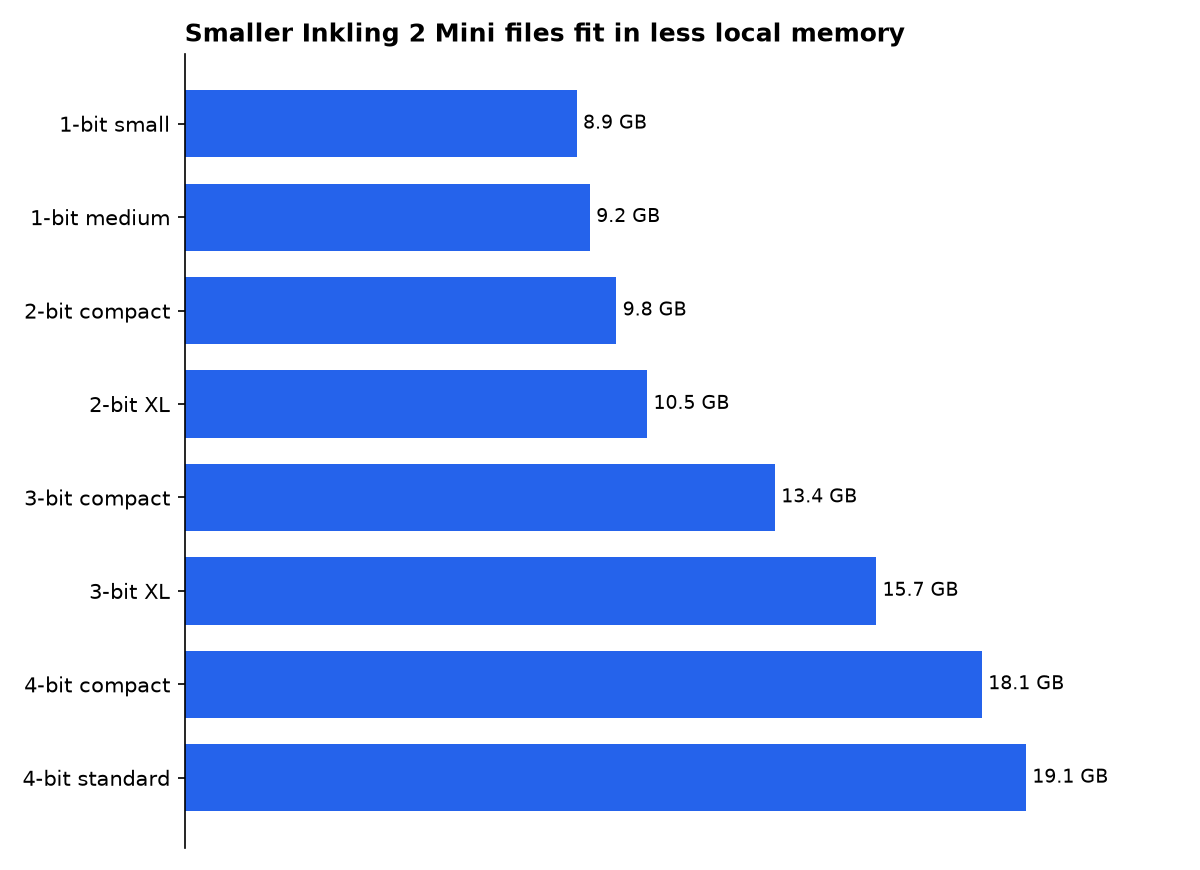
Choose by available RAM, VRAM, or unified memory, not by your computer’s advertised total. The file itself is only the starting point: the runtime also needs a context cache, meaning memory that holds the conversation and generated text. The table separates Unsloth’s published download sizes from FuturPulse planning arithmetic.
For the estimates below, FuturPulse adds a modest context allowance to each published GGUF size. That is a buying rule, not a hardware benchmark. Longer chats, image input, a larger batch, or other apps running at once can require more memory than this baseline.
| Download option | Published file size | Plan for RAM or VRAM | Best memory bracket | What to choose it for | Evidence tier |
|---|---|---|---|---|---|
| UD-IQ1_S | 7.76 GB | 8.9 GB | 9–10 GB free | The smallest listed download. Use when fitting matters more than output fidelity. | Published size + FuturPulse calculation |
| UD-IQ1_M | 8.02 GB | 9.2 GB | 10 GB free | A slightly larger 1-bit alternative when IQ1_S is your only other option. | Published size + FuturPulse calculation |
| UD-IQ2_XXS | 8.49 GB | 9.8 GB | 10–11 GB free | The first step up from 1-bit files for tightly limited machines. | Published size + FuturPulse calculation |
| UD-Q2_K_XL | 9.14 GB | 10.5 GB | 11–12 GB free | A 2-bit choice for a machine that cannot safely hold a 3-bit download. | Published size + FuturPulse calculation |
| UD-IQ3_XXS | 11.7 GB | 13.4 GB | 14–16 GB free | The sensible ceiling for a 16 GB local-memory budget. | Published size + FuturPulse calculation |
| UD-Q3_K_XL | 13.6 GB | 15.7 GB | 16 GB free | A borderline choice. Reserve it for an otherwise idle 16 GB device. | Published size + FuturPulse calculation |
| UD-IQ4_XS | 15.7 GB | 18.1 GB | 20 GB free | The first 4-bit-adjacent option that needs a clear 20 GB cushion. | Published size + FuturPulse calculation |
| UD-Q4_K_M | 16.6 GB | 19.1 GB | 20–24 GB free | The practical default when you have 24 GB available memory. | Published size + FuturPulse calculation |
The published sizes come from Unsloth’s Mainline Support file listing. The memory figures are FuturPulse arithmetic based on those files, not measured throughput or a guarantee that every prompt will fit.
What should 8 GB, 12 GB and 16 GB owners download?
An 8 GB machine should not be treated as a safe target for any listed GGUF once the runtime has to allocate its working memory. UD-IQ1_S is a 7.76 GB download, but the FuturPulse baseline is 8.9 GB before allowing for an unusually long chat or an image. A device with only 8 GB total memory should use hosted inference instead.
With around 12 GB free, choose UD-Q2_K_XL at 9.14 GB. Its estimated 10.5 GB requirement leaves little room, so keep the context short and close other applications. UD-IQ3_XXS is the better choice once roughly 14 GB is genuinely free.
With 16 GB free, choose UD-IQ3_XXS rather than assuming every 3-bit file will work. Its 13.4 GB planning figure leaves a modest cushion. UD-Q3_K_XL lands at roughly 15.7 GB, which makes it a risky fit on a computer that shares memory with the operating system or graphics display.
With 24 GB available, UD-Q4_K_M is the straightforward local pick. Its 16.6 GB download has an estimated 19.1 GB baseline. That spare room matters more than a nominal quantization label, because it lets you keep a useful conversation history instead of trimming context immediately.
Why is the file bigger than the active model?
Inkling 2 Mini is a mixture-of-experts model, or MoE: it stores many specialist weight sets but selects only some for each token. Thinking Machines Lab says the model has 26.4 billion total parameters, 3.4 billion active parameters, and 5.4 billion weight activations per token once its looping is included.
That distinction helps explain a common mistake. “Active” parameters describe calculation during generation. They do not tell you how much model data must be stored locally. The company describes the native checkpoint as having an approximately 20 GB total memory footprint, while the Hugging Face release lists the model as image-text-to-text and Apache 2.0 licensed.
The lower-size files are quantizations. Quantization stores numbers using fewer bits, trading some precision for a smaller download and less memory use. It is why a model with 26.4 billion total parameters can appear in GGUF files from 7.76 GB to far beyond the 16 GB range.
Is UD-Q4_K_M the automatic best choice?
No. UD-Q4_K_M is the automatic choice only if your available local memory comfortably clears roughly 19.1 GB under this guide’s baseline. Unsloth’s standard repository example uses UD-Q4_K_M, but that is a usage example, not a universal hardware requirement.
The main Unsloth repository shows commands for launching that exact variant through llama.cpp. It also offers instructions for local applications and other runtimes. The model page names GGUF as the format and shows a local llama.cpp command using UD-Q4_K_M.
Choose a smaller file when memory is the limit. A 3-bit or 2-bit quant that loads reliably is more useful than a 4-bit one that forces constant context cuts, swaps to system memory, or fails at startup. The table therefore ranks options by fit first, not by the largest label you can download.
Does image input change the memory choice?
Yes. Inkling 2 Mini accepts text and image input, so visual use adds an extra component beyond the language-model GGUF. Unsloth’s run guide says the F16 vision projector adds 639 MB to the download. A text-only setup can omit that projector, but an image-capable setup should include it in storage and memory planning.
Do not spend your last margin on the model file if you intend to upload screenshots, documents, or photos. Choose the next-smaller quant instead. This is especially important around the 16 GB line, where UD-Q3_K_XL already has an estimated 15.7 GB baseline before allowing for a demanding workflow.
Thinking Machines Lab’s Hugging Face model page describes the base release as image-text-to-text and shows both text and image content in its usage example. That makes the vision feature real, but it does not turn an 8 GB computer into a safe multimodal host.
Which llama.cpp build should you use?
Use a runtime that understands Inkling 2’s layout. Unsloth says the GGUFs in its repository root use its looped-layer layout, while upstream llama.cpp uses a different layout; for mainline llama.cpp, it directs users to the Mainline Support files instead.
Unsloth’s 22 November 2026 prebuilt release, b12631-mix-acc0843, lists Inkling 2 looped-layout loading and DSpark-related support among the merged changes. That release matters more than a generic “latest llama.cpp” instruction because an incompatible binary can fail before memory becomes the issue.
The underlying Unsloth llama.cpp repository describes CPU, CUDA, HIP, Vulkan and Metal support, plus CPU-and-GPU hybrid inference. Hybrid loading can help when VRAM is short, but it does not erase the total system-memory requirement and may hurt responsiveness.
Is local Inkling cheaper than API use?
For occasional use, hosted Inkling 2 Mini can be cheaper than buying hardware. OpenRouter lists Inkling 2 Mini at $0.075 per million input tokens and $0.30 per million output tokens, with a 1.05 million-token context listing. Tokens are the chunks of text that models read and bill by.
By FuturPulse calculation using those list prices, 1,000 chat turns of 1,000 input and 500 output tokens cost about $0.23. The same number of retrieval answers with 8,000 input and 500 output tokens cost about $0.75. Those figures exclude any provider-specific fees and are not local-running costs.
Local GGUF use changes the trade-off. You avoid per-token bills after downloading, but pay with storage, electricity, hardware depreciation, setup time, and possible speed limits. A third-party local guide describes the native checkpoint as roughly 20 GB and points to 32 GB-class systems for the original release, which is consistent with treating the smaller GGUFs as a separate low-memory route rather than the same deployment.
What should you actually download?
Buyer’s decision: If you have less than 9 GB free, do not download Inkling 2 Mini GGUF for local use. If you have 10–12 GB free, start with UD-Q2_K_XL. If you have 14–16 GB free, choose UD-IQ3_XXS. If you have 20 GB free, choose UD-IQ4_XS or UD-Q4_K_M. If you have 24 GB free, start with UD-Q4_K_M and keep room for the operating system and image support.
Download only one quant first. Test it with your intended context length. If it loads but becomes unstable when you add documents or images, step down one row in the table rather than trying to force a larger model through shared memory.
What we could not verify?
No public hardware matrix establishes a universal maximum context length for every Inkling 2 Mini GGUF on every CPU, GPU, Mac, or Windows machine. The needed headroom varies with the cache type, image projector, batch settings, GPU offload, and background software. Unsloth and llama.cpp maintainers could settle this with reproducible per-device memory tests.
No public benchmark in the sources above compares real task quality for every GGUF file under identical prompts and settings. The file sizes are published. The planning figures here are transparent arithmetic. Buyers should not treat a quantization name alone as a promise of equal coding, vision, or agent performance.

