

MOSS-Image-Base publishes 27.2 GB of safetensors weights and is the clearest starting point for a local comparison.
At a glance
- MOSS-Image-Base is the smallest package in this comparison and is designed for local use.
- Qwen-Image-2.1-Turbo is an accelerated checkpoint for text-to-image generation and image editing.
- FLUX 3 Image Klein combines image generation, editing and reference-image workflows in one model family.
- Sogni provides browser, app and API access to open-weight image models without a local GPU.
How do MOSS, Qwen and Flux differ?
These models solve related problems, but they do not offer the same trade-offs. MOSS-Image-Base is best understood as a local model whose main attraction is a relatively smaller published download. Qwen-Image-2.1-Turbo targets quick generation and editing. FLUX 3 Image Klein is aimed at generation and editing in a workflow that can use several reference images.
That distinction matters more than the phrase “open-source AI image generator”. A model can have downloadable weights without having the licence, tooling or package size that a business needs. The practical question is not simply which model can produce an image. It is which model fits the task, the machine and the rights required by the project.
Qwen’s model card describes Turbo as an accelerated checkpoint of Qwen-Image-2.1. It supports text-to-image generation and image editing, and uses 8 denoising steps. Denoising means repeatedly turning an initially noisy representation into an image that follows the prompt.
The checkpoint includes its recommended sampling schedule. That means the user does not need to configure that schedule manually before running the pipeline. Qwen also says the pipeline uses prefix key-value caching, which reuses text and reference-image context across denoising steps.
MOSS is a different proposition. Its value in this comparison is not a claimed speed lead. It is the combination of a smaller published package and a model size that makes the local storage question easier to ask. A smaller download does not automatically mean lower memory use or better image quality.
FLUX 3 Image Klein belongs in the same broad category, but its package is much larger. The published FLUX package includes supporting files for a ComfyUI workflow as well as model files. Readers should therefore treat package size as a deployment cost, not as a direct quality score.
The models also differ in how much control the user wants. Text-to-image generation is the simple case: describe an image and ask the system to create it. Editing adds an existing image to the process. Reference-image generation adds further constraints, because the output must follow selected visual information as well as the written prompt.
For a first test, use the same prompt with each model. Keep the requested subject, format and level of detail constant. Then record the output, generation settings, failures and time spent correcting the result. This avoids treating a convenient demo as a reliable comparison.
What do the package sizes tell you?
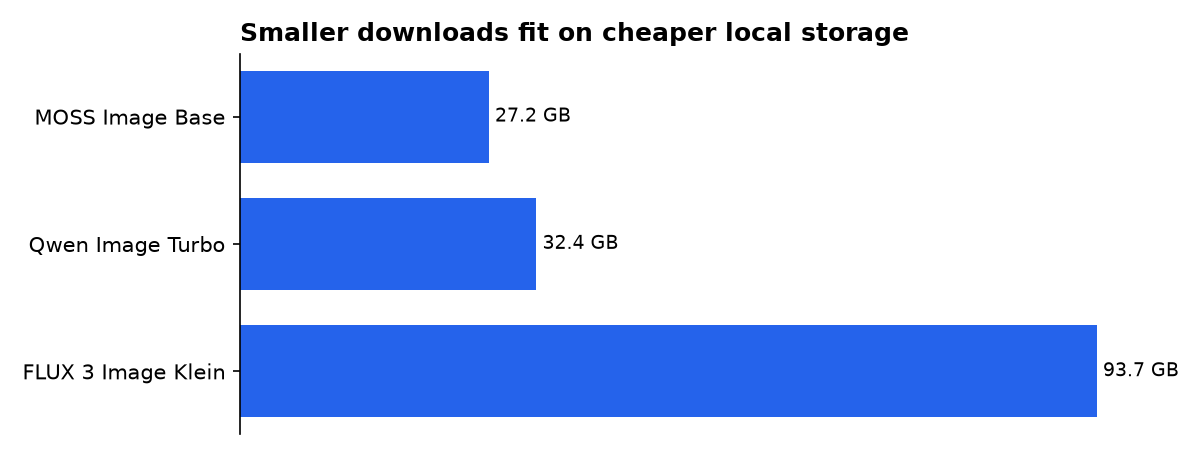
The published weight files total 27.2 GB for MOSS, 32.4 GB for Qwen Turbo and 93.7 GB for the FLUX ComfyUI package. Those are storage figures, not hardware tests.
Storage is only the first cost. A local installation also needs space for the operating environment, caches, image-processing components and temporary files. A machine with just enough free disk space for the weights can still fail during installation or while producing an image.
The three figures are not perfectly identical measures. The FLUX figure refers to a published ComfyUI package, while the MOSS and Qwen figures refer to their published safetensors weights. The comparison is still useful because it shows the scale of the download a user must plan for.
Do not convert these figures directly into a graphics-card requirement. Weight files are learned numerical settings, but running a model also requires memory for the active computation, the image representation and the surrounding software. The published MOSS and Qwen calculations explicitly describe their memory estimates as arithmetic rather than hardware tests.
| Concrete option | Licence position | Published package size | Workflow you must accept | Evidence tier |
|---|---|---|---|---|
| MOSS-Image-Base | Apache-2.0 | 27.2 GB | Diffusers or ComfyUI; structured layout prompting is optional. | Vendor-verified licence and workflow; calculation for file total. |
| Qwen-Image-2.1-Turbo | Qwen Research License | 32.4 GB | CUDA, current Diffusers source and the saved 8-step schedule. | Vendor-verified licence and workflow; calculation for file total. |
| FLUX 3 Image Klein for ComfyUI | FLUX Community License | 93.7 GB | ComfyUI package, prompt upsampler and access-condition acceptance. | Vendor-verified model details; calculation for file total. |
Source line: MOSS model card, Qwen model card and the FLUX 3 Image Klein reference repository. The package totals are published file figures. They do not measure generation speed or graphics-card memory.
Which licence should a business examine first?
Licence language should come before a deployment decision. “Open weights” describes how a model is distributed. It does not, by itself, answer whether a company can use the model in a paid product, modify it, redistribute it or offer it through an API.
The table lists MOSS as Apache-2.0, Qwen Turbo as covered by the Qwen Research License and FLUX as covered by the FLUX Community License. Those labels are materially different. A team should read the actual terms rather than treating all three entries as interchangeable open-source releases.
Qwen Turbo is therefore easier to recommend for research and evaluation than for an unexamined commercial launch. The model card describes its capabilities and installation route, but a product team still needs to check whether the research licence fits its users, revenue model and jurisdiction.
FLUX requires the same discipline. A public reference repository and downloadable files do not settle the full commercial question. The model’s community licence and any access conditions should be reviewed before a service accepts paying customers.
MOSS is the simplest candidate in this comparison when a team specifically wants the Apache-2.0 label shown in the table. That does not remove every legal question. The model licence is only one part of a product review, which may also cover training-data issues, user submissions, generated images and local law.
Which AI is completely open-source?
There is no precise answer without defining “completely open-source”. The phrase might refer to weights, inference code, training data, evaluation material or the whole stack. A release can be open in one respect and restricted in another.
For this comparison, MOSS is the least ambiguous option if the relevant requirement is the Apache-2.0 label shown for the weights and inference material. That is a narrower statement than calling the entire project completely open. It also does not guarantee that every use of every generated image is legally risk-free.
Qwen Turbo makes its weights available, but the research licence changes the commercial decision. FLUX makes model material and reference code available, but the community licence and access conditions still matter. The correct choice depends on what the buyer means by open: inspectable, downloadable, modifiable or commercially redistributable.
Teams should write that requirement down before testing. A student experimenting locally may prioritise access and ease of installation. A company selling image generation may prioritise licence clarity and rights to operate a service. The same model can be suitable for the first use and unsuitable for the second.
How much local memory should you plan for?
The MOSS calculation estimates that its declared 5.1 billion parameters would occupy about 10.2 GB at 16-bit precision, 5.1 GB at 8-bit precision or 2.5 GB at 4-bit precision. These are arithmetic estimates for the weights alone.
The Qwen calculation estimates about 14.2 GB at 16-bit precision, 7.1 GB at 8-bit precision or 3.6 GB at 4-bit precision for its declared 7.1 billion parameters. Lower precision can reduce the size of the numerical representation, but it can also change output behaviour and does not account for the rest of the pipeline.
Those estimates are useful for planning, but they are not recommendations for a particular graphics card. The active model, text processing, image decoding and temporary data all compete for memory while an image is generated. The machine must also have enough free system memory to run the operating system and the chosen interface.
FLUX needs particular care because the published ComfyUI package is 93.7 GB, much larger than the other two packages. Its package size should not be read as a direct measure of the image transformer’s active memory requirement. Check the exact workflow, precision and supporting files before buying hardware.
Quantisation is the general term for storing numerical values with fewer bits. It can make a model easier to load, but it is not a free upgrade. A quantised package may have different compatibility requirements, and the result may differ from the original precision. Test the output on the prompts that matter to your project.
Which workflow is easiest to learn?
Qwen offers the most explicit quick-start path in the material reviewed here. Its instructions call for a CUDA-compatible PyTorch installation, the latest Diffusers source and supporting packages for transformers, acceleration and image handling.
The pipeline loads the checkpoint directly and uses the sampling schedule included with it. That reduces one configuration task for a user who wants to move from installation to a first generation. The workflow still assumes comfort with Python environments, package installation and a CUDA-capable setup.
Diffusion is a useful concept to understand before changing settings. As BentoML explains, a diffusion model begins with random noise and gradually shapes it into an image. The number and type of denoising steps affect the balance between computation and the final result.
MOSS may appeal to users who care more about deliberate control than the shortest setup. A structured prompt can describe where elements should appear, while an ordinary prompt can describe the subject and style. A structured layout is essentially an instruction about the position and size of objects on the canvas.
FLUX is a better fit for teams already comfortable with a node-based workflow. ComfyUI connects stages through visual nodes, allowing a user to assemble generation, editing and supporting operations. That flexibility can help experienced users, but it also creates more places for a first-time user to make a configuration mistake.
Begin with one interface rather than changing several variables at once. Keep the model, prompt and output dimensions constant. Change only one setting, then record whether the change improved the image or merely made the process slower.
What is the best open-source AI image generation model?
There is no verified universal winner in this comparison. Image quality depends on the prompt, the reference material, the settings and the task. A model that handles a product edit well may not be the best choice for a poster or an interface concept.
Choose MOSS when the main decision is a smaller local package and the Apache-2.0 label is important. Choose Qwen Turbo when the project is research-oriented and its accelerated generation and editing workflow match the team’s needs. Choose FLUX when the team values a combined generation and editing workflow and is prepared to manage the larger package.
BentoML’s guide presents model selection as a deployment question rather than a single leaderboard contest. It discusses model families, licensing and local hardware as separate concerns. That approach is more useful to a buyer than a ranking that hides the difference between open weights and commercial permission.
Pinggy makes a similar distinction in its self-hosting guide. Open-weight models can offer control over where a model runs, how it is customised and who can access the data. Those benefits come with the work of maintaining the machine, software environment and storage.
A sensible evaluation set should include several types of request. Test a plain subject description, a composition with multiple objects, text inside an image and an edit based on an existing image. Record failures as carefully as successes. A model that produces one impressive sample may still be a poor fit for repeatable production work.
Should you self-host or use an online generator?
Self-hosting gives the team direct control over the files and the execution environment. It also creates responsibility for downloads, updates, compatibility, storage and access controls. The decision is operational as much as technical.
Sogni describes browser, mobile-app and API access to open-weight models through its decentralised network. It advertises free monthly Spark and Supernet rendering up to 1MP, a paid unlimited fair-use option from $20 per month and no requirement for a local GPU.
The hosted route is useful when a reader wants to test a model without preparing a machine. It is also useful when the cost of maintaining local hardware is greater than the value of owning the workflow. The provider’s terms and the individual model licence still need separate review.
Self-hosting is more attractive when a project needs a stable local workflow or does not want to send prompts and source images to an external service. It is less attractive when the team lacks time to maintain Python packages, model files and GPU drivers.
Neither route guarantees a better image. The hosted service may expose a carefully prepared interface, while local software may provide more control. The right choice depends on whether the buyer values convenience, control, predictable access or the ability to change the underlying workflow.
What should you actually do?
Start with the job, not the model name. Write down whether the project needs text-to-image generation, image editing, reference-image consistency or structured placement. Then identify the licence requirement and the machine or service budget.
Pick MOSS for a local commercial prototype when the package size and Apache-2.0 label fit the project. Begin with ordinary prompts. Add structured layout instructions only after the team knows what the basic workflow can and cannot do.
Pick Qwen Turbo for evaluation and research when the 8-step workflow is useful and the research licence is acceptable. Install it in an isolated environment. Keep a record of the exact Diffusers version, settings and prompt so another person can repeat the test.
Pick FLUX when the team already understands ComfyUI or specifically needs a generation-and-editing workflow with reference images. Budget for the larger package and check the community licence before exposing the model through a paid product.
Use Sogni when the priority is trying open-weight models without installing a local stack. Check the licence for the exact model selected. “Open model” is not a sufficient description of the rights attached to a commercial workflow.
Finally, run a small internal benchmark. Use the same prompts, retain the failed outputs and ask the people who will actually use the tool to judge the results. That evidence will be more relevant than a general ranking.
What we could not verify?
The public record does not provide a comparable, vendor-certified graphics-card requirement for all three exact packages under the same resolution and settings. The published MOSS and Qwen memory figures are arithmetic estimates for weights, not hardware tests.
It also does not provide a common speed test or output-quality score for MOSS-Image-Base, Qwen-Image-2.1-Turbo and FLUX 3 Image Klein. The package totals cannot establish which model generates images faster or produces better results.
The comparison also cannot turn licence labels into legal advice for a specific company. A business should review the full terms, intended use, customer contracts and jurisdiction before deployment.
Sources

