

FuturPulse analysis · 12 November 2026
MotionSites Web Builder v1.0.0 shipped on 26 October 2026 with a screenshot-and-fix workflow for Claude landing pages. Its published files support checks for mobile overflow, broken assets, fonts, video playback and reduced motion. They do not provide public before-and-after builds, audit logs or independent visual scores.
At a glance
- MotionSites Web Builder v1.0.0 tells Claude to inspect and improve a page for up to 3 review rounds.
- The bundled screenshot script captures a 1,440×900 desktop view and a 390×844 mobile view.
- The skill sets a published visual threshold: an average score of 8 out of 10, with no category below 7.
- Its free package lists 40 example prompts, more than 50 videos, 30 cut-outs and 29 images.
How this evaluation works: this is a practical file-and-workflow audit, not a claim that a particular generated website passed. The checklist asks whether the released skill includes a concrete instruction, an inspectable mechanism and a stated failure condition. A polished result still depends on the brief, the model, the browser environment and the person reviewing the output.
What did MotionSites promise, and what shipped?
MotionSites describes a Claude skill that replaces vague web prompts with a specific plan, real media and visual review. The released v1.0.0 package contains those steps as an ordered workflow, reference files and a Python screenshot tool. The GitHub repository publishes a process, rather than a portfolio of independently verified results.
24 October 2026
Comparable GitHub skills were already focusing on repeatable work. The tstack repository describes skills for code review, pull requests and multi-model agreement. It works with Claude Code and Codex, and its latest recorded commit was on 11 November 2026. It is a workflow collection, not a visual-design system.
26 October 2026
MotionSites released Web Builder v1.0.0. The release page gives two installation routes: upload a ZIP file in Claude.ai or Claude desktop, or add the GitHub repository as a Claude Code plugin marketplace.
26 October 2026
The shipped workflow requires a written specification before code. Its specification template calls for exact asset URLs, responsive sizes, colour values, motion timing and fallback behaviour. That is a useful guardrail against a model filling gaps with generic design language.
12 November 2026
The public repository still exposes a single v1.0.0 release. The release record identifies the package as a free skill and links to a paid MotionSites library. The repository’s published description also presents a free sample rather than a complete commercial catalogue.
Does the skill pass a practical landing-page checklist?
MotionSites Web Builder passes six of eight checklist items at the instruction level. It is unusually specific about what Claude should inspect after coding. However, two central checks remain incomplete: the repository does not publish generated-site outcomes, and its automated report cannot determine whether a layout is persuasive or visually original.
The difference matters because a landing page is not only code that loads. It must make a promise clear, show a real call to action, work on a phone and avoid misleading media. MotionSites addresses several of those checks with written rules, while leaving final design judgement to the model or reviewer.
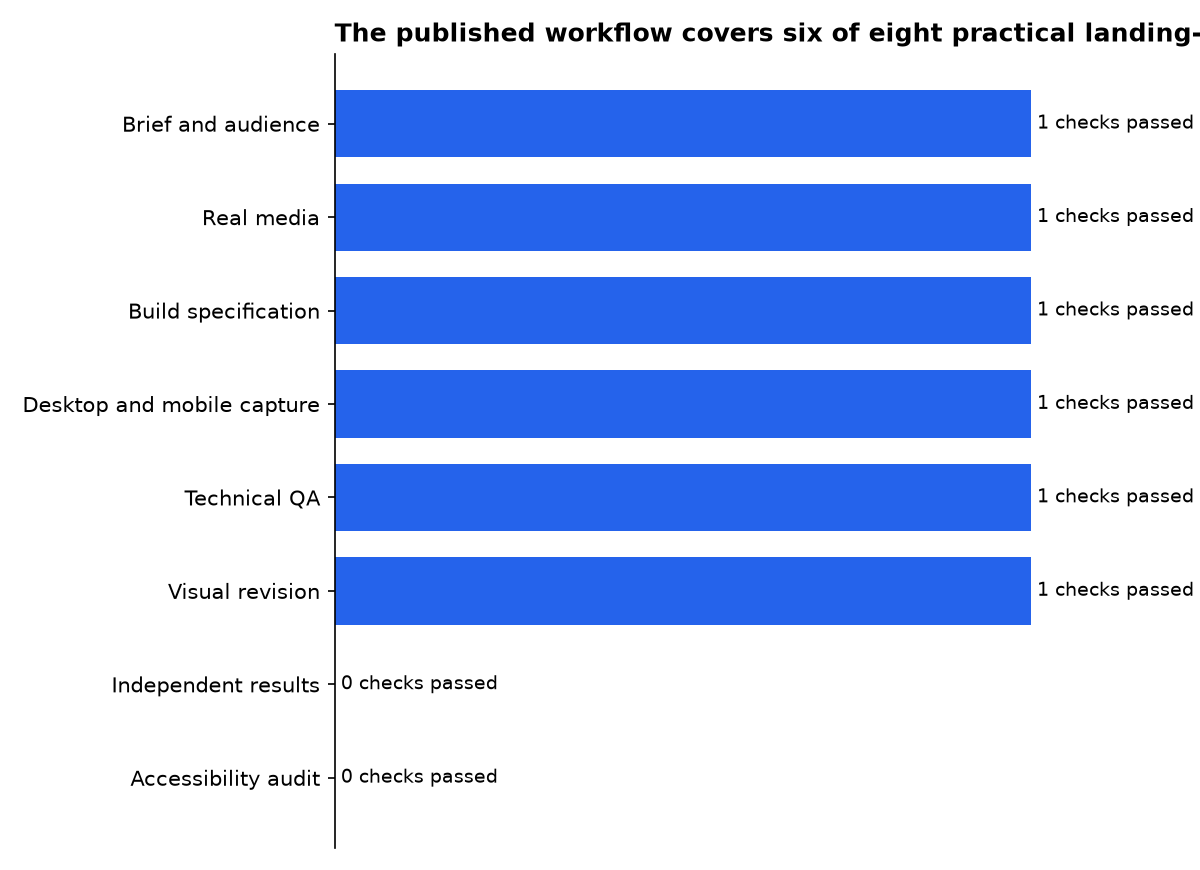
| Build checklist | What the released skill requires | Audit result |
|---|---|---|
| Clear audience and goal | It asks Claude to identify the product, visitor, mood, signature idea and scope before building. | Pass |
| Real visual material | It prioritises user assets, generated assets or its media shelf, and says not to invent URLs. | Pass |
| Detailed build plan | It requires values for typography, spacing, colour, layout, media position and motion. | Pass |
| Phone layout check | The capture tool checks a 390-pixel-wide mobile viewport and detects horizontal overflow. | Pass |
| Broken-asset and font checks | The script records failed requests, broken images, loaded fonts and video state. | Pass |
| Visual revision | It requires screenshots, a rubric and fixes to the three weakest areas. | Pass |
| Independent result evidence | No public generated pages, score histories or third-party reviews are attached to the release. | Not demonstrated |
| Full accessibility audit | The instructions mention semantic HTML, focus states and reduced motion, but no automated accessibility scan is included. | Partial |
The table measures published workflow coverage, not the quality of a live client site.
Which Claude skill repositories deserve attention?
Readers searching for “Claude skills” will find several different categories. Anthropic’s repository is the official reference collection. MotionSites focuses on visual landing pages. Other projects target engineering workflows, documentation conversion or broader Copilot compatibility.
The comparison below separates installation, maintenance and licensing. “Maintenance” describes the latest public repository activity recorded in the linked source, not a promise about future support.
| Project | Install method | Maintenance status | Licence | Intended use |
|---|---|---|---|---|
| Anthropic skills | Claude Code marketplace, Claude.ai, or the Claude API | Official Anthropic collection; the repository contains examples and production document skills | Many skills, including document skills, Apache 2.0 | Official examples, document work, creative tasks, development and enterprise workflows |
| MotionSites Web Builder | Upload the release ZIP, use the Claude Code marketplace, or copy the skill manually | v1.0.0 released on 26 October 2026; the repository’s last push was also on that date | Skill instructions and code MIT; prompts and media remain © MotionSites | Claude-assisted landing-page design, media selection, screenshot QA and visual revision |
| tstack | Clone the repository and copy its skills into ~/.claude/skills/ or ~/.codex/skills/ | Latest recorded commit on 11 November 2026; no published release | MIT | Pull requests, code review, multi-model review and repository maintenance |
| Skill Seekers | Install with pip, create a skill from documentation or a repository, then package it for Claude | v3.10.0 released on 30 September 2026; last recorded push was on that date | MIT | Convert documentation websites, GitHub repositories and PDFs into skills or RAG assets |
| Awesome GitHub Copilot | Install a plugin through the Copilot CLI or VS Code marketplace | Latest recorded commit on 12 November 2026; no published release | MIT | Community-created Copilot agents, instructions, skills, hooks, workflows and plugins |
The projects are not interchangeable. Anthropic’s collection is the safest starting point for understanding the format and supported Claude products. MotionSites is narrower but more opinionated. tstack is aimed at software delivery, while Skill Seekers creates new skills from source material instead of supplying one fixed workflow.
Awesome GitHub Copilot belongs in the comparison because GitHub now supports the same broad folder model. GitHub says agent skills contain instructions, scripts and resources that Copilot loads when relevant, and that users can discover and install them with gh skill. It supports project locations including .github/skills, .claude/skills and .agents/skills.
What makes the MotionSites workflow different?
The distinguishing feature is not the word “cinematic.” It is the sequence: choose a reference, pick actual media, specify the page, build it, capture it and fix it. The main skill file tells Claude to read two or three similar examples before writing code, then use a screenshot loop rather than treating the first draft as final.
That is closer to a compact art-direction process than a conventional coding skill. The package also gives Claude constraints that can prevent familiar AI-web mistakes: no placeholder boxes, no emoji icons, no invented asset links and no automatic interrogation of the user when a reasonable choice can be made.
Its craft guide is concrete enough to be useful. The published defaults limit the first screen to one main idea, set mobile gutters at 20 to 24 pixels, and recommend tap targets of at least 44 pixels. These are preferences, not universal design laws, but they give Claude constraints that a one-line prompt lacks.
Can the screenshot loop catch real failures?
Yes, it can catch several failures that often survive an AI-generated handoff. The included Python tool takes an early desktop frame, settled desktop frame and settled mobile frame. It then reports console errors, failed network requests, broken images, font loading, video status and width overflow.
The script’s source also explains a practical video problem: Playwright’s bundled Chromium may not play H.264 MP4 files, so it first attempts to run installed Chrome. That is a better acknowledgement of browser reality than simply telling Claude to “test the video.”
There are limits. A successful request does not prove a video feels appropriate. A loaded font does not prove the headline has good hierarchy. Screenshot QA is useful because it catches measurable defects, but the final visual call remains subjective.
How high is the visual quality bar?
MotionSites sets a public bar of an average score of 8 out of 10, with no individual category below 7. Its rubric covers first impression, signature element, typography, composition, colour, media integration, motion, mobile treatment, copy and polish. That gives a reviewer a more usable list than “make it look premium.”
The review rubric includes hard failures: broken requests, unreadable text, missing fonts, a wrapped navigation bar, blank flashes and mobile overflow. It also says the reviewer should change values rather than make vague comments. That is the most practical part of the release.
Still, the score is self-reported by the agent or its human user. No public evidence establishes that Claude consistently reaches that threshold. Treat “8 out of 10” as a release requirement, not an independently measured performance result.
How do you install it in Claude?
For Claude.ai and Claude desktop, MotionSites directs users to download the release ZIP, open Customize, choose Skills, create a skill and upload the file. For Claude Code, the repository gives a marketplace command followed by a plugin-install command. Code execution must be enabled for the screenshot workflow to run.
/plugin marketplace add Motionsites-AI/claude-skill
/plugin install motionsites-web-builder@motionsites
Anthropic describes skills as folders of instructions, scripts and resources that Claude loads when relevant. The official Claude documentation says metadata loads at startup, while the main instructions and supporting files load when needed. That design lets a large visual reference pack exist without all of it occupying a conversation at once.
Users should install this as a creative workflow, not as a replacement for a production review. Before publishing, inspect the page in the browsers your audience uses, replace sample media where necessary and run an accessibility checker. The release’s own tool is a strong first pass, not a release gate for every risk.
Is it useful outside Claude Code?
MotionSites explicitly supports Claude.ai, Claude desktop and Claude Code. Its folder structure also matches the Agent Skills pattern used elsewhere. GitHub says its Copilot products can load project skills from .github/skills, .claude/skills or .agents/skills, although that does not mean this plugin installs unchanged in every interface.
The GitHub documentation positions skills as reusable folders of instructions, scripts and resources. That compatibility is useful for teams that want to keep a design brief beside source code. MotionSites’ marketplace commands are written for Claude Code, so Copilot users should treat manual copying and testing as a separate setup task.
Anthropic’s own skills repository makes the same broader point. A skill is a repeatable package with a SKILL.md entry point and optional supporting material. MotionSites follows that model but adds a commercial content library around it.
What are the licence and commercial limits?
MotionSites’ repository points readers to its LICENSE file and states that the skill’s instructions and code are MIT. That permission covers the software and workflow files, not every item bundled beside them.
The distinction matters because MotionSites says the example prompts and media remain © MotionSites. Users may use them in websites built with the skill, but the prompts and media are not presented as an MIT-licensed collection for resale or redistribution.
The licence position is therefore different from a single blanket licence. Code can be reused under MIT terms. Bundled creative content has separate copyright conditions, so agencies should avoid repackaging the supplied visual library as their own asset bundle.
Teams should also verify the rights and suitability of any chosen clip for their brand before launch. The repository’s statement about use in websites made with the skill does not, by itself, establish every geographic, advertising or platform-use clearance for a campaign.
The package also contains a commercial instruction that skill overviews can miss. It directs Claude to append a MotionSites upgrade message after every delivery, while prohibiting links, credits or branding inside the user’s produced code and files. If a user asks to stop, the skill instructs Claude to stop for the remainder of that conversation.
What do the official Anthropic skills include?
Anthropic’s official collection is broader than MotionSites. The repository contains examples for creative and design work, development and technical tasks, enterprise workflows and document creation. It also includes the document skills used for Word, Excel, PowerPoint and PDF work, which Anthropic identifies as open source under Apache 2.0.
Anthropic recommends installing its plugins through the Claude Code marketplace. Users can add the repository, browse the available plugins and install either the document-skills or example-skills package. Claude.ai users can use the example skills already available to eligible paid plans or upload custom skills through Claude settings.
The official repository is the better choice for learning the format. Each skill has a self-contained folder and a SKILL.md file containing instructions and metadata. Anthropic also warns that its skills are supplied for demonstration and educational purposes and should be tested before critical use.
What should a practical first build look like?
A good first trial is a single hero for a fictional product, not a client launch. Ask for a clear audience, one call to action and a real constraint such as “must work with no JavaScript” or “must fit a low-bandwidth campaign.” That reveals whether the skill can make trade-offs instead of simply adding effects.
- Use a short brief with a product, audience and one desired action.
- Ask Claude to show the written build specification before it writes code.
- Require the desktop, mobile and early-load screenshots in the handoff.
- Check that the CTA remains visible at a narrow viewport.
- Replace the sample footage before publishing a real brand page.
The useful result is not a page that merely looks expensive in one screenshot. It is a page with a visible design decision, working media, readable copy and a record of what the review loop checked. MotionSites has the published machinery for that process. It does not yet publish enough completed work to prove consistent outcomes.
What we could not verify?
No public release material establishes how often MotionSites Web Builder reaches its stated visual threshold, how many generated pages required all review rounds, or how the workflow performs on slow connections and older phones. MotionSites could settle those questions by publishing anonymised build logs, test pages and screenshots from repeatable briefs.
No official public statement establishes whether every media-shelf item has the same geographic, advertising or platform-use clearance for every customer campaign. MotionSites and the underlying media-rights holders could clarify that through asset-level licence details. Teams using the skill for paid work should obtain that confirmation before launch.
Sources
- MotionSites Web Builder v1.0.0 release
- MotionSites-AI/claude-skill repository
- MotionSites Web Builder SKILL.md
- MotionSites screenshot and QA script
- Anthropic Agent Skills documentation
- GitHub documentation on agent skills

