

Pika launched Pika H3 Flex on 29 October 2026 as an open-weight video-and-audio package with two adapters for MiniMax H3. The practical benefit is not a new base model: it is a six-step workflow that lets creators choose endpoint-frame control or reference-led editing without replacing the H3 foundation.
At a glance
- Pika H3 Flex uses two task adapters, one for text and endpoint frames and one for multimodal references.
- ComfyUI documents a six-step schedule for a 5-second, 1344×768 Pika H3 Flex clip, versus 20 to 50 steps for a non-distilled H3 run.
- Pika’s representative 480p, 5-second tests used about 66–69 GiB of GPU allocation, so “open weights” does not mean consumer-laptop hardware.
- Lightricks LTX-2.5 has a fixed eight-step distilled transformer, but it is packaged as a broader set of separate model components rather than Pika’s two task-specific H3 adapters.
What does the Pika H3 Flex adapter actually enable?
Pika H3 Flex changes how MiniMax H3 is directed, not the underlying model architecture. ComfyUI describes it as a post-trained MiniMax H3 release with two LoRA adapters, meaning small add-on weight files that steer an existing base model toward a task.
The first adapter, FL2VA, covers text-to-video-and-audio plus first-frame, last-frame and first-and-last-frame conditioning. The second, Ref2VA, handles image, video and audio references, so it is the relevant choice when a shot must retain a product, character, costume, motion idea or sound reference. Pika lists those as the two task adapters in one video-and-audio family.
That division is the useful part of Flex. A team with an existing MiniMax H3 setup can switch between a rough storyboard shot and a controlled brand-reference shot by loading a different adapter, rather than downloading an entirely separate generator for every task.
How do its two adapters change the workflow?
The FL2VA adapter is the simpler route: write a scene prompt, optionally supply a first or final still, and describe the action that connects the two. Pika’s prompt guide asks for visuals, action, camera movement and synchronised sound in three fields, which makes it suitable for draft ads, animated storyboards and controlled transitions between approved images.
The Ref2VA adapter is more like a directed brief. Pika says Ref2VA accepts up to nine images, three videos and three standalone audio clips, with 12 files in total. At least one image or video is required, and its reference prompt separates subjects, preservation rules, detailed playback order, ambience and music.
Those prompt fields matter because they define what should survive an edit. Pika distinguishes “fully preserved,” “partially preserved,” “attribute transfer” and “weak reference”. A producer can therefore ask to retain a face and wardrobe while borrowing only a camera path from a second clip.
That is more specific than simply attaching images to a prompt. It gives an editor a way to state that a source image supplies identity, a source video supplies motion, and a source audio clip supplies only vocal character. It remains an instruction, however, not a guarantee of pixel-exact editing or literal audio copying.
How does Pika H3 Flex compare with LTX-2.5?
Pika H3 Flex is best understood as a task-adapter layer on MiniMax H3, while Lightricks LTX-2.5 is a split package whose user chooses whole transformer checkpoints and supporting components. LTX-2.5 provides a 22B distilled transformer with a fixed eight-step schedule and a separate full, trainable transformer.
LTX-2.5 also separates its text encoder, video VAE, audio VAE, duration component and optional upscalers. A VAE is the component that converts compressed model output into watchable video or audio. The LTX-2.5 card lists those files as distinct loadable parts, which suits people building pipelines but adds more component choices.
Pika’s simpler decision is purposeful: choose FL2VA for a prompt or endpoint frames, then choose Ref2VA when the job depends on a set of references. LTX-2.5 instead exposes a full or distilled transformer choice, quantised ComfyUI variants and optional pipeline pieces. Neither approach proves better video quality by itself; they optimise different points in the workflow.
| Concrete option | Exact figure | What that means before you download | Evidence tier |
|---|---|---|---|
| Pika H3 Flex, default local 480p clip | 66–69 GiB GPU allocation for 5 seconds | Plan for a data-centre-class GPU or test cloud hardware first. | Primary test result |
| Pika H3 Flex, 768p long clip with CPU offload | 29–32 GiB GPU plus about 94 GiB host memory for 15 seconds | Offload lowers GPU demand but shifts a large burden to system memory. | Primary test result |
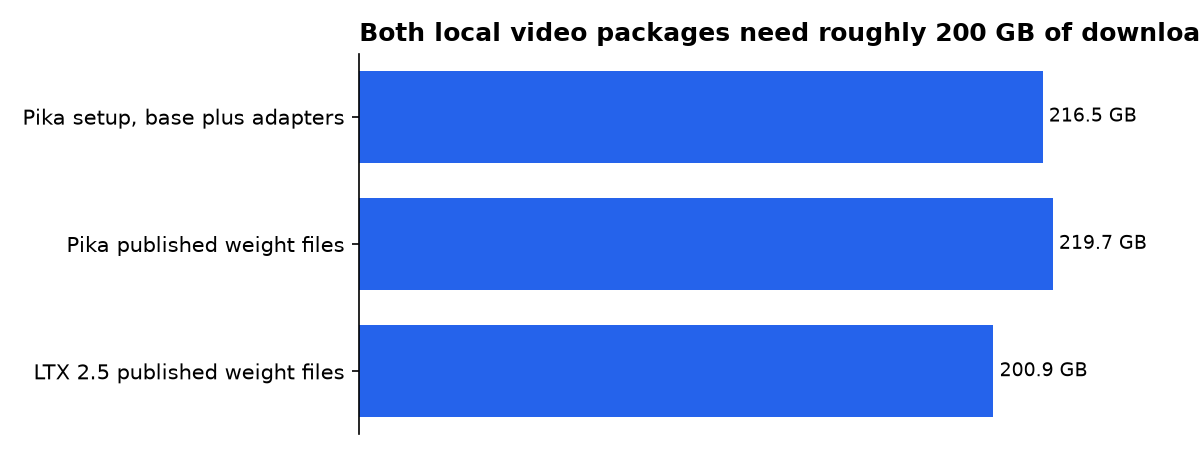
| Pika H3 Flex, base files plus both adapters | At least 216.5 GB | Keep substantial free storage before dependencies and temporary downloads. | FuturPulse calculation |
| Pika H3 Flex, published Hugging Face safetensors | 219.7 GB | This is the published weight-file total, not a promise of required runtime memory. | FuturPulse calculation |
| Lightricks LTX-2.5, published Hugging Face safetensors | 200.9 GB | The file total is smaller, but it does not establish a like-for-like VRAM requirement. | FuturPulse calculation |
Our storage calculation adds Pika’s published minimum of 211 GB for base components to about 5.5 GB for both adapters. Pika’s hardware guide gives those two figures separately, while the model repositories publish component files in different packs and formats.
What hardware does local Pika H3 Flex need?
Pika H3 Flex is not currently a practical local option for most desktop GPUs. Pika’s tested default 480p, 5-second sampling allocated about 66–69 GiB, and the package sends one generation request to one GPU rather than splitting a shot across several cards.
For a 768p, 15-second job, Pika says the default path exceeded H100 memory. Its CPU-offload test allocated about 29–32 GiB on the GPU and observed near 94 GiB of host memory. Those are representative measurements, not minimum requirements, and exclude some separate encoder and VAE demands.
The test coverage is narrower than marketing language can imply. Pika qualified representative requests on an H100 80GB, including 480p reference jobs and 768p, 15-second offloaded jobs. It has not qualified H200 or B300 for this package.
For a technical team, the sensible first run is a 480p, 5-second clip. For everyone else, Comfy Cloud or a hosted Pika workflow is more realistic than treating the public adapter files as a small local download.
Does six-step generation prove faster results?
Six steps means the generator evaluates its denoising schedule six times, rather than following a longer iterative path. ComfyUI says Pika distilled a 50-step generator to six steps, and says a 5-second 1344×768 clip can finish in about a minute on a single card rather than needing a 20- to 50-step non-distilled H3 run.
That is a useful iteration claim, but it is not a universal throughput benchmark. The timing depends on the GPU, resolution, clip duration, reference set and whether CPU offload is enabled. Pika’s own released examples are creative demonstrations, not reproducible performance validation renders.
Pika’s hosted research page makes a stronger claim: the company says H3 Flex can generate a 15-second 768p clip in as little as seven seconds of DiT denoising time. Treat that as a vendor performance claim, not a local hardware result, because the public hardware guide reports memory allocation rather than an equivalent end-to-end timing figure.
LTX-2.5 is also distilled, but its public card describes an eight-step schedule for its distilled transformer. Lightricks identifies the distilled LTX-2.5 checkpoint as fixed at eight steps with CFG set to 1. Step counts alone cannot rank speed across different model families.
What runs locally and what still needs Pika’s API?
Local Pika H3 Flex supports native 480p and 768p output with mixed 32 kHz stereo audio. The open package supports requested 5- to 15-second clips, 24 fps output and 11 aspect-ratio buckets. Actual duration follows the model’s frame grid, so a requested 5-second clip produces 124 frames, or about 5.17 seconds.
Higher resolutions are a separate hosted feature. Pika says its API can turn a draft into 1080p, 2K or 4K video and can provide audio stems and prompt enhancement. Those capabilities should not be confused with what the downloadable adapter package provides locally.
Pika’s research page lists a starting text-or-image video price of $0.01 per output second and a reference-video starting price of $0.03 per second. Those figures are Pika’s own published pricing claims, rather than a full public rate card covering every resolution, enhancement or finishing option.
The clearest buying implication is simple: use local inference for controlled drafts only if you already have suitable NVIDIA capacity. Use the hosted path when the final deliverable needs 1080p, 2K, 4K or separated audio stems.
Which creative jobs suit each Pika adapter?
Choose FL2VA when the shot is mostly specified by words or when art direction depends on hitting a defined opening or ending image. The guidance tells users to place image-alignment instructions before a continuous action description. This fits before-and-after product reveals, title-card transitions and storyboard panels.
Choose Ref2VA when continuity is the actual job. ComfyUI says image references can carry identity, props and scene information while the prompt specifies action and shot direction. It is the better starting point for a character in a campaign, a product film with fixed industrial design, or a motion-reference brief.
Use LTX-2.5 when your team wants its broader component-level pipeline choices. Lightricks offers both a full trainable transformer and a distilled transformer, along with image conditioning and optional spatial upscalers. That route gives builders more combinations, but it also gives them more files and compatibility decisions.
What should you actually do?
Start with Pika H3 Flex if you already use MiniMax H3 and need a clean choice between endpoint control and reference-led direction. The two-adapter design is its real advantage: FL2VA is the fast draft and transition tool, while Ref2VA is the identity, product and motion-control tool.
- Use Pika FL2VA for text-to-video, a first frame, a last frame, or a planned visual transformation.
- Use Pika Ref2VA when your brief includes several source assets and you must state what stays, changes or transfers.
- Use LTX-2.5 if you want to select between its full and distilled transformers, or need its component-oriented local pipeline.
- Do not download either package casually if 200 GB of storage and high-memory GPU planning are a problem.
- Do not budget from Pika’s starting price alone if your workflow needs 4K finishing, enhancement or audio stems.
What we could not verify?
There is no public, like-for-like benchmark comparing Pika H3 Flex and Lightricks LTX-2.5 on the same hardware, prompt set, resolution and reference load. Pika’s quality and speed statements can be settled by independent evaluation groups that publish prompts, seeds, hardware, full runtimes and failure cases.
Pika has not published a general local performance table for consumer GPUs, a complete hosted API rate card for every finishing option, or a public guarantee that complex reference combinations will fit within memory limits. The company, or an independent lab with access to the released weights, could settle those questions.
Sources
- Business Wire release carried by Yahoo Finance
- Pika H3 Flex GitHub repository
- ComfyUI Pika H3 Flex workflows
- Pika H3 Flex prompt guidance
- Pika H3 Flex hardware and tested configurations
- Lightricks LTX-2.5 on Hugging Face
- Pika H3 Flex technical deep dive

