
Key Takeaways
- GitHub Copilot CLI allows developers to execute commands directly in the terminal, improving productivity.
- Automatic cloning of repositories and fetching dependencies reduces setup time significantly.
- The CLI supports headless operation for task automation, enhancing workflow efficiency.
- Users can delegate commands to Copilot, enabling multitasking and streamlined project management.
- Integration with GitHub MCP server allows advanced issue searching to aid in development tasks.
What We Know So Far
Introduction to GitHub Copilot CLI
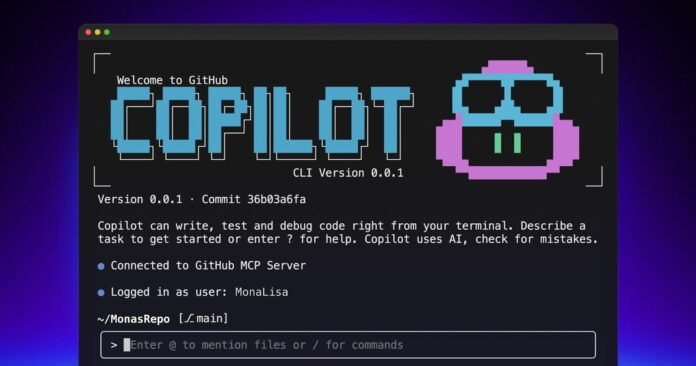
GitHub Copilot CLI made its public debut in September 2025, promising to transform terminal workflows for developers. It leverages AI to streamline common coding tasks, making development more efficient.

This innovative tool enables users to execute commands directly within the terminal, minimizing the time spent searching for commands or scripts. The integration of intelligent suggestions allows for a smoother coding experience.
Key Functionalities
The Copilot CLI can clone repositories and fetch dependencies automatically, significantly reducing initial setup time. This convenience enables developers to focus more on coding and less on configuration.
Additionally, Copilot analyzes images to suggest relevant code changes, providing a unique and interactive workflow experience that responds dynamically to visual cues.
Key Details and Context
More Details from the Release
Updates and features are actively developed for GitHub Copilot CLI based on user feedback and requests.
GitHub Copilot CLI integrates with the GitHub MCP server to search for open issues related to user tasks.
Copilot offers a delegate command to send tasks to coding agents, allowing multitasking.
The CLI provides commands to run tasks headlessly, allowing for automation and rapid task completion.
Copilot can analyze images to suggest code changes based on visual feedback.
Copilot can clone repositories and fetch required dependencies automatically.
GitHub Copilot CLI allows developers to perform tasks directly in the terminal, reducing the time spent looking up commands.
GitHub Copilot CLI was launched in public preview in September 2025.
Updates and features are actively developed for GitHub Copilot CLI based on user feedback and requests.
GitHub Copilot CLI integrates with the GitHub MCP server to search for open issues related to user tasks.
Copilot offers a delegate command to send tasks to coding agents, allowing multitasking.
The CLI provides commands to run tasks headlessly, allowing for automation and rapid task completion.
Copilot can analyze images to suggest code changes based on visual feedback.
Copilot can clone repositories and fetch required dependencies automatically.
GitHub Copilot CLI allows developers to perform tasks directly in the terminal, reducing the time spent looking up commands.
GitHub Copilot CLI was launched in public preview in September 2025.
Enhancing Developer Productivity
As the software development landscape rapidly evolves, GitHub Copilot CLI positions itself as a vital tool in the coding arsenal. It employs robust AI capabilities to enhance productivity by automating repetitive tasks.

With its ability to run commands headlessly, the CLI facilitates task automation which allows developers to complete work more rapidly and efficiently. This functionality is especially beneficial for large codebases or extensive projects.
Multitasking with Copilot
The CLI offers a unique delegate command feature that allows tasks to be assigned to coding agents for multitasking. This capability streamlines project management, letting developers juggle multiple tasks without getting bogged down.
Furthermore, the integration with the GitHub MCP server facilitates a search for open issues relevant to user tasks. This feature enhances the support developers receive while working on various projects.
What Happens Next
Future Developments
As more developers adopt the GitHub Copilot CLI, it is expected that new features and updates is expected to follow. The development team emphasizes responsiveness to user feedback, ensuring the tool evolves alongside developer needs.
Continuous improvements are likely to bolster Copilot’s ability to assist developers effectively, making it an indispensable part of the GitHub ecosystem.
Community Engagement
Encouraging user engagement is crucial for GitHub Copilot CLI’s growth. As developers share their insights and experiences, the platform is expected to better adapt to real-world use cases, driving the innovation of future enhancements.
Why This Matters
Significance of GitHub Copilot CLI
GitHub Copilot CLI represents a significant step toward integrating AI tools into everyday developer operations. By enhancing terminal workflows, it addresses critical pain points faced by coders, enabling increased productivity and efficiency.
The ability to quickly access commands, manage repositories, and automate processes saves time, allowing developers to focus on creative problem-solving rather than operational hurdles.
The Impact on the Development Community
By making coding easier and more intuitive, GitHub Copilot CLI empowers developers of all skill levels. This leveling of the playing field could lead to greater diversity and innovation within the tech community.
Ultimately, the adoption of such tools fosters a more productive and collaborative environment, essential for the future of software development.
FAQ
When was GitHub Copilot CLI launched?
GitHub Copilot CLI was launched in public preview in September 2025.
What tasks can GitHub Copilot CLI perform in the terminal?
It can execute commands, clone repositories, fetch dependencies, and automate various coding tasks.
“Updates and features are actively developed for GitHub Copilot CLI based on user feedback and requests.”

