
FuturPulse analysis · 20 October 2026
On 20 October 2026, a practical open-source AI stack has three verified building blocks: Indra OCR for document extraction, Scout for browser work, and Tracely for agent regression tests. Their licences, infrastructure needs, and model bills differ sharply in deployment.
At a glance
- Indra OCR’s default download is about 76 MB, and its command-line tool can produce Markdown, text or JSON from PDFs and images.
- Scout requires Node 22 or later and can use either a local Chromium browser or Outcrawl’s hosted browser.
- Tracely replays recorded fixtures in CI for $0 in model spend, according to its project description.
- Our calculation from OpenRouter list prices puts 1,000 large agent steps with Gemini 3.1 Pro Preview Custom Tools at $84.
Which open-source AI stack solves real work?
The useful answer is not another broad list of model frameworks. Use Datalab’s Indra OCR to turn source documents into structured text, Outcrawl Scout to take actions in a browser, and Tracely to stop known agent failures returning through a pull request.
That sequence matters. Optical character recognition, or OCR, converts a scan or image into machine-readable text. Browser automation then works with sites that have no suitable API. Regression testing repeats a previously broken run to check that a code change did not bring the failure back.
Popular guides usually organise open-source AI by categories such as runtimes, chat interfaces and workflow systems. Instaclustr’s guide, for example, separates local inference, retrieval systems and agent automation. That is useful architecture context, but it does not give a compact operational chain from document intake to browser action to a CI block.
The distinction is important because “open source” is not the same as “free to operate.” You can inspect and run the code, yet still pay for a model API, browser infrastructure, storage, or a commercial licence for particular weights. Each of these three projects makes a different trade.
| Concrete option | Best first job | Exact figure to plan around | What you operate | Evidence tier |
|---|---|---|---|---|
| Indra OCR | Extract a PDF into Markdown or JSON | 76 MB default model download | Python 3.10+, CPU and local files | Primary source: project model card |
| Scout with local Chromium | Research, compare or fill a form in a browser | $0 Outcrawl browser billing on your own browser | Node 22+, Chromium and a model endpoint | Primary source: vendor documentation |
| Scout on Outcrawl cloud | Run browser tasks with replay and hosted access | 1,000 free credits each month | Outcrawl browser credits plus your model bill | Primary source: project repository |
| Tracely self-hosted | Turn a failed production trace into a CI regression case | $0 model spend for fixture replay | Docker services, trace ingest and CI integration | Project claim: not an independent cost test |
What does Indra OCR cost to run?
Indra OCR is the best fit when your first bottleneck is getting usable text out of PDFs, scans and images. Its published default model package is about 76 MB, split between 30 MB of networks and 46 MB of language models, so it is small enough to trial on a normal CPU machine. The project card says it uses ONNX Runtime rather than PyTorch and does not require a GPU.
Indra’s practical appeal is its output shape. It can write Markdown, plain text, or JSON containing lines, boxes, layout blocks and confidence data. That makes it more useful for an agent than a simple text dump, because the next step can distinguish a table from a footer or a heading.
Datalab reports a median 212 milliseconds per page on four virtual CPUs in its auto mode, which reads a valid PDF text layer and OCRs missing material. That is a vendor benchmark, not a promise for your scans. Faded forms, handwriting and complex merged-cell tables are specifically identified as weak cases.
Licence checking comes before a production launch. The source code is Apache-2.0, while the project says its weights use a modified OpenRAIL-M licence. The stated free-use boundary includes research, personal use and startups under $20 million in funding or revenue; a company building a competing OCR API should not assume that the free model-weight terms apply.
When should a browser agent use Scout?
Outcrawl Scout is the browser layer when an agent must see a live page and interact with it. The Apache-2.0 project says Scout reads, clicks, types and scrolls in a real browser, then returns an answer or a partial result explaining what remains missing.
Scout does not bundle a language model. You select one model for the “hands” job that performs page actions, and may choose others for planning, visual interpretation or extraction. That separation lets a team use a faster, cheaper model for repetitive browser steps while reserving a stronger model for hard decisions.
Scout’s local route is the cleanest place to start with low-risk internal websites. Outcrawl’s documentation says the local package runs in your own Node process, supports a browser it launches or one attached through the Chrome DevTools Protocol, and incurs no Outcrawl browser billing when you bring the browser.
The cloud route adds residential connections, CAPTCHA handling and a replay of each run. Those features can solve access problems, but they also turn a local script into a service dependency. Do not use the hosted route for a task that exposes passwords, customer data or financial approval unless its access controls meet your own policy.
npm i @outcrawl/scout
npm i playwright-core
npx playwright install chromium
Scout’s published quickstart requires Node 22 or later. It also offers 1,000 free browser credits each month without a card, but that figure is only browser allowance. Your language-model provider still bills model calls separately, and browser tasks can generate many of them.
How much can browser-agent model calls cost?
A browser agent can be cheap per step and expensive per completed job because it repeatedly reads, decides and acts. Tokens are the chunks of text a model reads and bills by. Our calculation uses OpenRouter’s listed Gemini 3.1 Pro Preview Custom Tools rates of $2 per million input tokens and $12 per million output tokens.
We assume a chat turn contains 1,000 input tokens and 500 output tokens. A retrieval-augmented generation answer, where the model receives retrieved source material, uses 8,000 input tokens and 500 output tokens. An agent step uses 30,000 input tokens and 2,000 output tokens.
| Usage profile | Input and output assumption | Cost per 1,000 requests | What the figure means | Evidence tier |
|---|---|---|---|---|
| Chat turn | 1,000 input + 500 output tokens | $8 | Suitable for short internal questions | Our arithmetic from vendor list prices |
| RAG answer | 8,000 input + 500 output tokens | $22 | Document context becomes the main cost | Our arithmetic from vendor list prices |
| Agent step | 30,000 input + 2,000 output tokens | $84 | Repeated browsing needs a budget cap | Our arithmetic from vendor list prices |
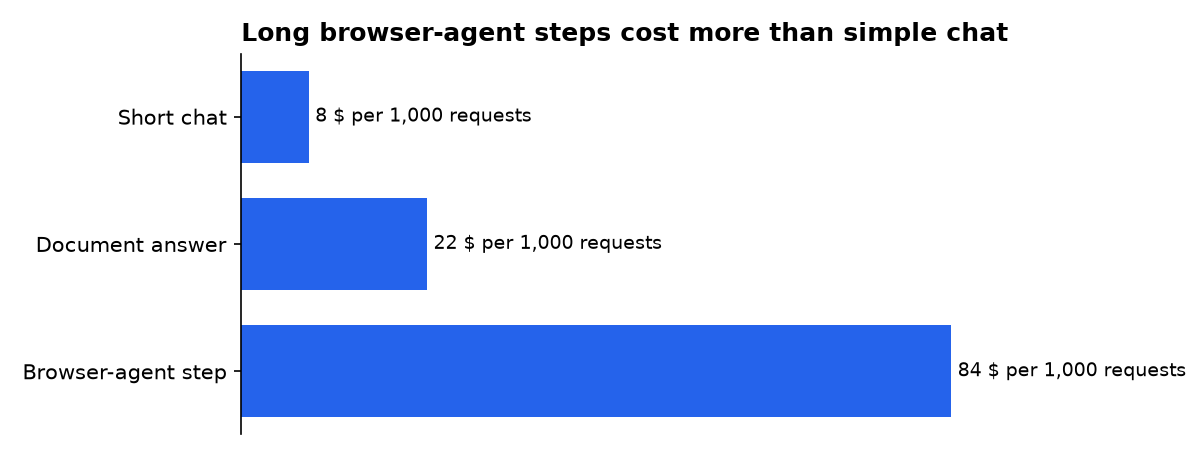
OpenRouter’s model list is the source for the list-price inputs, while the three totals are FuturPulse arithmetic. They are not a Scout benchmark. Actual costs change with prompt size, retries, screenshots, cached tokens, model choice and the cap you place on a run.
How does Tracely make failures testable?
Tracely addresses the part many agent prototypes skip: preserving a real failure and making it fail again in CI until the code fixes it. The MIT-licensed project describes a pipeline that ingests production traces, groups failures, freezes a failing trace into a replayable case, and blocks a pull request when that case regresses.
A trace is the recorded path through an agent run: user input, tool calls, model responses, timing and other event data. Tracely’s approach treats that trace as the test fixture. This differs from hand-writing a synthetic evaluation dataset before you know how users will actually break the agent.
Tracely’s product documentation says it accepts OTLP/HTTP traces, which is a standard telemetry format, and exposes evaluators at conversation, run and span levels. Its repository says regression replay uses recorded tool and model fixtures, allowing offline CI without API keys or model spend.
There is a trade-off. Fixture replay checks whether your code handles the captured failure correctly, not whether a live provider has changed behaviour this morning. Keep a small live test set for provider drift, but do not run it as the only merge gate. Live tests cost money and produce less repeatable results.
How should the three tools connect?
The useful first workflow is deliberately narrow: collect a document, extract facts, verify those facts on a permitted site, then freeze any bad run. Avoid giving the browser agent a general instruction such as “research everything.” Define the source, the fields and the maximum work before it opens a page.
- Run Indra OCR locally on incoming PDFs and retain the Markdown plus JSON layout output.
- Pass only the relevant extracted passages to Scout, with a schema for the facts it must return.
- Set Scout caps for steps, duration and budget before the browser run begins.
- Send the complete trace to Tracely and promote verified failures into regression cases.
- Use CI to replay those cases on every relevant pull request.
This is more focused than a general open-source platform directory. GreenNode’s 2025 overview correctly places tools such as model hubs, serving systems and orchestration platforms in the broader stack. This three-tool pattern instead starts from a common business task: extract, act and stop the same mistake recurring.
It also complements, rather than replaces, coding agents. Developer tool roundups tend to focus on agents that edit a repository or connect services. Indra, Scout and Tracely cover the surrounding operational work: outside documents, hostile browser surfaces and production regression evidence.
Where can this stack fail?
Indra OCR can misread handwriting, degraded scans and complex tables. Scout can encounter a login wall, a CAPTCHA, an unexpected confirmation screen or a site whose terms prohibit automation. Tracely can faithfully replay an old fixture while missing a new live failure pattern.
Build explicit human checkpoints around irreversible actions. A browser agent can prepare a purchase order, update a draft record or collect options. It should not submit a payment, terminate an account or publish regulated text merely because the page presented a button.
Use evidence tiers in your own outputs. A document line extracted by OCR is a candidate fact. A fact verified on a source page is stronger. A model’s guess, even when it sounds specific, should remain unverified until a person or deterministic rule confirms it.
What should you deploy first?
Start with Indra OCR if staff now copy facts from PDFs by hand. Its small local download and CPU-first design make it the lowest-risk test. Measure extraction errors on your own document sample before connecting the output to an agent.
Next, add Scout only for browser tasks that have a clear endpoint and a safe failure mode. Run it locally first, use a fixed answer schema, and set a hard budget. Move to hosted browser infrastructure only if site access or replay features justify the added dependency.
Add Tracely once a real agent workflow has failed in a way you never want to repeat. Its strongest use is not a dashboard. It is the pull-request gate that turns a costly incident into a permanent test case.
What we could not verify?
Public project pages do not establish an independent end-to-end accuracy rate for a particular company’s documents, browser targets or agent prompts. They also do not publish a full hosted-browser price per task, a complete Tracely hosting bill, or the terms that every target website applies to automation.
Datalab could settle current commercial weight permissions for a specific use case. Outcrawl could settle expected cloud-browser credit consumption for a defined workflow. A prospective Tracely operator could settle infrastructure cost by publishing its deployment size, retention rules and trace volume.
Sources
- Hugging Face: datalab-to/indra-ocr
- GitHub: outcrawlai/scout
- Outcrawl Scout documentation
- GitHub: jwuthri-cloud/Tracely-ai
- Tracely documentation: traces and conversations
- OpenRouter model list and list prices
- Instaclustr open-source AI tools guide
- GreenNode open-source AI platforms overview
- DEV Community coding-tools roundup

