

FuturPulse analysis · 18 October 2026
Seven buildable Jev projects are support routing, inbox triage, lead scoring, invoice review, agent guardrails, model routing and chat-reply coaching; TypeSafe AI released Jev in early access on 15 September 2026.
At a glance
- TypeSafe AI lists Jev input at $0.042 per million tokens, while output is not metered.
- TypeSafe AI says Jev responses take 70ms to 500ms for its System One tasks.
- Jev returns three useful decision types: a choice, a score or a yes-or-no probability, according to the official quick start.
- The strongest first projects keep Jev away from prose writing and use it to choose, score, flag or route.
What makes Jev useful for real projects?
Jev is useful when software needs a bounded judgment, not an essay. A conventional chat model generates text one piece at a time. Jev instead receives a state, meaning the relevant text or structured application data, and returns typed decisions that code can act on directly.
TypeSafe AI says its model supports Choice, Score and Noul questions. Choice selects from named options. Score places an item on a defined scale. Noul returns the probability that a clear statement is true, from zero to one. The primitives guide recommends separating a complicated judgment into narrower questions, then combining the results in application code.
This changes the project brief. Do not ask Jev to “handle customer support.” Ask it whether a ticket is urgent, which queue owns it and whether a human should review it. A separate writing model can draft a reply only after those decisions are made.
What are some examples of AI app projects?
Good AI app projects turn messy human input into a small set of actions your software already understands. The most practical examples are a help-desk sorter, a sales-lead queue, a policy checker and a safety stop for an autonomous tool. Each has clear labels, known exceptions and a human owner.
TypeSafe AI’s own workflow material uses security incidents, agent traces, invoice processing and customer service as examples. Its workflow evaluation site describes a useful pattern: decompose a policy into programmatic rules plus independent judgments, rather than asking one model to solve the whole job in one prompt.
That is also the useful lesson from Jev Chat Assistant. Its open-source project reads a conversation, judges intent and risk, drafts options with a language model, then leaves sending to the user. The project repository says the user, not the assistant, presses send. For real deployments, that final human control is a feature rather than a missing capability.
Which seven Jev projects should you build?
1. Customer-support ticket router
Build a router that sends each incoming ticket to billing, technical support, sales or a human review queue. Put the customer message, account plan, recent errors and current service status into the state. Ask a Choice question for department, a Score question for frustration and a Noul question for urgency.
Start with read-only routing. Do not let the system promise refunds or change subscriptions. TypeSafe’s quick-start example uses this shape: one ticket and three questions in one request. The official example also shows that typed answers can be read directly by Python, JavaScript or TypeScript code.
2. Shared-inbox triage assistant
Build an inbox tool for a founder, operations team or recruiter. Its job is not to write replies. Its job is to label messages as “reply today,” “delegate,” “archive,” “needs research” or “needs a human decision.” Add a separate Noul question for personal data or a payment request.
Use the confidence and probability fields to make uncertainty visible. Messages with a weak lead label should land in a review view, not disappear into automation. This project is valuable because it gives people a shorter work queue without pretending that software knows every relationship or business priority.
3. Sales-lead qualification and handoff
Build a lead scorer that reads form answers, product usage and meeting notes. Ask whether the buyer has a stated deadline, whether the account fits your market, and which team should own the follow-up. Use a Score for purchase readiness, then let your CRM assign an owner only above a threshold you choose.
This is stronger than a single “hot lead” prompt because your sales team can inspect each factor. If conversion quality falls, change the weight on timing or fit in code. The model remains responsible for narrow judgments, while the revenue team remains responsible for the policy.
4. Invoice exception reviewer
Build an accounts-payable queue that compares an invoice, purchase order, delivery record and payment policy. Ask whether the records describe the same supplier, whether the amount needs sign-off and whether any document is unreadable. Code should approve only the cases that meet a written policy.
TypeSafe’s workflow example uses precisely this kind of split: a business rule handles the threshold, while model questions classify the expense and assess whether a description matches a receipt. That makes the project auditable. It also avoids letting a generated paragraph become an accidental payment decision.
5. Tool-call guardrail for an AI agent
Build a gate in front of risky tools such as shell commands, account changes or data exports. Before execution, send Jev the proposed action, the user request, affected system and policy. Ask whether the action is destructive, whether approval is required and which risk band applies.
LangChain’s Jev integration describes an Auto Mode middleware that checks risky tool calls before a tool executes. Its implementation guide is clear on the division of labour: Jev is not a text model, but it can be a fast classifier inside an agent loop. Begin in log-only mode before blocking anything.
6. Model router for an internal assistant
Build a model router that sends simple retrieval and extraction requests to a cheaper language model, while complex debugging or sensitive requests go to a more capable model or a person. Jev makes the selection from criteria you define. The writing model then performs the actual answer.
This project saves money only if its rules are measured. Track the route, final outcome, user corrections and cost of the writing model. LangChain’s published Jev example routes simple requests differently from architecture and high-stakes decisions. Copy the pattern, but set your categories from your own support and product data.
7. Chat-reply coach with manual send
Build a private reply coach for customer-success or community teams. The first stage judges intent, tension, requested outcome and whether a reply needs escalation. A text model then drafts several replies. Jev ranks those drafts against the earlier judgment, while the person edits and sends the final message.
The Windows Jev Chat implementation uses a similar three-stage approach: judgment, drafting and ranking. Its Windows repository says it presents three candidate replies and does not send them automatically. Keep that boundary. A reply assistant should help someone decide, not impersonate them without review.
What do the seven projects cost to classify?
At TypeSafe AI’s listed rate of $42 per billion input tokens, Jev classification can be cheap enough to place inside a workflow. The table is a planning estimate, not a vendor benchmark. It counts one Jev decision event per item and excludes any separate language model used to write text.
OUR CALCULATION Our estimates multiply TypeSafe AI’s published $0.042-per-million input price by the assumed state size. They assume output remains unmetered as TypeSafe AI describes. Real bills will change with message length, repeated calls and any external model used for generation.
| Project | Assumed input per decision | Jev cost per 1,000 decisions | What that covers |
|---|---|---|---|
| Ticket router | 1,000 tokens | $0.042 | Short ticket and account status |
| Inbox triage | 2,000 tokens | $0.084 | Email plus recent thread |
| Lead qualification | 3,000 tokens | $0.126 | Form, notes and account facts |
| Invoice exception review | 4,000 tokens | $0.168 | Invoice and policy fields |
| Agent tool-call guardrail | 6,000 tokens | $0.252 | Tool proposal and agent trace |
| Model router | 8,000 tokens | $0.336 | User request and routing rules |
| Chat-reply coach | 10,000 tokens | $0.420 | Conversation context and candidates |
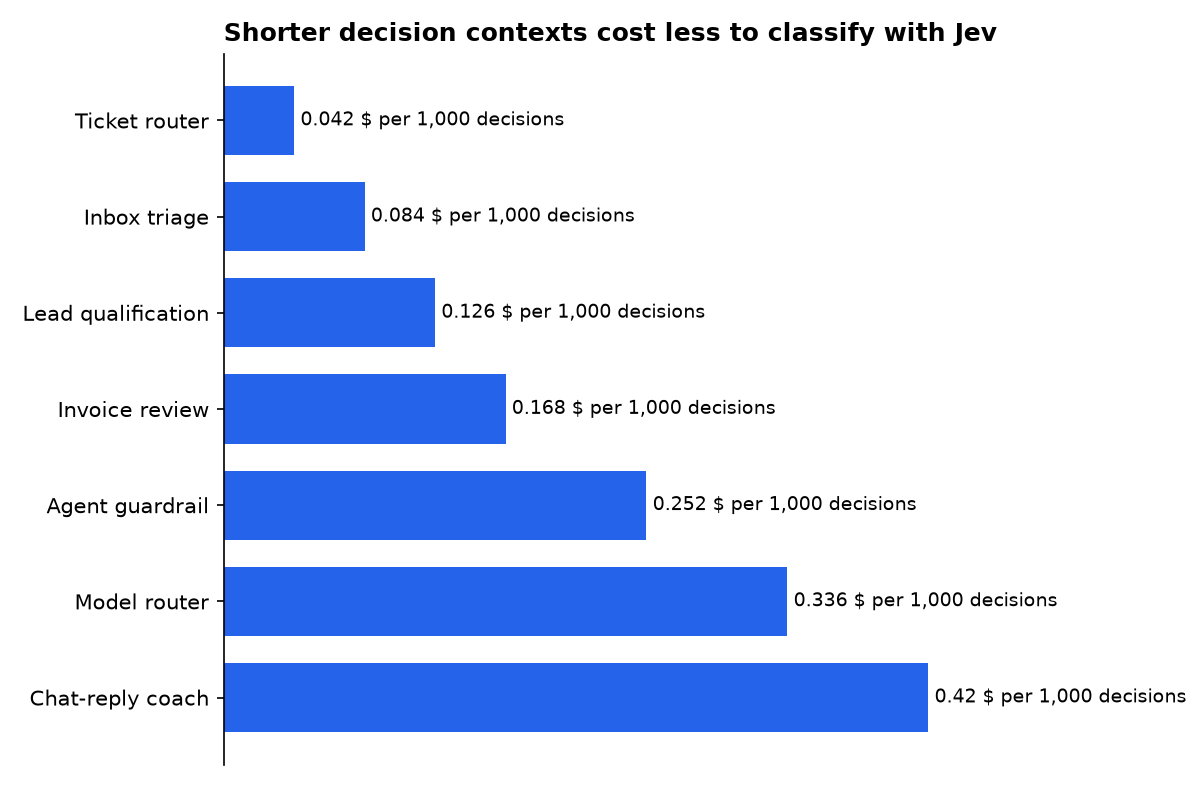
The important number is usually not Jev’s classification cost. It is the avoided cost of sending every request to a large writing model, or the avoided cost of a person opening irrelevant work. If a project uses generated replies, record that separate model’s tokens and price beside Jev’s cost.
What are some good AI projects for beginners?
The best beginner project is the customer-support ticket router. It has familiar input, a limited list of possible destinations and an easy manual fallback. You can test it with historical tickets before connecting it to a live help desk.
Start with three labels and one safety flag. For example, choose billing, technical or sales, then ask whether the ticket is urgent. Compare Jev’s results with the queue your team actually used. Add frustration scoring only after basic routing works.
Avoid beginning with a browser agent or a reply bot. Those systems can act in the world, so errors have consequences. A classifier that only creates a queue is easier to inspect, easier to reverse and more useful for learning how thresholds affect automation.
How should you set up the first version?
Build the smallest version around one state object and a small question set. TypeSafe’s documentation says a state can be a string, JSON object or array. Use an object when the judgment depends on several related facts, such as a message, customer record and policy.
- Write the human policy first, including when a person must review a case.
- Create a state object with only the information needed for that decision.
- Turn each judgment into a Choice, Score or Noul question.
- Store the answer, probabilities, confidence and the action your code took.
- Test against old cases, then run live in recommendation-only mode.
Batch questions that use the same state. The TypeSafe documentation says those questions are evaluated independently and in parallel. That reduces duplicated context and keeps one decision record together. Make a second call only when the first answer determines what information must be fetched next.
For application plumbing, LangChain is optional. The LangChain project provides agent and model integrations, but a small service can call TypeSafe’s HTTP endpoint directly. The official quick start lists Python, JavaScript, TypeScript and Bash examples, so choose the language already used by your application.
Who is making each claim, and why?
TypeSafe AI makes the central performance, pricing and reliability claims about Jev. It sells access to the model, so its reported speed, cost and evaluation results should be treated as vendor claims until independently reproduced. To its credit, the company notes that its workflow references use external-model consensus labels and that its own capability team created the workflows.
LangChain says Jev can fit into model routing and tool-call checks through its integration. LangChain has a commercial interest in developers building agent applications with its framework and related platform products. Its code examples are useful implementation evidence, not independent validation of Jev’s performance.
Jev Chat contributors make product claims about their open-source chat assistants. Their repositories show a concrete design: analyze intent and risk, generate candidates, rank them and retain manual sending. The project is MIT-licensed, but its maintainers also list sponsors and warn that use inside third-party chat apps can conflict with those apps’ terms.
OpenRouter is relevant because Jev Chat’s Windows project offers OpenRouter as a decision-model source. OpenRouter operates a model-routing and pricing marketplace, so its model catalogue is useful for comparing available options, but it is not an independent test of TypeSafe AI’s own model claims.
What we could not verify?
No public independent benchmark in the material reviewed here establishes that Jev is consistently 200 times faster or 400 times cheaper than comparable language models across ordinary production workloads. TypeSafe AI could settle that question by publishing repeatable tests with fixed regions, workloads, models and billing assumptions.
Public information also does not establish a universal safe confidence threshold for automated approvals, escalations or tool blocking. Each organization must calibrate thresholds against its own errors and policies. A regulator, customer contract or internal risk owner may require human review even where the model reports high confidence.
Finally, the Jev Chat repositories describe platform-specific privacy and compatibility choices, but they cannot determine whether every installation complies with WhatsApp, X, Feishu, QQ or other services’ current terms. Those platform operators can settle that point through their published rules and enforcement decisions.
Sources

