
FuturPulse analysis · 19 October 2026
MLflow aliases are mutable, while a numbered model URI such as models:/name/17 stays pinned to version 17. For cost-sensitive AI workloads, use aliases for approved promotion and record the resolved version before every production run.
At a glance
- MLflow aliases can be reassigned without changing application code, so an alias is a deployment control rather than a fixed artifact reference.
- A numbered MLflow URI resolves a specific registered version, making it the safer default for reproducible batch jobs and cost investigations.
- Databricks says the Workspace Model Registry imposes quotas on registered models and model versions. Its MLflow Tracking service also limits runs, parameters, tags and metric steps.
- Databricks separates registry identity from model-serving configuration. An MLflow alias therefore does not automatically pin an upstream provider model.
The practical distinction is simple: an alias optimises controlled change, while a pinned version optimises repeatability. Neither is enough alone when a request ultimately reaches a third-party large language model, because the provider model name and its commercial terms are separate configuration choices.
What is the difference between an alias and a pinned model?
An MLflow alias is a human-readable label that points to one registered model version. The MLflow tutorial defines aliases as user-defined identifiers that remain mutable after registration. A team can move a label such as champion from one version to another without changing the label in application code.
A pinned model reference uses the registered model’s version number. MLflow’s documented form is models:/<model-name>/<model-version>; loading that URI requests the named version rather than whatever version currently owns an alias. The number identifies the registry version, provided that the registered artifact and its serving environment remain available.
Databricks documents the same distinction in its older Model Serving implementation. A deployed model version can be called through a URI containing the registered model name and version, while another URI can refer to a deployment stage. The first form names a particular version; the second follows a movable lifecycle label.
| Choice | Example reference | What can change without code edits | Best use |
|---|---|---|---|
| MLflow alias | models:/risk_model@champion |
The alias can be reassigned to another registered version. | Approved production promotion and controlled rollouts. |
| Pinned MLflow version | models:/risk_model/1 |
Nothing in the version selector itself. | Batch scoring, audits, incident replay and cost comparison. |
| MLflow 3 registry selection | databricks-uc |
The registry target follows the configured workspace and workload. | Explicitly selecting the registry used by a workload. |
| Legacy serving request | 16 MB request limit |
Serving availability and deployment policy can change independently. | Checking operational limits before using a serving endpoint. |
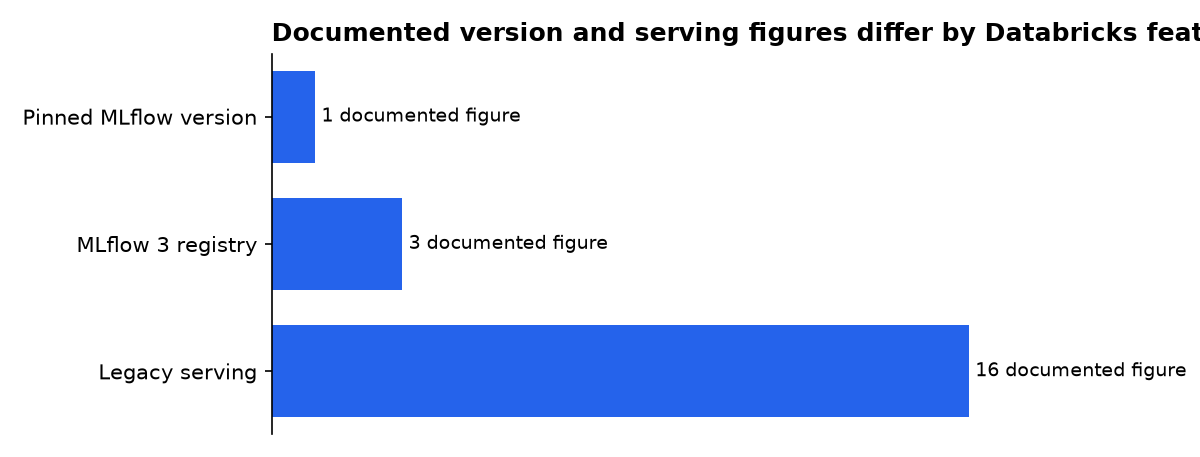
The table’s figures come from Databricks documentation: its example uses version 1, MLflow 3 uses the Unity Catalog registry URI by default, and Legacy MLflow Model Serving documents a 16 MB request limit.
The important limitation is scope. An MLflow alias points to an MLflow Model Registry version. It does not, by itself, freeze the behaviour, token billing, context rules or availability of an external foundation model called inside that registered model.
This distinction matters because teams often use the word “model” for several different objects. The registry may contain a wrapper, preprocessing code, prompt templates or an inference function. The provider may then receive a request from that wrapper and apply its own model name, limits and billing rules.
A pinned registry version gives the team a stable reference to the packaged object. It does not prove that every external dependency will behave identically forever. Reproducibility therefore requires a record of the registry version and the configuration that version used when it ran.
Why can aliases create silent AI cost changes?
An alias can change the code path without a code deployment. MLflow says a workload using models:/<registered-model-name>@champion loads the version currently assigned to that alias, so the next execution can use a different version after reassignment. That is useful for operations, but it means finance may review one package while production uses another.
Cost is not just a model-card price. Tokens are the chunks of text a model reads and bills by. A replacement may use a different prompt template, produce longer answers, call tools more often or select a different external model.
Each change can raise spending even if request volume stays flat. It can also change latency, output quality and failure behaviour. The alias itself does not cause those changes; the mutable pointer makes them easier to introduce without an application-code change.
The silent part is not an MLflow defect. It is the expected result of a mutable pointer. The governance failure is treating an alias update as harmless metadata instead of a production release.
Databricks’ external-model architecture makes the boundary clear. External models are third-party models hosted outside Databricks, while Databricks Model Serving provides an endpoint for requests and configuration. The endpoint still carries a provider and an external model name.
The Model Serving API reference lists the external model’s provider and name as separate fields. That creates two independent change surfaces: the MLflow registry reference and the provider-model selection. A production record should capture both.
That record should also identify the prompt or request policy. A new prompt can increase input tokens without changing the registered model name. A tool or retrieval change can add calls and context while leaving the endpoint address unchanged.
Which MLflow reference should production use?
Use both, but at different points in the release process. Production traffic can use a controlled alias after approval. Every execution, deployment record or request log should also capture the resolved numbered version and the exact external provider model configured by that version.
MLflow’s workflow guidance says aliases can be reassigned through the UI or client API and recommends them for identifying deployed versions. It also says model-version tags can hold status information, such as a validation result. The workflow guide recommends aliases and tags as the replacement for fixed model stages.
The alias is therefore a useful operational handle. It gives release managers a deliberate place to promote a candidate and a simple place to redirect live traffic. It is not sufficient as historical evidence because its destination can change later.
That produces a workable release rule:
- Use
candidatefor evaluation and load testing. - Use
championonly for the approved production version. - Store a tag such as
cost_review=approvedon that version. - Write the resolved version number into deployment and usage records.
- Pin scheduled backfills and investigations to a version number.
Do not use a bare alias as the only evidence of what ran. After reassignment, the same alias string describes a different version. An incident review then needs the version resolved at the time of the request, not the alias’s current destination.
Teams should also record the registry target. Databricks says MLflow 3 uses databricks-uc as its default registry URI, while a workload can explicitly target the Workspace Model Registry with mlflow.set_registry_uri("databricks"). A name and version are less useful if the team cannot establish which registry contained them.
How should teams promote an alias safely?
Promote an alias through a small, auditable change procedure. First, register the candidate model. Databricks says its Workspace Model Registry provides model versioning, lineage, stage transitions, webhooks and model-event notifications. Databricks also says Unity Catalog-enabled workspaces should use the Unity Catalog model workflow instead of the Workspace Model Registry procedures.
Next, evaluate the exact registered version, not merely its source code. The registry stores the model produced by a run and can preserve information about that run. A candidate should therefore be tested from the registry object that production will resolve.
Attach review metadata that explains the intended provider model, prompt revision, evaluation result, rollout owner and cost decision. Keep the metadata concise enough to search. Databricks warns that MLflow tracking has quotas, so unlimited logging is not a substitute for a useful retention strategy.
Finally, move the alias in one deliberate action. The following pattern uses MLflow’s documented alias API. The values are examples, not Databricks-prescribed names.
from mlflow import MlflowClient

client = MlflowClient()

model_name = "prod.support_assistant"
candidate_version = "17"

# Run evaluations and cost checks before this update.
client.set_registered_model_alias(
    model_name,
    "champion",
    candidate_version,
)

resolved = client.get_model_version_by_alias(
    model_name,
    "champion",
)

print({
    "model_name": resolved.name,
    "resolved_version": resolved.version,
    "run_id": resolved.run_id,
})
MLflow’s maintained tutorial source shows the same set-and-resolve sequence. Save the printed version and the approval record together. That turns a mutable deployment label into an auditable release event.
The order matters. Resolve the alias after the update, then persist the result with the deployment record. If the application resolves the alias only inside an opaque serving layer, the team may have no reliable account of which version handled a later request.
Databricks’ older serving documentation describes automatic synchronisation with the Model Registry and automatic deployment of newly registered versions. That behaviour is convenient for an evolving service, but it is another reason to inspect the deployment policy before treating registration as a controlled release.
How do pinned models prevent surprise changes?
A pinned version prevents an alias reassignment from altering that reference. It is the right control for a monthly job, a regulated decision flow, a benchmark rerun or a cost investigation asking what generated a specific output.
Pinning does not mean “never upgrade.” It means upgrades are explicit. Create a new registered version, compare it with the old one, record the provider model configuration and change the numbered reference only after approval.
Use the alias to direct live traffic later, if live traffic needs quick rollback. Keep the pinned reference for the evidence that must remain stable. This separates operational flexibility from historical reconstruction.
Databricks MLflow Tracking supplies the companion evidence. Databricks says MLflow Tracking logs parameters, metrics, tags and artifacts for a run. For an AI application, log the registry version, external model identifier, prompt revision, token settings, fallback policy and evaluation dataset identifier as run parameters or tags.
Tracking records are not automatically unlimited. Databricks says that, starting on 27 March 2024, MLflow imposed quotas on total parameters, tags and metric steps for runs, as well as total runs for experiments. The practical lesson is to preserve the fields needed to reconstruct a release rather than logging every transient value.
Databricks also says the Workspace Model Registry imposes quotas on registered models and model versions. A retention policy should identify which versions must remain available for audit, which can be archived and which can be deleted after an approved retention period.
A stable data input matters as much as a stable model. Databricks says each write to a Delta Lake table creates a new table version, and earlier versions can be queried through the transaction log. Delta Lake history can therefore supply the data-side reference when reproducing a result or reconciling a bill.
Model and data pins answer different questions. The model version says which registered artifact ran. The table version says which stored data state supplied the input. A useful investigation records both, along with the request configuration.
What does Databricks’ registry structure change?
Databricks distinguishes the Workspace Model Registry from Unity Catalog. Its registry documentation says that Unity Catalog-enabled workspaces should use Unity Catalog procedures. It also says that with MLflow 3, the default registry URI is databricks-uc.
This affects deployment design because a registry reference is meaningful only within the registry that resolves it. A migration can preserve a model name while changing the system that stores and serves it. The migration record should therefore include the old registry, the new registry and the resolved version in each environment.
The Workspace Model Registry still supplies useful lifecycle information where it applies. Databricks lists chronological lineage, model versioning, stage transitions, webhooks, email notifications, descriptions and comments among its capabilities. Those features support review, but they do not make a mutable label into an immutable identifier.
Databricks also says a registered model can be created from an MLflow run and that a new registered version can be created when a logged model is registered. The run, its parameters and its artifacts form the evidence around the version. The application should retain the version selected for production rather than only the run’s experiment name.
Can “latest” and aliases be used together?
Yes, but only if the team accepts two layers of mutability. An MLflow alias can move from one registered version to another. The selected version can also be configured to call a provider model whose name ends in latest.
A safer production arrangement is to permit one mutable layer at a time. For example, a champion alias may point to an MLflow version that names a dated provider model. Alternatively, a development environment may use provider “latest” names, while production versions use the vendor’s dated or otherwise fixed identifiers.
The registry can prove which wrapper version ran. It cannot prove that a vendor’s “latest” model remained unchanged unless the vendor publishes and honours a fixed underlying identifier. Treat “latest” as a release channel, not as a pin.
This is also why provider configuration belongs in the release record. The registry version, endpoint provider, external model string and request settings together describe the execution path. Leaving any one of them out creates an avoidable gap in a cost review.
What should a cost-change audit record?
A useful audit record answers four questions without guessing: which application version ran, which MLflow version resolved, which provider model received the request and what usage resulted. Keep these fields together in a trace, run record or deployment log.
- Release identity: application commit, deployment timestamp and environment.
- MLflow identity: registered model name, alias used and resolved version number.
- Provider identity: provider, exact model string, region and endpoint configuration.
- Request identity: prompt revision, tool policy, retrieval configuration and fallback rule.
- Usage identity: input tokens, output tokens, cache behaviour and the billing export reference.
- Data identity: source table, table version and any evaluation dataset identifier.
Do not rely on model names alone. A name tells you what the caller requested. The resolved MLflow version and actual provider configuration tell you what the system was set up to execute. Usage data then shows what the customer was charged for.
Record the alias and the resolved version together. The alias helps explain the release decision. The version makes the event searchable after the alias moves.
For scheduled work, store the pinned reference in the job definition and in the run metadata. For live traffic, resolve the alias at deployment or request time according to the service design, then record the result. The choice should be deliberate and visible to the team that owns the bill.
Use tags for compact status fields and artifacts for larger evaluation outputs. Databricks’ Tracking API supports parameters, metrics, tags and artifacts, but its documented quotas make selective logging important. A small, consistent schema is more valuable than a large collection of unstructured traces.
What should happen when a version is retired?
Pinning does not preserve an unavailable service. A provider or serving platform can retire a model, remove an endpoint or change the supported registry workflow. The pin protects the reference from alias movement, not the service from planned or unplanned withdrawal.
Databricks’ current documentation also shows that some older pages are retired or describe legacy services. Its Legacy MLflow Model Serving page says the feature is no longer supported and recommends migration to Model Serving. A deployment plan should therefore record the serving product, not just the model URI.
Before migration, run the old and replacement paths against the same evaluation inputs. Compare output quality, input and output token use, latency, error behaviour and the resulting bill. Keep the old pinned version long enough to support an investigation, subject to availability and retention policy.
What we could not verify?
Databricks’ public MLflow and Model Serving guidance does not publish a universal mapping between a model alias update and a dollar-cost change. The financial effect depends on the provider’s price schedule, actual token use, caching, output length, fallback behaviour and any contracted terms.
Public material also does not establish that a pinned MLflow version freezes every external dependency. The registry can identify the registered artifact and its metadata, but the provider, endpoint and external model configuration require their own records.
The public documentation does not show that an alias itself records every historical resolution automatically. Teams should test their serving and logging implementation and verify that the resolved version is persisted at the point of deployment or inference.
Sources
