
FuturPulse guide · 19 October 2026
BrowserStack advertises more than 30,000 real iOS and Android devices across more than 365 models, while an on-device agent such as ESP32 iPhone Agent works with one owned iPhone. That difference defines the buying decision: AI can help write, explore and analyse tests, but teams still need the right devices, repeatable checks and security controls.
At a glance
- Use AI test generation or natural-language tools when exploratory journeys change often and script maintenance is expensive.
- Use real-device clouds when your release must cover many iOS and Android models, operating systems, networks or hardware features.
- Use deterministic scripts for release gates. A deterministic check has a fixed input and an unambiguous result.
- Use an owned-phone agent for visual exploration, not as the sole judge of whether a release passes.
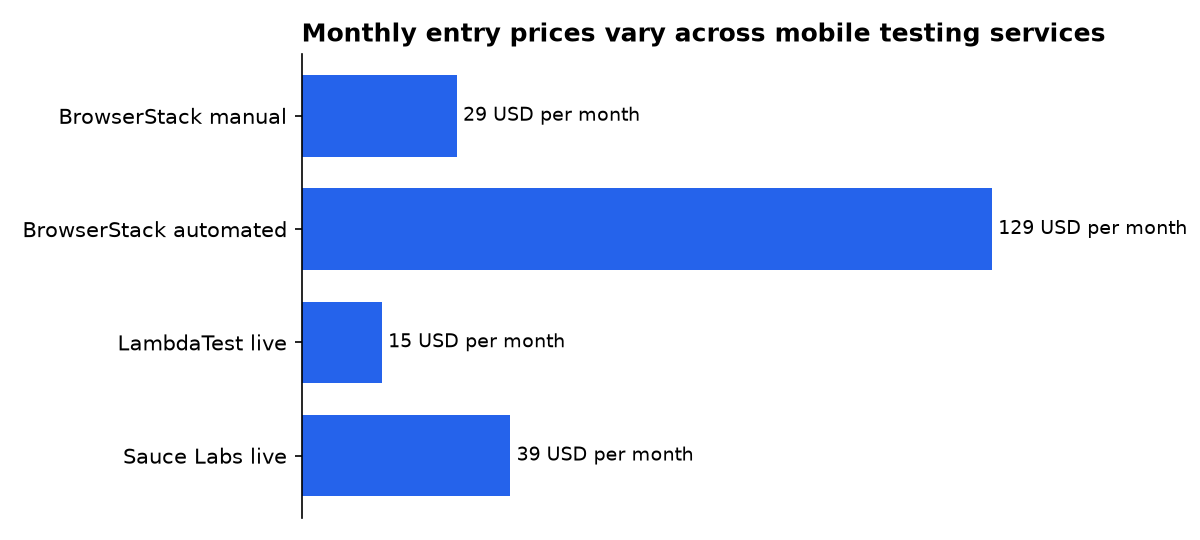
- Pricing varies sharply. GetPanto lists BrowserStack manual testing from $29 a month, automated testing from $129, LambdaTest from $15 and Sauce Labs from $39.
What does AI add to mobile device testing?
AI mobile testing covers several different jobs, not one product category. A model can generate test actions, adapt to a changed interface, compare screens, rank risks or operate a device from a natural-language instruction.
Orangebeard describes AI testing as analysing results, identifying unstable tests and prioritising useful runs. That is different from an agent that sees a screen and taps it. Analysis works after execution, while device control can change the application state and touch sensitive user journeys.
Quash describes a broader set of functions. Its overview covers test generation, visual checking, risk analysis, test maintenance and execution across real and virtual devices. Those capabilities can reduce routine authoring, but they do not remove the need to decide which devices, accounts and assertions matter.
The practical distinction is between exploration and proof. An AI agent is good at finding a route through a changing interface and recording what it sees. A release gate needs a stable assertion, such as matching known text, checking a backend response or confirming a known account state.
Which mobile testing approach should a team choose?
The choice depends on the coverage you need. A single physical phone gives realistic interaction but narrow hardware coverage. A cloud device farm gives breadth and parallel execution. Virtual devices provide speed and repeatability, but they cannot represent every physical condition.
| Product or approach | iOS and Android coverage | Device model | AI functions | Appium or CI position | Pricing information | Security and controls | Best fit |
|---|---|---|---|---|---|---|---|
| BrowserStack App Live | Real iOS and Android devices | Cloud real-device access; more than 30,000 devices and more than 365 models | AI-first features are not specified on the cited App Live page; manual interaction, logs and debugging are listed | Appium and CI integrations are listed | Manual from $29 a month; automated from $129 | Isolated environments and policy-compliant custom labs are listed | Broad device coverage and remote exploratory testing |
| LambdaTest | Real iOS and Android devices, according to the cited comparison | Real devices plus cross-device execution | AI-powered visual regression and automated reports are listed | Appium, Selenium, Cypress, Playwright and CI integrations are listed | Live testing from $15 a month; automated testing from about $99 | Security controls are not detailed in the cited comparison | Budget-conscious teams that need broad automation |
| Sauce Labs | Real and virtual iOS and Android devices | Mix physical devices and emulators | Analytics, visual anomaly support and failure reporting are listed | Appium, Selenium, Cypress, Playwright, Espresso and CI integrations are listed | Live testing from $39 a month; enterprise pricing is custom | SOC 2 and ISO 27001 compliance certifications are listed | Enterprise teams with mixed device infrastructure and compliance needs |
| Quash | Real and virtual devices; exact matrix is not stated in the cited article | Cloud execution across real and virtual devices | Natural-language testing, visual checking, risk analysis, test generation and maintenance | Appium, CI and pricing are not stated in the cited article | Not stated in the cited article | Boundaries for self-healing policies are discussed; detailed controls are not stated | Teams testing changing flows with plain-language instructions |
| Melaya | Android real-device control; no iOS device-control capability is claimed | Paired real Android device | Agent-assisted exploratory navigation between checkpoints | Not presented as a device farm or broad CI replacement | Not stated in the cited guide | Resettable data, forbidden actions, checkpoints, evidence and bounded retries | Controlled Android exploration on a paired phone |
| ESP32 iPhone Agent | One iPhone running iOS 18 or later | Owned physical iPhone and ESP32-S3 board | Vision-model planning, screen observation, action replay and natural-language tasks | Uses USB HID and Bluetooth; Appium and CI integration are not claimed | The tested board costs about $7, excluding the phone, setup hardware and model service | Local traces, a visible stop control and pause on connection loss; responsible use remains the operator’s duty | Low-volume visual exploration on one owned iPhone |
| Deterministic scripted tests | Whatever iOS and Android targets the team configures | Real or virtual devices | None required; fixed assertions decide pass or fail | Automation can cover devices, operating systems, screen sizes and networks | Depends on the framework and infrastructure | Versioned scripts, controlled data and explicit permissions | Release-critical regression checks |
Comparison compiled from BrowserStack, GetPanto, Quash, Melaya, ESP32 iPhone Agent and testRigor. Product capabilities and prices can change.
When should a team use a real-device cloud?
Choose a real-device cloud when compatibility is the main risk. Mobile applications must work across hardware, screen sizes, operating systems and network conditions, so one phone cannot represent the customer base.
BrowserStack lists iPhone, Samsung Galaxy, Pixel and Nexus devices across multiple iOS and Android versions. It also lists more than 30 native device features, including biometrics, physical SIM and file transfer. Those features matter when an app depends on hardware or operating-system behaviour that a virtual device cannot reproduce.
BrowserStack also lists remote debugging, crash reports, logs, UI inspection and testing of uploaded APK, AAB and IPA files. Its page says teams can test simultaneously on up to four real devices. This is a better fit than an owned-phone rig when a release must compare several device and operating-system combinations.
GetPanto’s comparison lists BrowserStack support for Appium, Selenium, Cypress and Playwright, plus Jenkins, GitHub Actions and Bitbucket integrations. That makes the service relevant to teams that already run automated checks in continuous integration, where code changes trigger tests before release.
Cloud access does not solve every security problem. The application build, test credentials, screenshots, logs and network data still leave the local environment. BrowserStack lists isolated environments and policy-compliant custom labs, but each organisation should confirm retention, access, region and data-handling terms before uploading sensitive builds.
How do LambdaTest and Sauce Labs differ from BrowserStack?
LambdaTest is positioned in the cited comparison as a lower-cost option for teams that still need real-device coverage and automation. It lists Appium, Selenium, Cypress and Playwright support, alongside AWS CodePipeline, GitLab CI and Azure Pipelines integrations.
Its listed AI functions include visual regression support, automatic reporting and failure highlighting. Those functions can reduce review time, but the comparison does not establish how the models work, what data they retain or how teams can audit their decisions.
These are starting prices in that comparison, not a complete estimate for parallel sessions, device minutes, storage or enterprise controls.
Sauce Labs targets a different operating model. The cited comparison describes a mix of physical devices and emulators, support for Appium and Espresso, and analytics covering test flakiness, bottlenecks and performance.
Sauce Labs also lists network-data capture, video replay, code inspection and integrations with CI systems and TestRail. Its security section lists SOC 2 and ISO 27001 certifications. That combination suits teams that need centralised reporting and formal controls, although certification does not replace an organisation’s own review of test data.
Enterprise plans are described as custom. The comparison does not provide enough information to calculate the cost of a large parallel test programme.
What can AI agents do well on a real phone?
Agents are most useful when the path is visible but changes often. They can follow a natural-language goal, adapt to a layout, describe a visible error and save evidence without requiring a new locator for every interface change.
The ESP32 iPhone Agent README describes an iPhone app that decodes a screen mirror, sends screenshots to an OpenAI-compatible vision endpoint and runs planner and actor models. It can tap, swipe, draw, type, press keys, return home and finish a task.
The project also records each run on the phone. Its trace can be replayed step by step with taps and swipes drawn over the screen. Screenshots, actions and annotations can be exported for later analysis.
That workflow is useful for exploratory testing, but it has strict limits. The README says the board uses USB HID, meaning it appears as a mouse and keyboard. The agent changes what a person would change on the visible interface; it does not gain privileged access to the application.
The project’s board costs about $7, but that is not the cost of a usable test rig. The same README requires a compatible iPhone, a Mac with Xcode for setup, a vision-model endpoint and, for some phones, a Lightning-to-USB Camera Adapter. Model calls, the phone and any paid services are separate costs.
How should teams control an AI phone agent?
Give the agent a bounded mission. Melaya says to specify the device state, app build, account, test data, journey, expected checkpoints and forbidden actions. The model can explore between checkpoints, but it should not decide what counts as a pass.
Use resettable accounts and non-production payment data. Prohibit purchases, password changes, account deletion and other irreversible actions unless the test explicitly requires them. Keep a human able to stop the run.
Require evidence before reporting a defect. Melaya recommends retaining the application and device versions, inputs, screenshots, actions, checkpoints, errors and final deterministic assertion result. That record lets a tester reproduce the issue without asking the model to find it again.
- Define the starting device state and application build.
- Give the agent a resettable account and controlled test data.
- Set forbidden actions and a maximum retry policy.
- Capture evidence before and after important steps.
- Use fixed assertions for release decisions.
- Review traces before turning an exploratory finding into a defect.
An agent is therefore a complement to scripted regression. It can explore navigation, visual changes and usability problems. It is a poor sole judge when the same input must produce the same result on every run.
Where do virtual devices and scripts still fit?
Virtual devices are useful when teams need fast, repeatable execution or many parallel environments. They can help test application logic and interface flows before a physical device is available. They cannot prove behaviour that depends on a real sensor, SIM, battery condition, manufacturer skin or physical gesture.
testRigor defines mobile testing as checking functionality, usability and performance across devices, operating systems, screen sizes and network conditions. Its overview recommends combining manual testing, automation and real-device validation. That combination is more credible than treating any single environment as complete coverage.
Scripts remain the right tool for release-critical paths. A fixed script can assert a known result, run in continuous integration and show exactly which step failed. AI can help draft or maintain the script, but the team should review changes before an automated repair alters intended coverage.
Quash describes self-healing automation as a way to adapt when interface elements change. That can reduce maintenance, but it needs a policy. A test that silently finds a different button may keep running while checking the wrong journey.
The safest division is simple: use virtual devices and scripts for repeatable checks, real devices for physical behaviour, and AI agents for bounded exploration. Store the evidence from each layer in the same defect and release workflow.
What does the research show about AI-generated tests?
A 12 September 2024 paper presented CAT, a retrieval-based large language model system for mobile UI automation. It uses examples of industrial app usage to help generate action sequences, then uses machine learning to map actions to screen elements.
The authors reported 90% UI automation at a cost of $0.34 on their WeChat testing dataset. They also reported an integration with the real-world WeChat testing platform that detected 141 bugs.
Those results show that retrieval and model assistance can reduce test-authoring work in a specific industrial case. They do not establish the same coverage, cost or defect rate for another application. The paper is evidence for a technique, not a universal product benchmark.
The distinction matters for procurement. A vendor’s claim that AI generates tests does not tell a team how many tests will run on real hardware, how failures will be triaged or whether repaired steps still test the intended requirement.
What should a practical rollout look like?
Start with the release risks rather than the tool. List the supported operating systems, important device families, hardware features, network conditions and user journeys. Then label each journey as exploratory, compatibility-focused or release-critical.
Use a small real-device matrix for the first automated checks. Add virtual devices where speed matters, and expand to a cloud farm when the supported matrix exceeds the phones the team owns.
Introduce AI agents only with a controlled account and a narrow mission. Compare their findings with existing scripted tests. Record false positives, missed assertions, recovery loops and evidence quality before increasing their permissions.
For integrations, select a platform that matches the current pipeline. The cited comparison lists Appium and several CI integrations for BrowserStack, LambdaTest and Sauce Labs. Melaya is presented as paired Android device control, while ESP32 iPhone Agent does not claim Appium or CI integration.
For security, decide where builds, screenshots, credentials, model prompts and network traces may travel. Cloud services need access and retention review. Local agents need device isolation, account controls and a stop procedure. Neither approach is safe by default.
The decision-ready pattern is a layered one. A cloud farm supplies breadth, scripts supply repeatability, and agents supply flexible exploration. The team should keep those roles separate in reports and release approvals.
What we could not verify?
No cited source establishes that ESP32 iPhone Agent finds more defects than Appium, a conventional HID rig or a device farm. No cited source provides a complete end-to-end cost for the ESP32 setup, including the phone, model calls, adapters, cellular data and engineering time.
No cited product material in the supplied comparison gives a complete, like-for-like matrix of AI functions, Appium support, CI integration, pricing and security controls for every vendor. Starting prices are not total programme costs, and product pages can change.
The CAT results apply to the reported WeChat evaluation. They do not prove that an AI system will achieve the same automation rate or defect yield on another application.
Sources
- https://github.com/onehumanbeing/esp32-iphone-agent
- https://arxiv.org/abs/2409.07829?utm_source=chatgpt.com
- https://melaya.org/en/guides/ai-mobile-app-testing
- https://quashbugs.com/blog/ai-use-cases-mobile-app-testing
- https://testrigor.com/blog/mobile-testing/
- https://orangebeard.io/en/blog/can-ai-testing-be-used-for-mobile-app-testing/
- https://www.browserstack.com/app-live
- https://www.getpanto.ai/blog/device-farms-for-mobile-testing
