

RefCraft tested visual-reference web development across 300 tasks and found that the strongest system scored only 52.12 out of 100, so buyers should test image use rather than trust a polished page. The current shortlist is narrower: /awwwards can read screenshots and inspect its own browser output, Zephyr can control existing web components, and Hugging Face Spaces can host a repeatable demo. None of the public material reviewed here proves that a commercial coding agent consistently turns a supplied design image into production code.
At a glance
- RefCraft combines written instructions with screenshots from one to five reference webpages across 300 tasks.
- The benchmark’s strongest system reached 52.12 out of 100, according to the RefCraft preprint.
- /awwwards requires a model that can read images and uses real-browser screenshots in its quality loop.
- Zephyr controls existing components through structured browser actions instead of asking an agent to generate markup.
- Hugging Face Spaces can publish Gradio, Docker or static HTML demos for public testing.
What counts as visual-reference web development?
A visual-reference agent must change its output when the supplied reference changes. The change should match an instruction, such as borrowing a colour system from one image while taking a layout relationship from another.
A page that looks attractive is not enough. An agent can produce familiar cards, gradients and navigation from a text prompt without using the image. The useful question is causal: which visible decision came from the reference, and what would the agent have built without it?
The RefCraft paper frames the task as webpage development from visual examples, rather than simple screenshot reconstruction. Its benchmark combines natural-language instructions with screenshots from one to five reference webpages. Agents render, inspect and refine their work, while evaluators check independently verifiable keypoints and use programmatic and vision-language judges.
That distinction matters for a team choosing a tool. Image input, browser access and repository access solve different parts of the job. Image input lets an agent inspect a reference. Browser access lets it see the page it built. Repository access lets it change files. A useful workflow needs the relevant combination, not merely a model with a vision feature.
The practical rule: ask for a relationship, not a mood. “Use the first reference’s palette and the second reference’s navigation hierarchy” creates checks. “Make it feel premium” does not.
Which products are usable for this workflow?
The public material supports a shortlist of complementary tools rather than a clean leaderboard. /awwwards is the clearest documented option for screenshot-based visual review. Zephyr is a browser-control layer for existing components. Hugging Face Spaces is a hosting option for a reproducible test. BrowserAct’s SkillHub is a catalogue for agent skills, while Solid Glass is a UI style and component system rather than a visual-reference agent.
The table separates what each product documents from what it does not. “Image input” means the published material explicitly describes reading images or screenshots. “Browser or repository integration” means the material describes browser control, browser screenshots, installation into a project, or hosting code. “Pricing” records only what the public record establishes; no unsupported price is added.
| Product | Image input | Browser or project integration | Availability | Pricing disclosed in the reviewed material | Best fit |
|---|---|---|---|---|---|
| /awwwards | Yes: requires a model that can read images | Real-browser screenshots; installs through the skills CLI | Open-source skill repository | Not stated | Screenshot review and iterative visual QA |
| Zephyr Framework | Not documented as a reference-image input | Controls browser components through an agent API and WebSocket bridge | Open-source web components; CDN, npm and AI SDK examples | Not stated | Structured interaction with an existing interface |
| BrowserAct SkillHub | Not established by the catalogue entry | Catalogue includes frontend and design agent skills | Public catalogue | Not stated | Finding installable frontend skills |
| Solid Glass | No visual-reference agent documented | Installable stylesheet and shadcn/ui components for a project | MIT-licensed repository | Not stated | Applying a defined interface style |
| Hugging Face Spaces | Depends on the demo you build | Hosts Gradio, Docker and static HTML applications | Public hosting documentation | Upgrade options are documented; price not stated | Publishing a repeatable evaluation |
Source: product documentation and repositories linked below. The table reports documented capabilities, not independent performance measurements.
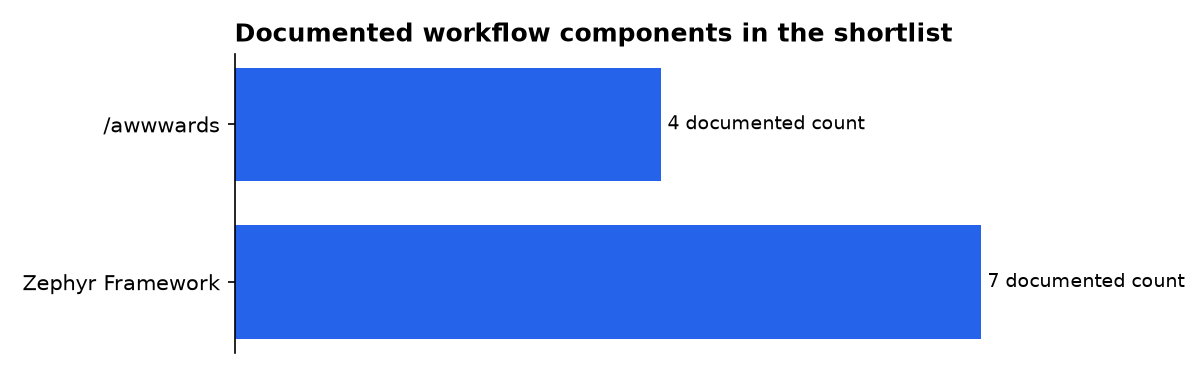
The table is not a claim that one product beats another. The figures in the chart count documented workflow items, not quality. The /awwwards repository describes screenshots across desktop, mobile, reduced-motion and mid-transition states. The Zephyr AI SDK example describes seven tools. Those counts answer different questions and should not be treated as a benchmark.
What does /awwwards actually provide?
/awwwards is the most directly relevant option for visual QA in the reviewed material. Its workflow asks an agent to act as creative director, designer and creative developer, then return a site checked in a real browser. The repository also includes /jury, which scores a site against an Awwwards-style rubric.
The skill can install through the public skills CLI. The repository documents support for Claude Code, Codex, Cursor, Gemini CLI, OpenCode and Copilot, with the target selected during installation. It also describes a Claude Code plugin and manual installation into an agent’s skills directory.
The important limitation is explicit: the workflow needs a model that can read images. That makes it a candidate for screenshot comparison, not proof that every supported agent accepts arbitrary design references in the same way. The repository does not establish a vendor-neutral image-trace format or a commercial price.
Its quality loop is broader than visual similarity. The documented process includes a production build, a crawling audit, screenshots on desktop and mobile, reduced-motion checks, a fresh critic subagent and accessibility testing with axe. It also describes checking placeholder copy, metadata, page weight and AI-generated copy patterns.
That process helps catch a common failure: an agent can make a convincing first screenshot while leaving broken states behind. The repository describes screenshots during mid-transition as well as stable desktop and mobile states. For a visual-reference project, that means a reviewer can inspect both the intended composition and the page’s behaviour during use.
There are practical costs. The project says a full run takes a long session and heavy token use. It also says results depend on the model, and that the site’s content remains the user’s responsibility when real projects, photographs and copy are missing.
/awwwards is therefore best treated as a test and QA skill. It is not a documented repository-aware visual-reference benchmark. Install it in a project with a fixed brief, save the input references and preserve the screenshots. Then run the same brief with the references withheld.
What can Zephyr do for an agent-controlled page?
Zephyr solves a different problem. Its published examples let an agent inspect, interact with and create web components through structured methods. The agent can open a modal, switch a tab, select an option or create a dashboard component without generating a complete HTML tree.
The AI SDK example describes seven tools connected through a WebSocket bridge. They include state inspection, component description, actions, state changes, schema access, rendering and composition. The browser runs the corresponding Zephyr method and sends the result back to the server.
This approach is useful when the visual design already exists as a component system. The agent can inspect the page state and take named actions. A team can then test whether a menu opens, a tab changes or a dashboard updates without asking the model to invent markup for every step.
Zephyr’s documentation also describes a no-framework route. Its components use web standards, and the project presents a CDN example that can run without React, a bundler or a build step. The AI SDK example instead uses an Express server, a browser bridge and an Anthropic API key.
The framework reports 14 core components, with dashboard and runtime additions. Its examples include modals, tabs, selects, carousels, toasts, dropdowns, comboboxes, date pickers, file uploads and other interface controls. Those are structured controls, not a visual-reference input system.
That boundary matters. Zephyr can establish what an agent did to an existing interface. It cannot, on the evidence reviewed here, show that a particular colour, spacing rule or hero composition came from a supplied image. Pair it with image-present and image-withheld runs if visual grounding is part of the acceptance test.
Can BrowserAct or Solid Glass replace a visual-reference agent?
No. BrowserAct’s SkillHub is a catalogue, and Solid Glass is a design system. They can support an agent workflow, but neither source establishes consistent reference-conditioned webpage generation.
The BrowserAct catalogue lists frontend and design skills, including a frontend-design entry that guides aesthetic direction, typography, colour variables, motion and spatial composition. It also lists performance and React guidance. The catalogue is useful for discovering installable skills, but its listing does not document image input, repository access or visual-reference accuracy for a specific agent.
The catalogue reports a changing total of skills and installations. Those activity figures describe catalogue usage, not the quality of generated webpages. They should not be used as evidence that an agent followed a design image.
Solid Glass takes the opposite approach: it supplies a defined visual language. Its README describes a glass-inspired style with restrained highlights, borders and shadows. It provides a stylesheet and components that work with shadcn/ui, with light and dark modes.
Solid Glass includes components for agent interfaces, such as status indicators, tool steps, diffs, questions, context state and task notices. That can give an agent workspace a coherent visual grammar. It can also make an output look consistent even when no external design reference was used.
For that reason, a design system should be marked as a control condition. Ask the agent to build once with the system installed and once without it. If the page retains the same visual decisions after a reference swap, the system or the prompt may be doing more work than the image.
How should a team test image use?
Use a controlled counterfactual. Run the same brief with the same model, starting files, repository, browser and time limit. Change only whether the reference images are available.
The reference run receives the images and the complete brief. The withheld run receives the same brief but no images. A third, swapped run replaces one image with a contrasting reference while leaving the written instructions unchanged.
The withheld run asks whether images matter at all. The swapped run asks whether a particular image matters. If the palette, hierarchy or component treatment does not change when a reference changes, the agent may be following the words or a familiar template.
Write the score sheet before starting. Separate visual, functional and reference-dependent requirements. A visual requirement might specify a colour relationship. A functional requirement might require a working menu. A reference-dependent requirement might assign the first image’s navigation to the desktop layout.
Keep the task small enough to audit. A product page with a menu, comparison section, form and mobile layout creates visible failure points without requiring an entire application. Use real browser checks for clicks, keyboard movement, form errors and responsive states.
Save the prompt, reference images, generated files, screenshots and console output for every run. If the agent edits a repository, preserve the commit or file diff. A reviewer should be able to compare the inputs, the implementation and the visible result without relying on the agent’s explanation.
Use deterministic checks where possible. Code can confirm that a drawer opens or that a tab changes state. A screenshot review can assess density, hierarchy and resemblance. Neither method should be asked to answer the other’s question.
How can a team publish a repeatable test?
Hugging Face Spaces provides a practical place to publish a test harness or a demo. Its documentation says Spaces can host Gradio applications, arbitrary Dockerfiles and static applications built with JavaScript and HTML.
Hugging Face’s documentation also describes Spaces as a way to showcase projects, collaborate and publish demos from a profile or organisation profile. A team can use that structure to expose the brief, reference images, generated output and evaluation instructions.
Hosting does not validate the test. A public demo can still omit the withheld run, change the prompt between runs or hide the generated files. Publish the inputs and the procedure alongside the result.
Keep the environment stable. Record the model, prompt, starting repository, browser version and available tools. If a project uses Zephyr, document the component state and the actions the agent can call. If it uses /awwwards, preserve the browser screenshots and the critic output.
A public Space is most useful when another team can reproduce a failure. The goal is not a showcase page. It is an auditable comparison between image-present, image-withheld and image-swapped conditions.
What does the RefCraft result tell buyers?
RefCraft provides a warning, not a shopping list. Its abstract says the benchmark covers 300 multimodal webpage-development tasks and evaluates nine frontier models. The strongest system reached 52.12 out of 100.
That score does not identify a generally available product for a buyer. The preprint describes a controlled benchmark, not a guarantee for a hosted coding agent. It also does not replace a team’s own repository, browser and design-system constraints.
The paper’s value is methodological. It treats reference use as selective interpretation, visual inspection and iterative refinement. That is closer to the work teams ask agents to do than a single screenshot-to-code prompt.
For procurement, the important result is the gap between a plausible page and demonstrated reference use. A vendor should show the prompt, supplied images, generated files, browser evidence and a withheld comparison. Without those artefacts, a visual demo proves appearance only.
What should you buy or install first?
Start with /awwwards if the immediate problem is visual review of generated webpages. It documents image-capable models, browser screenshots and a critic loop. Do not treat its rubric score as proof of reference grounding.
Use Zephyr when the immediate problem is reliable interaction with an existing component interface. Its structured methods can make browser actions easier to inspect than free-form markup generation. Add a separate visual-reference test if the agent must follow screenshots.
Use Solid Glass when the team needs a defined interface style for an agent workspace. Use BrowserAct’s catalogue when the team needs to discover frontend skills. Use Hugging Face Spaces when the test needs a public, reproducible home.
The safest sequence is to establish the test before optimising the tool. Begin with a small page, three controlled runs and a written keypoint sheet. Then compare the agent’s screenshots, code changes and interaction results.
What we could not verify?
No public result here establishes that a particular commercial coding agent consistently uses design images in ordinary customer projects. The RefCraft preprint was submitted on 19 October 2026 and describes a controlled benchmark rather than every vendor’s hosted workflow.
The reviewed material does not provide like-for-like prices for the shortlisted tools. It also does not establish a common standard for tracing which image regions drove specific CSS declarations or layout decisions.
The public product material does not establish that Zephyr accepts design images, that BrowserAct’s catalogue guarantees visual-reference behaviour, or that Solid Glass interprets external references. Those claims would require product documentation or repeatable tests.
A stronger procurement record would publish the exact prompt, reference images, repository state, browser artefacts, generated diff and independent rerun. It would also report failures, not only the most attractive screenshot.
Sources

