

A working Blender MCP setup requires Blender 3.0+, Python 3.10+ and uv; the current community server installs as mcp-for-blender, while its default local socket uses port 9876. The practical answer is not simply to connect an AI client: start with read-only inspection, then grant code execution only inside a disposable Blender project.
At a glance
- The community project requires Blender 3.0 or later, Python 3.10 or later, and Astral’s uv package manager.
- The Blender MCP socket defaults to localhost on port 9876, with no authentication or encryption on that socket.
- The project exposes nine MCP tools, including direct Blender Python execution and viewport inspection.
- Python 3.11 is the project’s documented fallback for machines where Conda, pyenv, or a newer interpreter causes dependency failures.
- ChatGPT cannot connect directly to this local Blender server; OpenAI requires a remote HTTPS MCP endpoint or its Secure MCP Tunnel.
What do you need before installing Blender MCP?
You need a desktop copy of Blender, an MCP-capable AI client, and a package launcher called uv. MCP for Blender’s installation guide sets the minimum software baseline at Blender 3.0 and Python 3.10, then uses uvx to fetch and run the server.
That requirement matters because Blender’s bundled Python is not the same thing as the Python environment that starts the MCP server. The server runs outside Blender, while an add-on runs inside Blender. The two components communicate through a local socket, a private network connection between programs on the same machine.
Install uv through a method you can audit and update. Astral’s installation guide lists winget install --id=astral-sh.uv -e for Windows, brew install uv for macOS, and its standalone installer for macOS and Linux.
# Windows PowerShell
winget install --id=astral-sh.uv -e

# macOS
brew install uv

# Linux
curl -LsSf https://astral.sh/uv/install.sh | sh

# Confirm the client launcher is visible
uvx --version
Close and reopen your terminal after installation. Graphical AI clients often inherit a different PATH, the operating system list of executable locations, than your shell. That difference is the usual reason a command works in Terminal but fails in Claude Desktop, Cursor, or Visual Studio Code.
How do you install the Blender MCP server?
For a new installation, run the project’s setup command, then verify the add-on before connecting an AI client. The project’s September 2026 rename notice says new users should install mcp-for-blender; the older blender-mcp command remains a compatibility wrapper.
# Configure supported desktop clients and install the Blender add-on
uvx mcp-for-blender setup

# Manual route, if you prefer to control each step
uvx mcp-for-blender install-addon
Open Blender after the command completes. Go to Edit → Preferences → Add-ons, search for MCP for Blender, and enable the entry named Interface: MCP for Blender. Then press N in the 3D Viewport and open the MCP for Blender tab.
Blender 4.2 changed its extension system, but it still supports legacy add-ons installed from disk. Blender’s add-on manual describes legacy add-ons as supported while the older packaging model is deprecated. This matters because the community MCP project installs a Python add-on rather than a Blender Foundation extension.
uvx.Which client configuration should you use?
Use one local client first. MCP for Blender warns against running two server instances at once, because separate clients can compete for the same Blender connection. The lowest-friction route is its automated setup, but a manual configuration makes the permissions and executable path visible.
For Claude Desktop, add this server entry through its local MCP configuration route. The server starts from standard input and output, rather than from a public web address.
{
  "mcpServers": {
    "blender": {
      "command": "uvx",
      "args": ["--python", "3.11", "mcp-for-blender"],
      "env": {
        "UV_PYTHON_PREFERENCE": "only-managed",
        "DISABLE_TELEMETRY": "true"
      }
    }
  }
}
The --python 3.11 setting is a compatibility choice, not a Blender requirement. The server’s troubleshooting guidance recommends it when Conda, pyenv, asdf, or a newer Python release causes uv to select an incompatible interpreter.
If the client reports spawn uvx ENOENT, replace uvx with its full path. Run which uvx on macOS or Linux, or where uvx on Windows. Then fully quit the AI app, including from the Windows system tray, and launch it again.
Claude Desktop now also supports desktop extensions, which can simplify local MCP installation. Anthropic’s local-server guide says these extensions can package server metadata and configuration, while enterprise administrators can disable local developer-defined MCP servers through policy.
Can ChatGPT use a local Blender MCP server?
No, not directly. OpenAI’s current ChatGPT guidance says ChatGPT connects to remote MCP servers, not a local server on a laptop; a private or on-premises server needs Secure MCP Tunnel support before it can be used with supported OpenAI products.
That changes the security decision. A local Blender server can stay bound to localhost, while a ChatGPT deployment introduces a tunnel or remote endpoint that must be reviewed by an administrator. ChatGPT Business and Enterprise/Edu workspaces can also limit which actions are enabled after an MCP app is published.
For local Blender work, choose a local desktop client instead of exposing the port merely to use a browser chat. The community project says its socket lacks authentication and encryption. Its own advice is to keep it on localhost and use an SSH tunnel, rather than point the server at a remote machine.
What permissions should Blender MCP receive?
Blender MCP should receive the fewest tools needed for the current task. This is more important here than in a document connector because the server can execute Blender Python, which can create, alter, delete, save, or export work inside the running application.
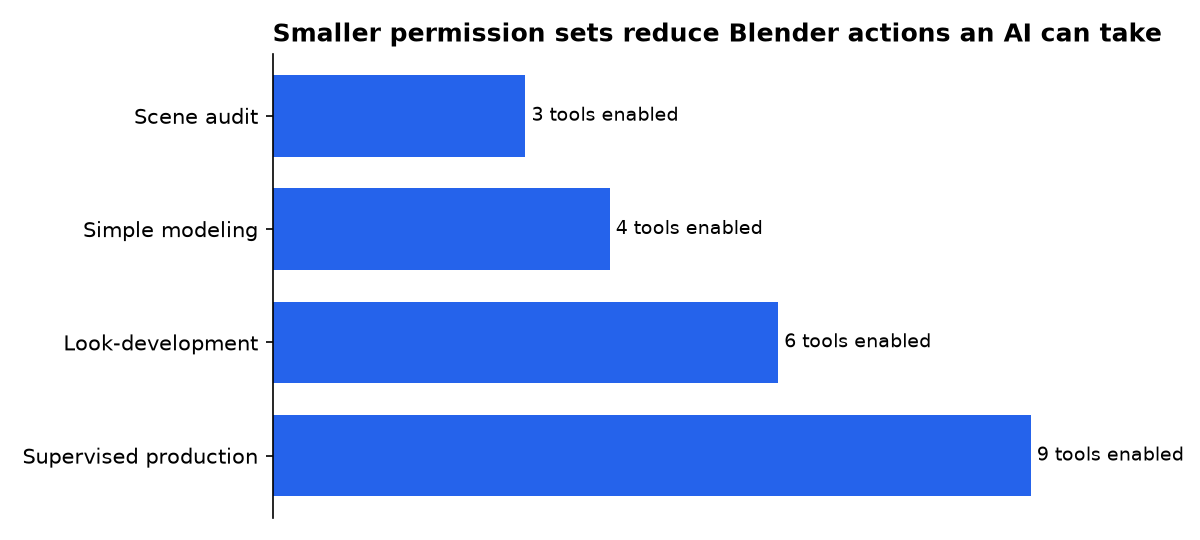
MCP for Blender documents nine tools, including execute_blender_code, look, and get_scene_info. The project’s code-execution feature is useful, but it means a prompt can become a Blender action without you pasting a script into the Text Editor.
| FuturPulse permission profile | Enabled tools | Use it for | Do not enable yet |
|---|---|---|---|
| Scene audit | 3 | Inspect objects, materials, and viewport output | Code execution and external asset imports |
| Simple modeling | 4 | Create basic geometry in a throwaway file | Exports, asset downloads, and saved production files |
| Look-development | 6 | Materials, cameras, and rendered checks | Unreviewed web and model-generation services |
| Supervised production | 9 | Short, reviewed tasks with versioned backups | Unattended work on the only copy of a scene |
Our permission blueprint starts from the project’s nine documented tools. It is an editorial operating model, not a vendor security rating.
Use approval prompts as a second control, not the only control. Anthropic’s security guidance warns that MCP servers can read, create, modify, or delete data, and recommends disabling tools that are irrelevant to a conversation. The same principle applies locally: a model cannot misuse a tool you did not expose.
- Work in a copied
.blendfile with a clear test name. - Save before every AI-directed write operation.
- Allow inspection tools before enabling Python execution.
- Turn off web search, downloads, and asset services unless the task needs them.
- Never bind the Blender socket to a public network interface.
How do you test the connection safely?
Start with a read-only prompt that forces the client to prove it can see Blender without changing the scene. Ask: “List the objects, active camera, render engine, and current frame. Do not run code or modify anything.”
Next, test one reversible write. Ask it to create a cube named MCP_TEST at the world origin, then request a viewport check. Delete the object yourself after confirming that the AI created only the expected item.
Only then try a bounded modeling task. Good first jobs include adding a camera, assigning a single material, or arranging primitives. Avoid prompts such as “clean up the whole scene” because they leave the model to decide both the scope and the destructive operations.
The server can also use external asset and model-generation services. That is a separate permission boundary. The Tripo Blender plug-in, for example, requires an internet connection and a valid API key for text-to-model or image-to-model generation, according to its project instructions. Keep those credentials out of general-purpose prompts and add them only when you have chosen that provider.
How do you fix the common Blender MCP failures?
“The client cannot find uvx”: use an absolute executable path. GUI apps often launch without the PATH changes made by a shell installer. Astral explains that uvx is an alias for uv tool run, which runs a tool in an isolated environment; that is why installing a random Python package into Blender’s Python does not fix this error.
“The server starts but Blender does nothing”: open Blender, enable the MCP add-on, open the sidebar, and start its server. Then check that its port matches the MCP client configuration. The project defaults to port 9876; a second Blender instance needs a distinct port such as 9877 on both sides.
“Installation resolves the wrong Python”: pin Python 3.11 in the MCP configuration and set UV_PYTHON_PREFERENCE=only-managed. Clear a stale tool cache with uv cache clean mcp-for-blender blender-mcp, then refresh the command. This avoids repeatedly starting a cached failed environment.
“The add-on does not appear”: restart Blender after installation, then use the add-on’s manual installation route if necessary. Blender’s extension guidance notes that an add-on that fails to activate may have a Console error, so inspect Blender’s Console before reinstalling several times.
Who is making the claims, and why?
Siddharth Ahuja’s MCP for Blender project is the primary source for the setup commands, supported clients, socket design, telemetry, and available tools. It has a commercial interest in adoption of its community integration and premium capabilities, so treat its convenience claims separately from its explicit security warnings.
Astral maintains uv and benefits when developers use its package workflow. Its material establishes what uv and uvx do, but it does not certify the Blender MCP package that uv downloads.
Anthropic and OpenAI operate AI clients that can connect to MCP services. Both have an interest in expanding tool-enabled workflows, but their current guidance is useful here because it also states constraints: Anthropic warns users to review tool permissions, while OpenAI requires remote connectivity for ChatGPT MCP connections.
The Blender Foundation publishes Blender’s extension and add-on documentation. It does not make or endorse this community MCP project. The distinction matters: installing an add-on into Blender is not the same as installing an official Blender Foundation connector.
What we could not verify?
No public independent benchmark establishes how reliably this server completes modeling tasks, how often it generates destructive Blender Python, or how much a typical AI session costs in tokens. A reproducible study would need fixed scenes, fixed prompts, model versions, approval settings, and a public error log.
There is also no universal permission preset for every client. The MCP server maintainer can define tools, while Anthropic, OpenAI, and other clients decide how they display approvals and enforce workspace policy. Those vendors could settle the remaining questions by publishing tool-level audit results and default permission behavior.
Sources
- PRIMARY SOURCE: MCP for Blender repository
- PRIMARY SOURCE: package rename and compatibility notice
- PRIMARY SOURCE: Astral uv installation guide
- PRIMARY SOURCE: Astral uv tools documentation
- PRIMARY SOURCE: Blender add-on documentation
- PRIMARY SOURCE: Claude Desktop local MCP guidance
- PRIMARY SOURCE: Claude MCP security and connector guidance
- PRIMARY SOURCE: OpenAI custom MCP server guidance

