

LTX 2.5 has a working video-to-video route in ComfyUI, but it is a local IC-LoRA workflow rather than a hosted Fast or Pro mode. The published Fast and Pro rates begin at $0.09 and $0.12 per second for text-to-video or image-to-video, not verified video-to-video pricing.
At a glance
- Lightricks’ ComfyUI package lists a 2.5 video-to-video upscale graph and a native 4K/8K graph, with a stated baseline of 32GB VRAM and 100GB of free disk space.
- Published Fast pricing runs from $0.09 per output second at 720p to $0.30 at 4K for text-to-video and image-to-video.
- Published Pro pricing is $0.12 per second at 720p and $0.17 at 1080p, while its documented maximum clip length is 10 seconds.
- Replicate’s Fast endpoint supports 720p through 4K, but describes text-to-video and image-to-video rather than uploaded-video transformation.
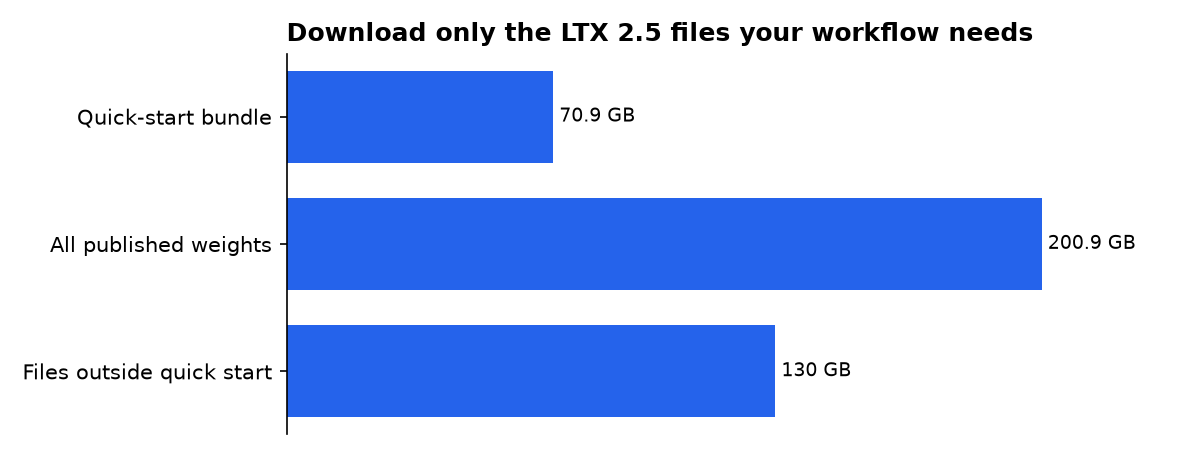
- Our calculation from the published LTX 2.5 weight files puts the full visible weight set at 200.9GB on disk, while Lightricks’ basic local download is roughly 66GiB.
What does LTX 2.5 video-to-video actually do?
LTX 2.5 video-to-video means using an existing video as conditioning: source material that guides a new render. Lightricks’ official pipeline identifies its IC-LoRA path as supporting video-to-video and image-to-video transformations, using the distilled model rather than a separate “Pro” checkpoint.
The practical result is not a frame-perfect editor. It is a guided re-render. The source clip can preserve movement, composition, and broad scene structure while a prompt changes the look, lighting, sharpness, or creative detail.
The IC-LoRA implementation accepts a reference video plus a strength value. A value of 1.0 means full conditioning influence, while 0.0 ignores the conditioning. That makes strength the first control to adjust when a result either copies too much or drifts too far.
There are three different editing jobs
- Creative transformation: keep a clip’s motion and recast its grade, texture, or visual style through IC-LoRA conditioning.
- Detail-led upscale: re-render a lower-resolution clip at a larger output size. This generates new detail, so it should not be used where pixel accuracy matters.
- Retake: regenerate a selected time window while leaving the rest of the clip intact.
Lightricks’ RetakePipeline takes a source-video path, a prompt, and start and end times. It can regenerate video, audio, or both inside that chosen interval. That is closer to fixing a shot than regenerating an entire scene.
How does the ComfyUI workflow change footage?
The most direct LTX 2.5 video-to-video workflow is the ComfyUI tiled-fusion setup. Lightricks publishes separate 2.5 graphs for video-to-video upscale and a larger native 4K or 8K route.
Tiled fusion divides a large frame into overlapping areas during denoising, the model’s step-by-step cleanup process. Lightricks says the tiles share one latent canvas and noise field. In plain English, the workflow is intended to keep a single result coherent when the target image is larger than the model’s normal working window.
The vendor’s guidance is unusually specific: prompt tiled upscale graphs for look and style, not for named objects. Naming a new object can make it appear repeatedly across tiles. Use terms such as “soft overcast grade,” “restrained film grain,” or “cleaner fabric texture,” rather than asking for a particular car, sign, or person.
A practical footage-first workflow
- Trim the source to the smallest section that needs changing. This reduces the chance that later motion differs from the original.
- Decide which property must survive: camera movement, subject identity, speech, framing, or only timing.
- Start with full reference influence. Lower it only when the transformation remains too close to the source.
- Describe visual treatment and lighting before adding detailed content changes.
- Render a short proof, inspect cuts and moving edges, then enlarge or refine the chosen take.
For a spoken clip, do not assume the ordinary video-to-video graph will safely rewrite dialogue. Lightricks’ ComfyUI package has a dedicated Dub-It workflow that changes speech and regenerates lip movement and audio while aiming to preserve speaker identity. That is a different job from restyling footage.
Which LTX 2.5 variant should you use?
LTX 2.5 Fast is the broader hosted generator, while Pro is the narrower fidelity-oriented option. Neither public variant description establishes a paid video-to-video endpoint. The clean workflow is therefore local video-to-video for alteration, then Fast or Pro only when generating replacement footage from text or a still image.
| Variant | Published output range | Published duration limit | Best fit | Video-to-video status |
|---|---|---|---|---|
| Fast | 720p, 1080p, 1440p, 4K | Up to 20 seconds at supported 720p or 1080p settings | Exploring prompts, longer clips, or outputs above 1080p | No public uploaded-video transformation control confirmed |
| Pro | 720p or 1080p | Up to 10 seconds | Final 720p or 1080p generation where fidelity is prioritised | No public uploaded-video transformation control confirmed |
| Local IC-LoRA | Depends on the ComfyUI graph and installed weights | Depends on the input workflow | Restyling, creative upscaling, and source-guided changes | Verified in Lightricks’ local pipeline and ComfyUI materials |
Fast and Pro ranges are drawn from the published LTX 2.5 comparison. Replicate independently lists Fast resolutions from 720p to 4K and says clips over 10 seconds require 720p or 1080p at 24 or 25fps.
Fast is not simply a cheaper Pro. It reaches 4K and longer supported durations. Pro stops at 1080p and 10 seconds. A team making a replacement cut should use Fast for rough composition, then consider Pro only for a fresh 720p or 1080p insert that does not need direct video-to-video conditioning.
How much do Fast and Pro cost per second?
The published price list bills text-to-video and image-to-video by output second. It does not publicly label these rates as video-to-video prices. That distinction matters because local ComfyUI video-to-video work has no per-second API charge, but it does require hardware, storage, setup time, and electricity.
| Variant | Resolution | Published price per second | FuturPulse calculation for 10 seconds |
|---|---|---|---|
| Fast | 720p | $0.09 | $0.90 |
| Fast | 1080p | $0.13 | $1.30 |
| Fast | 1440p | $0.19 | $1.90 |
| Fast | 4K | $0.30 | $3.00 |
| Pro | 720p | $0.12 | $1.20 |
| Pro | 1080p | $0.17 | $1.70 |
The per-second figures come from JXP’s published API pricing table. The 10-second column is FuturPulse arithmetic: price per second multiplied by 10.
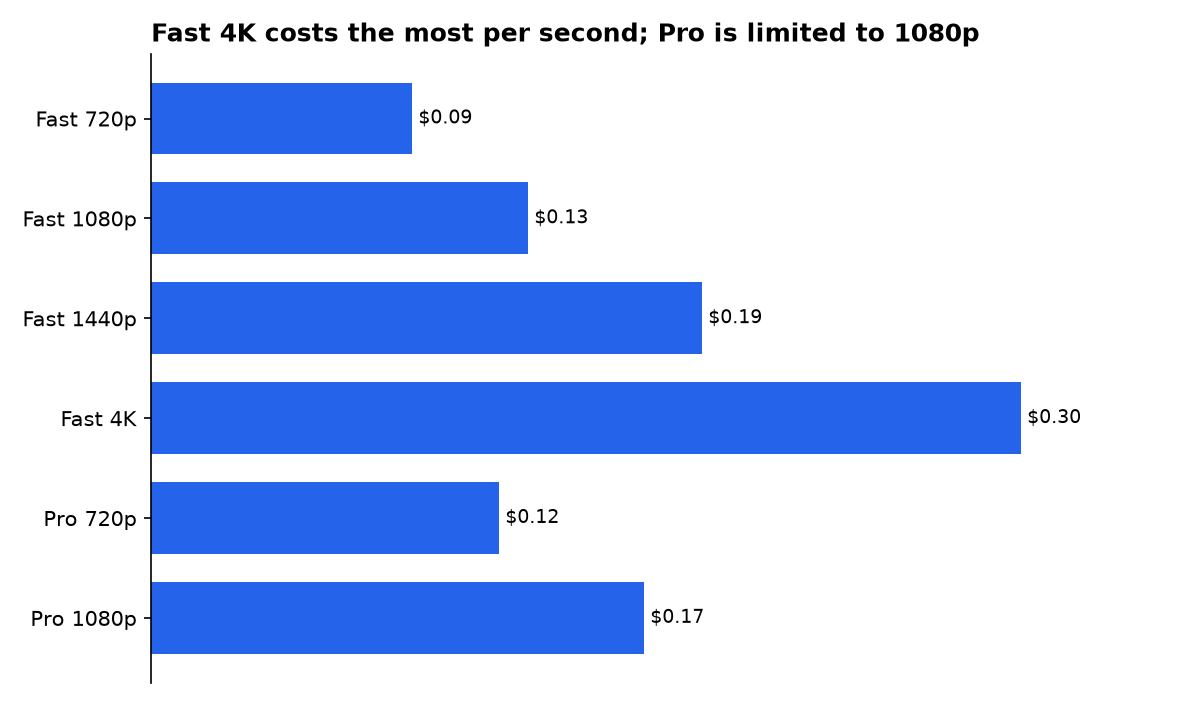
For a practical budget, multiply the final duration by the number of takes you expect to keep. The cheapest rate is not always the lowest project cost if it produces fewer usable takes.
Replicate’s published Fast interface adds a useful constraint: it supports a start image and an optional end image for interpolation. That is image-to-video, not footage editing. It can help create a replacement shot that begins and ends on chosen stills, but it is not a substitute for a source-video transformation pipeline.
Can you run LTX 2.5 video-to-video locally?
Yes, but the local route has a meaningful storage and GPU threshold. Lightricks’ ComfyUI repository recommends a CUDA-compatible GPU with at least 32GB of VRAM and 100GB of free disk space before starting an LTX-2 workflow.
The requirements are consistent with the model’s scale. The official LTX repository describes its quick-start LTX 2.5 download as roughly 66GiB, including a distilled transformer, a text encoder, video and audio decoders, and a spatial upscaler. That bundle is the smaller practical starting point, not the entire model repository.
| Storage view | FuturPulse estimate | What it means |
|---|---|---|
| Vendor quick-start bundle | About 70.9GB | Conversion of Lightricks’ “roughly 66GiB” download estimate to decimal GB |
| All published safetensors weights | 200.9GB | The full visible collection, including alternatives and optional components |
| Files outside the quick-start estimate | About 130.0GB | Potentially avoidable storage if you download only the route you need |
Our calculation uses the published LTX 2.5 file listing and the repository’s roughly 66GiB quick-start statement. It converts 66GiB to 70.9GB, then subtracts that from 200.9GB. This is disk arithmetic, not a hardware test.
Lightricks also documents lower-memory measures. Its core repository suggests FP8 casting and CPU or disk offloading for constrained GPUs. Those options reduce the memory footprint, but they do not turn a large local video workflow into a lightweight laptop task.
What was promised and what shipped?
LTX 2.5’s launch story mixed broad model claims with narrower hosted controls. The timeline below separates public release claims from the features that can be traced to a shipped local pipeline, a ComfyUI graph, or a hosted endpoint.
-
Lightricks created the LTX-2.5 model repository.
The model page carries tags for text-to-video, video-to-video, image-to-video, and audio-to-video. It also identifies the model as gated under the LTX-2.x Community License. -
A hosted Fast endpoint became publicly described.
Its shipped controls cover prompts, first and last still frames, resolution, duration, aspect ratio, frame rate, and synchronised audio. The public input list does not show a source-video upload field. -
Fast and Pro were described as separate hosted choices.
Fast was listed with a 4K ceiling and longer supported clips, while Pro was listed with a 1080p ceiling and a 10-second maximum. The same comparison noted that editing endpoints were not documented as LTX 2.5 API features. -
The release messaging highlighted multi-shot generation, DFR, HDR, and RAW-oriented work.
Those are model and local-pipeline capabilities. They should not be assumed to appear unchanged in every browser tool or API endpoint. -
The official ComfyUI extension lists 2.5 V2V workflows.
The repository includes video-to-video upscale, native 4K/8K, and SDR-to-HDR graph references. That is the clearest shipped route for changing existing footage without starting again from a text prompt.
What are the workflow limits?
The key limit is that a generative upscale is not restoration. Lightricks says its pixel spatial upscaler synthesises texture and structure rather than faithfully preserving every pixel. It can make footage look richer, but it can also alter logos, faces, product surfaces, or text.
That makes the workflow a poor fit for evidence footage, legal review, medical imaging, archival restoration, or brand material with exact packaging. It is better suited to mood changes, concept films, music visuals, stylised b-roll, and non-critical detail enhancement.
Retake is the safer local tool when only one moment is wrong. The pipeline preserves video or audio outside the selected interval, depending on the regeneration options. It still needs a source that meets the stated shape requirements: the frame count must fit the model’s 8k+1 pattern, and width and height must be divisible by 32.
For multi-shot scenes, keep the prompt chronological. InVideo’s LTX 2.5 guide describes the model as responding to a continuous paragraph covering the shot, setting, action order, characters, camera, and sound. That structure is useful even when the actual render happens locally, because it reduces contradictory instructions.
What we could not verify?
No public LTX source in this review establishes a hosted LTX 2.5 Fast or Pro price specifically for uploaded-video transformation. LTX could settle that with endpoint documentation that names video input, supported resolutions, duration limits, and per-second billing.
No public quality comparison establishes that Fast, Pro, or IC-LoRA is best for a particular footage-editing job. The answer depends on the source clip, the strength setting, the prompt, the chosen LoRA, and whether altered detail is acceptable.
There is also no public guarantee that a ComfyUI video-to-video graph preserves brand marks, text, or faces exactly. Lightricks could settle that with task-specific evaluation results and explicit fidelity limits for each workflow.
Sources
- Lightricks/LTX-2.5 model page
- Lightricks/LTX-2.5 published file listing
- Lightricks IC-LoRA video-conditioning pipeline
- Lightricks ComfyUI-LTXVideo repository
- Replicate LTX 2.5 Fast endpoint
- JXP LTX 2.5 Fast versus Pro and pricing comparison
- LTX 2.5 release guide
- InVideo LTX 2.5 model guide

