

ComfyUI’s MOSS-Image support changed on 16 October 2026: users can now run the 5B model through native loaders and Comfy-Org’s single-file checkpoints, rather than the OpenMOSS plugin workflow. The practical gain is simpler setup, not a tiny download: the full Comfy-Org repository totals 68.5 GB of published safetensors files.
At a glance
- ComfyUI’s official templates require version 0.42.0 or later, according to ComfyUI’s MOSS-Image guide.
- MOSS-Image uses a 5B image generator, while its required Qwen3.5 text encoder has 9B parameters.
- The native template uses the SFT checkpoint and int8 model files by default.
- OpenMOSS recommends 50 steps, CFG 3, shift 5 and negative-branch skipping at layer 22 for its reference workflow.
- Our calculation puts 5.1B weights at about 10.2 GB in 16-bit form before runtime overhead.
What changed in the MOSS-Image ComfyUI workflow?
The new path is native ComfyUI support. It loads Comfy-Org’s repackaged safetensors files with ordinary core loaders, rather than relying on OpenMOSS’s optional repository plugin and a local Diffusers-format model directory.
That distinction matters because the two graphs are not interchangeable. OpenMOSS’s ComfyUI instructions say users moving from the plugin workflow must import a native workflow, not merely replace its loader node. The native model uses a different timestep multiplier, so carrying over the plugin’s ModelSamplingSD3 node unchanged can produce incorrect sampling.
ComfyUI merged the core implementation in pull request 17095 on 16 October. The change added checkpoint detection, the Qwen3.5 9B text-encoder type, LoRA key mappings and a layout-prompt node, according to the merged pull request.
Which version should most people download?
Most image makers should begin with MOSS-Image-SFT. ComfyUI’s default templates load the instruction-tuned SFT checkpoint because Comfy-Org says it groups text and organizes layouts more cleanly than Base.
MOSS-Image-Base is the better starting point for a custom LoRA, a small add-on trained for a style or subject. ComfyUI’s guide says Base has no post-training or CFG distillation, while its SFT variant is intended for cleaner general-purpose results. Switching between them is one change in the diffusion-model loader.
| Choice | Use it when | What changes in ComfyUI | Published position |
|---|---|---|---|
| MOSS-Image-SFT | You want posters, scenes and text-heavy images now. | Load moss_image_sft_int8_convrot.safetensors. |
Fine-tuned from Base for general use. |
| MOSS-Image-Base | You are comparing raw behavior or training a LoRA. | Load moss_image_base_int8_convrot.safetensors. |
Base checkpoint for fine-tuning. |
| OpenMOSS plugin route | You already have a Diffusers directory or an old plugin graph. | Use MOSS-Image HF Loader, not the native loaders. | Optional compatibility route. |
Source: OpenMOSS’s SFT model card, the Base model card and ComfyUI’s workflow guide.
OpenMOSS describes SFT as a supervised fine-tune derived from Base. Its own comparison says SFT creates clearer text grouping and a more organized whiteboard layout, which is a vendor demonstration rather than an independent benchmark.
How do you install the native workflow?
The shortest verified setup is the official template route. It avoids custom-node installation, but it only works when the ComfyUI build includes MOSS-Image support.
- Update to ComfyUI 0.42.0 or later.
- Open Template and search for MOSS-Image.
- Select MOSS-Image: Text to Image for SFT, or the Base version for the raw checkpoint.
- Download the named model files into the exact ComfyUI model folders.
- Write the desired image in the positive prompt, then select Queue.
ComfyUI’s setup instructions specify the required locations: the image model belongs in models/diffusion_models, the Qwen3.5 encoder in models/text_encoders, and the FLUX.2 small VAE in models/vae. A VAE, or variational autoencoder, converts the model’s compressed image data into pixels.
The default native download set is deliberately narrower than the repository. It uses the int8 SFT model, qwen3.5_9b_w4a8_gptq.safetensors, and flux2-vae_small.safetensors. Int8 means the image-model weights were compressed to eight-bit values, reducing storage and memory pressure compared with 16-bit weights.
If ComfyUI does not show moss_image in CLIP Loader, update before troubleshooting the graph. A user in the Comfy-Org community discussion reported that updating the nightly build made that loader type appear; that is an anecdote, but it matches the official version requirement.
How much memory does MOSS-Image really need?
The 5B label understates the whole workflow. The image model has 5.1B declared parameters, but ComfyUI also loads a 9B Qwen3.5 text encoder and a VAE. Runtime memory also rises with image size, sampling steps and temporary tensors.
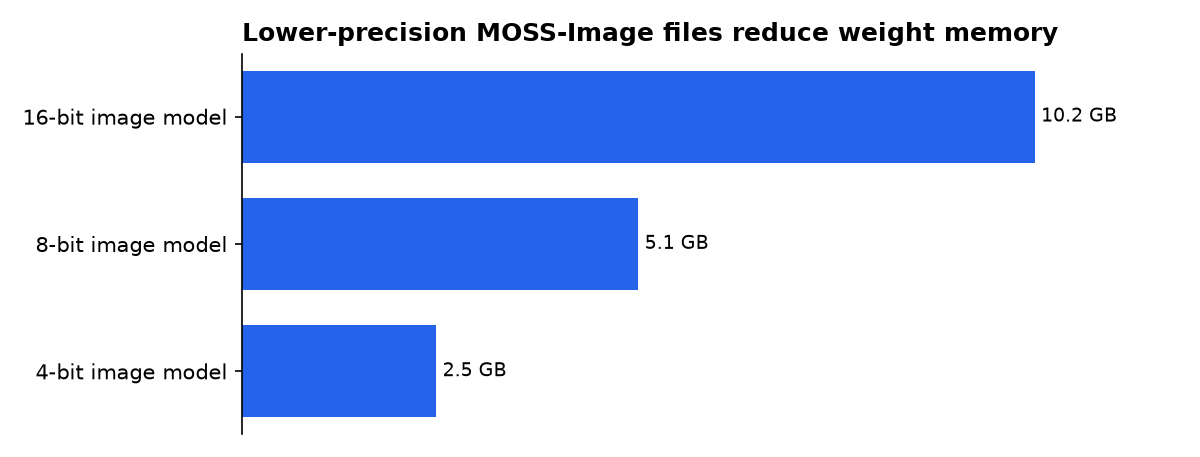
By our calculation from the published 5.1B parameter count, the image model’s weights alone need about 10.2 GB at 16-bit precision. That falls to about 5.1 GB at eight-bit precision and about 2.5 GB at four-bit precision. These are weight-only estimates, not a hardware test and not a claim that a GPU with that exact capacity will complete a generation.
| Image-model precision | Our calculated weight memory | What it excludes |
|---|---|---|
| 16-bit | 10.2 GB | Text encoder, VAE, latent image data and runtime workspace |
| 8-bit | 5.1 GB | Text encoder, VAE, latent image data and runtime workspace |
| 4-bit | 2.5 GB | Text encoder, VAE, latent image data and runtime workspace |
Our calculation assumes one byte per 8-bit parameter, two bytes per 16-bit parameter and half a byte per 4-bit parameter. The declared parameter count comes from MOSI.AI’s technical report.
The full Comfy-Org model repository contains alternatives, not a single required 68.5 GB installation. It includes Base and SFT diffusion files in bf16 and int8, three encoder variants, two VAEs and a color-depth LoRA. Downloading every option is useful for comparison work, but unnecessary for a first SFT run.
What settings match the official MOSS-Image workflow?
For a careful first comparison, use the reference settings rather than chasing community presets. OpenMOSS’s plugin workflow specifies 50 steps, CFG 3, shift 5 and negative-branch skipping at layer 22 at 1024×1024.
Steps are the number of denoising passes. CFG, or classifier-free guidance, controls how strongly the output follows the prompt. Shift changes the model’s sampling schedule, which is why native and plugin graphs cannot safely share every old sampler node.
- Start fast: ComfyUI’s templates use 25 steps, CFG 2.5 and the
er_sdesampler. - Match the reference look: move to 50 steps and CFG 3.
- Keep the canvas sensible: ComfyUI says the model was trained around 1 MP to 2 MP, with width and height divisible by 16.
- Use real line breaks: type a newline or
\nwhere the placement of text lines matters.
OpenMOSS’s ComfyUI guide says the native model defaults to shift 5 and includes a MOSS-Image Layout Prompt node. It also warns that matching a seed and numeric settings does not guarantee identical images between the plugin and native schedulers.
A reported problem needs careful handling. One community user said --use-sage-attention produced desaturated images and unusual curls on a Windows 11 machine with an RTX 3090, then improved after removal. That is a single user report, not an official incompatibility notice; disable the flag only as a troubleshooting test.
How does layout-guided generation work?
Layout mode is the reason to choose MOSS-Image over a plain prompt-only workflow. You draw a bounding box for every object or text block, caption each box, and let the MOSS-Image Layout Prompt node turn those instructions into JSON.
The layout JSON defines a scene summary and a list of items. Each item carries a label, a description and a bounding box. Text items also include the literal text that should appear in the image.
ComfyUI’s layout template turns boxes from Create Bounding Boxes into the prompt the model reads. That gives users a clearer way to control a poster headline, a price label or a product placement than repeatedly asking for “top left” in prose.
For manual JSON, OpenMOSS defines its boxes as yxyx: top, left, bottom and right. Coordinates are centered on the canvas, so a 1024-pixel-wide image runs from -512 to 512 on its horizontal axis. The dimensions in the layout must match the dimensions selected for generation.
What does the published research measure?
MOSI.AI’s technical report gives a useful but limited measurement beyond product claims. The report says MOSS-Image achieved 96.3% average text coverage on LongLongTextBench, its English-and-Chinese text-rendering benchmark.
The same 16 October technical report ranks MOSS-Image second in the full RealLayoutArena system comparison. It says the MOSS-Image backbone ranked first among generators tested with shared enhanced prompts. Those are authors’ benchmark results, not a direct promise that every ComfyUI prompt will render perfect text.
The practical implication is narrow but useful: test MOSS-Image on images where readable labels and controlled composition matter. A photorealistic portrait without text does not test the feature that the authors measured most directly.
Who is making each claim, and why?
What we could not verify?
No public hardware test establishes a minimum VRAM figure for the complete native MOSS-Image workflow at each resolution. OpenMOSS, Comfy-Org or independent benchmarkers could settle that with repeatable tests covering the int8 and bf16 files, CPU offloading, different GPUs and common canvas sizes.
No official statement confirms a general conflict between MOSS-Image and SageAttention. The current evidence is one community report. Comfy-Org or the SageAttention maintainers would need to reproduce the result and publish the affected versions before users should treat it as a confirmed compatibility limit.
The next useful milestone is a stable ComfyUI build that includes the native MOSS-Image nodes. Until then, users should check their installed version and load the matching native template rather than rebuild an older plugin graph by hand.
Sources
- PRIMARY SOURCE — ComfyUI: MOSS-Image text-to-image and layout workflows
- PRIMARY SOURCE — Comfy-Org MOSS-Image model repository
- PRIMARY SOURCE — OpenMOSS ComfyUI installation and workflow guide
- PRIMARY SOURCE — ComfyUI pull request 17095
- PRIMARY SOURCE — OpenMOSS MOSS-Image-SFT model card
- PRIMARY SOURCE — MOSS-Image Technical Report
- Community coverage — ComfyUI Wiki
- Release coverage — AlphaSignal

