
FuturPulse analysis · 30 October 2026
Mika version 0.1.6 shipped on 30 October 2026 with setup changes for an Android agent that can read screens and operate apps through accessibility and wireless debugging. Its default approval boundary is narrow: it asks before spending money, but messaging, posting, deleting, submitting forms and changing settings can proceed without a per-action confirmation.
At a glance
- Mika 0.1.6 was published at 07:29 UTC on 30 October 2026 as the latest release.
- Mika installs on Android 11 or later, but app-operation tasks require Android 13 or later.
- The Android manifest declares 10 permissions, including notifications, alarms, media access and foreground-service access.
- Mika’s task sandbox is offline by default and runs only on arm64 Android devices.
- The current roadmap says the final review step is disabled during development.
How does Mika operate Android apps?
Mika is an Android agent, not a fully local language model. The app’s screen control, hidden virtual display, browser and Linux sandbox run on the phone, but its README says prompts, screen contents and screenshots go to the model provider selected by the user. That distinction matters: “on-device” describes the control plane, while model inference and sensitive visual context can leave the handset.
The app operates other software by inspecting interface elements, then clicking, typing and scrolling. Android describes accessibility services as background components that can read a screen’s accessibility tree and act for a user, including pressing buttons and scrolling lists. That is an unusually broad capability when an AI model decides which element to select next. Android’s accessibility-service guidance describes both interface inspection and user-delegated actions.
Mika’s model is more expansive than an assistant embedded in one merchant’s app. Fynd Kaily, for example, describes a developer-installed Android widget that triggers actions inside the host app. Mika instead claims to operate installed third-party apps and websites through a separate background screen, including sites where the user remains logged in. That wider reach makes the safety question less about a chatbot’s tone and more about which actions require a fresh human decision.
Which privileges must be enabled?
Mika separates installation from full app control. It can install on Android 11, while tasks that operate apps need Android 13. Its setup flow asks the user to enable Developer options, USB debugging and wireless debugging, then pair with a six-digit code. The latest release says the setup can continue when the app cannot reliably read a system toggle. Mika 0.1.6’s release notes say successful pairing and connection are the test of success.
The permission list is wider than a simple chat client’s. Mika’s current manifest requests internet access, network-state access, foreground-service permissions, notifications, wake locks, exact alarms, boot completion and photo access. It also declares WRITE_SECURE_SETTINGS, while its own manifest comments say a normally installed app does not receive that privilege and that it is granted through the paired connection only after the user enables the relevant path. Mika’s Android manifest also shows its accessibility service and private, non-exported file providers.
Android’s permission system is intended to make sensitive access visible and controllable by the user. That model works best when a permission is narrow and the resulting action is predictable. A general-purpose agent creates a harder case: the same screen-reading privilege can support a harmless reminder, inspect a private chat, or drive a destructive account setting. Android’s permissions overview says permissions are meant to improve user awareness and limit access to sensitive data.
What does Mika ask before it acts?
Mika version 0.1.6 does not use an approval model that matches the usual meaning of “high impact.” In its default Ask mode, it pauses before an order or payment step. It does not pause before sending a message, publishing a post, submitting a form, deleting information or changing a setting. The project’s own release history confirms that this was a deliberate policy change, not merely an undocumented edge case.
The result is a simple but consequential rule: spending is gated, while many irreversible social, administrative and privacy actions are not. A mistaken grocery order can be declined at the payment card. A wrongly addressed message, deleted chat, changed account setting or submitted job application may be harder to reverse.
| Action class | Mika default boundary | Approval prompts before action | Safer operating rule |
|---|---|---|---|
| Read a page or list | Agent can continue | 0 | Use only on accounts whose contents may reach the chosen model provider. |
| Send, post, submit, delete or change a setting | Agent can continue | 0 | Keep tasks narrow and stop before the final external action. |
| Place an order or submit an order | Ask mode shows a confirmation | 1 | Read the merchant, items and amount before agreeing. |
| Login, one-time code or payment password | Human takeover is required | 1 | Complete it manually, then verify where the agent resumed. |
Source: Mika’s published release history and current README policy.
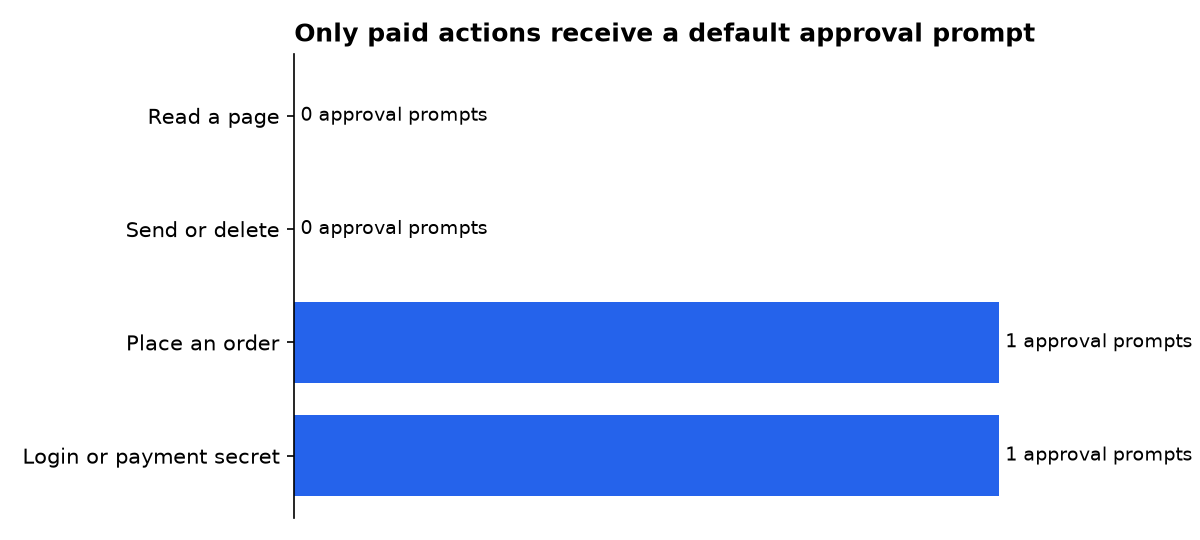
The latest public policy also has an Autonomy mode. With that switch enabled, Mika can proceed with payments without the preceding confirmation. The project says login credentials, verification codes and payment passwords still require user takeover, but that protection does not solve an agent selecting the wrong recipient or acting on an incorrect interpretation before reaching a payment screen.
What shipped after Mika’s first public beta?
The dated timeline shows Mika moved from a broad “ask before outward actions” promise to a money-only default gate within hours of its first public beta. The latest 0.1.6 release then focused on making the powerful phone-control setup less likely to stall. The sequence matters because the product became easier to enable while its approval scope became narrower.
- 29 October 2026, version 0.1.0: Mika’s first public beta shipped with background app control, a built-in browser, scheduled work and an arm64 Linux sandbox. Its release notes described a default mode that asked before outward actions such as sending a message or making a payment. The 0.1.0 release record also warned that app and website operation could be unreliable in beta.
- 29 October 2026, version 0.1.1: Mika changed the default. The project said it would ask only before spending money, while messages, posts, submissions, deletions and settings changes would complete directly. It also removed “long-term authorization” and “allow this whole task” options. Version 0.1.1’s notes record that policy change.
- 30 October 2026, version 0.1.3: Mika added a button that could open WeChat in the background and send a request to join the developer’s beta group, provided the user had already added the developer as a contact. The feature is a small example of the core risk: an agent may perform real outbound communication while the user watches a task feed rather than a normal app screen.
- 30 October 2026, version 0.1.6: Mika made its phone-control onboarding more forgiving. Users can advance through Developer options, USB debugging and wireless debugging even if the agent cannot accurately read the system switches. GitHub’s release API lists version 0.1.6 as the latest published build on 30 October 2026.
What security gaps does Mika acknowledge?
Mika’s roadmap is unusually direct about unfinished protections. It says final verification is disabled during development, meaning answers are marked unverified and learning workflows that require verification do not become active. It also says that in Autonomy mode, a payment is not blocked and an internal protection against acting on Mika’s own interface does not apply.
The same roadmap identifies weaknesses in its read-only web scripting. It says password-field protections can be bypassed through some selectors and indirect properties, while request headers are currently unrestricted. Those are not hypothetical criticisms from outside the project. Mika’s roadmap lists them as deferred fixes.
There is also a clipboard concern. The roadmap says web-style editable fields use paste input, and sensitive text such as a verification code or identity number can remain on the clipboard for about one second. That is brief, but it means “the agent asks me to take over” does not automatically mean every sensitive value stays inside a secure system prompt.
Mika does include useful limits. Its sandbox is offline by default, each conversation has its own working directory, and the project says API keys, memories and user profiles are encrypted in Android Keystore. It also says conversations, task records and token-use records remain local. These controls reduce exposure in some paths, but they do not override the declared model-provider flow for screen contents and screenshots.
How should Mika be configured safely?
The safest practical configuration is to treat Mika as a supervised operator, not an unattended executive assistant. Keep Ask mode enabled. Do not enable Autonomy mode on a device that has payment methods, important messaging accounts or administrator-level apps signed in.
- Use a separate Android profile or spare phone for early testing, especially while Mika remains a public beta.
- Start with read-only tasks: summaries, local file sorting, reminders and research that does not require logged-in private accounts.
- Use a dedicated model-provider key with a spending limit where the provider offers one.
- Disable script networking unless a task clearly needs it; Mika’s sandbox starts with networking off.
- Do not ask Mika to delete, post, apply, message or alter settings unless you are prepared to inspect the result immediately.
- Revoke wireless debugging and disable the accessibility service when you are not using phone-control features.
Notifications deserve attention because Mika uses them to request takeover and, in some setups, collect the wireless-debugging pairing code. Android 13 treats notification access as a runtime permission, and Android recommends asking in a context that makes the purpose clear. Android’s notification-permission guidance explains that users can deny this permission, even though foreground-service notices remain visible through system task controls.
Finally, distinguish “the agent cannot see this screen” from “the task is safe.” Mika says some payment and password pages block screenshots, forcing human takeover. That is a useful technical boundary. It does not protect earlier steps, such as choosing a recipient, opening a banking site, filling non-secret fields or moving a conversation into a sensitive context.
What we could not verify?
Mika has not published an independent security audit, a complete threat model, or a public test showing how reliably its approval logic distinguishes a harmless button from a destructive one across third-party apps. The public materials also do not establish which model providers retain screen data, how long they retain it, or how provider-specific safety controls affect agent tasks.
The project says several real-device cases still need verification, including recovery after wireless debugging closes, long-idle authorization expiry, browser-process crashes, Android 13 through Android 15 alarm permissions, and scheduled work while the phone is locked. Mika’s maintainer could settle those questions with reproducible device-test results, a signed APK provenance process and an external security review.

