

Pixelfx is a GitHub library with 244 code-driven pixel effects and a Claude Code skill, and it is the right approach when a team needs editable game effects rather than a one-click image filter. Version 0.3.0 requires Node.js 18 or newer, while its claimed quality method still depends on human visual review.
At a glance
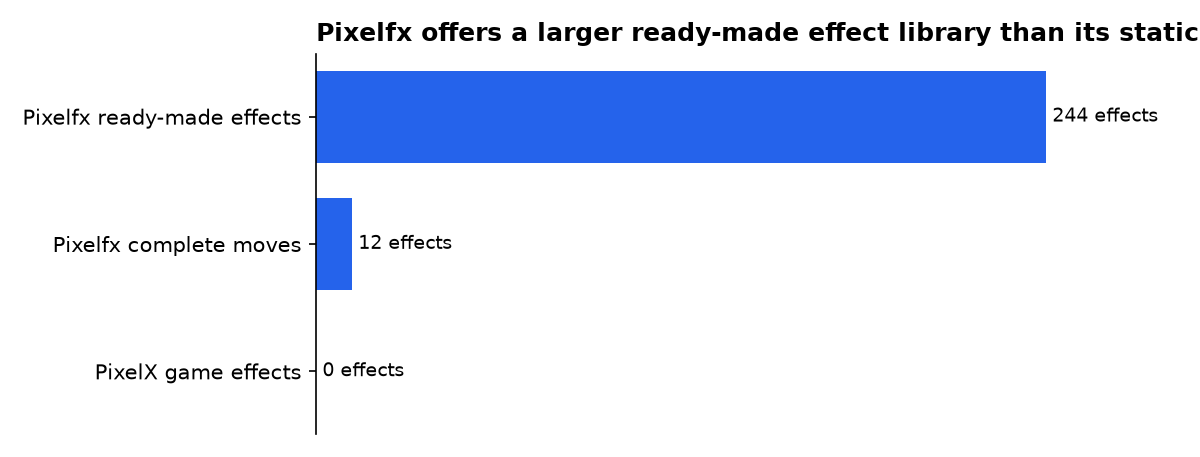
- Pixelfx lists 244 pixel-art effects across categories including fire, water, melee, UI and transitions.
- Pixelfx describes 12 complete moves that connect wind-up, contact, reaction and recovery.
- The Pixelfx skill specifies Node.js 18 or newer, with ffmpeg optional for GIF and MP4 previews.
- Pixelfx simulates particle-based effects at 120 Hz or finer to keep motion consistent across frame rates.
- PixelX accepts PNG and JPG files up to 10MB, but it pixelates existing images rather than creating game VFX.
Is Pixelfx GitHub the right way to build pixel effects?
Yes, if “pixel effects” means animated game feedback that must remain editable in code. Pixelfx stores an effect as a JavaScript file, rather than as a fixed sprite image. That lets a game recolor, mirror, rotate, reseed or export an effect without redrawing its source art.
The Claude Code skill is not a pixel-art generator in the usual sense. It is a workflow layer: it tells Claude Code to find an existing effect, render variants, inspect the result, run checks and refine the code. Anthropic defines a Claude Code skill as a SKILL.md instruction file that Claude can load when relevant or run directly.
The important distinction is practical. An image pixelator converts a photo or illustration into blocks. A shader changes how a graphics pipeline draws pixels. Pixelfx instead creates timed animation logic for sparks, smoke, impacts, spell casts and interface feedback.
What does Pixelfx actually ship?
Pixelfx ships a library, command-line render tools and a Claude Code skill. The repository’s current catalogue says every effect lives in src/fx/<category>/<name>.js, while the core renderer can be copied into a browser game without dependencies.
For JavaScript games, the library draws a low-resolution frame, places the effect behind and in front of characters, then composites the result. That makes it suited to Canvas-based games and JavaScript engines. For Godot, Unity, GameMaker, Defold, LÖVE and Bevy, its render command exports sprite sheets plus Aseprite-style JSON metadata.
The skill adds a prescribed loop rather than a magic prompt. Its published instructions tell Claude Code to search the library first, render candidates and inspect contact sheets. They also specify palette, seed, flip, angle and light controls for variants before an artist edits the underlying effect.
| Approach | What it changes | Output | Best use | Verified constraint |
|---|---|---|---|---|
| Pixelfx library and skill | Animation code and timed particles | Live game effect or sprite sheet | Spells, hits, pickups and UI feedback | Node.js 18 or newer |
| PixelX web app | Pixels in an uploaded image | High-resolution PNG | Quick image pixelation | PNG/JPG files up to 10MB |
| Direct3D pixel shader example | Per-pixel colour during GPU rendering | Rendered frame | Material and screen effects | Requires a shader-capable renderer |
Comparison based on the Pixelfx repository, the PixelX project description and the Direct3D tutorial’s source code. “Output” describes each project’s stated model, not a cross-platform benchmark.
How does the Claude Code skill change the workflow?
The Pixelfx skill turns effect creation into a review cycle: draft, render, look and refine. That is more useful than asking an assistant for one final animation, because pixel animation errors often appear only in motion, at contact, or during the last few frames.
Its authoring guide separates effects into two technical types. “Pure” effects calculate each frame from time alone, which is useful for seamless loops such as beams, portals and waterfalls. “Simulated” effects carry state for particles, debris, lights and smoke, which suits explosions and impacts.
That split is a meaningful implementation choice. A pure loop is easier to replay and tile without a seam. A simulated burst can behave more naturally, but it needs deterministic random numbers so the same seed recreates the same animation during debugging or export.
The Pixelfx authoring contract requires seeded randomness and says simulated effects are stepped at 120 Hz or finer. This is a consistency design, not evidence that Pixelfx renders at 120 frames per second on a particular computer.
What performance claims can be verified?
Pixelfx publishes a simulation rate, but no device-by-device speed benchmark. The authoring guide says the runtime advances simulated effects at 120 Hz or finer, so particle motion should look consistent when a game’s display frame rate changes.
That is not the same as a frame-rate guarantee. Total cost will depend on canvas size, effect size, particle count, the game’s own draw work, browser or engine, and the target hardware. The available repository pages do not publish milliseconds per frame, memory use, mobile results or a standard benchmark scene.
Teams should therefore test their actual worst case: several simultaneous explosions, UI effects and character overlays at the game’s intended pixel resolution. Pixelfx provides tools/check.mjs for checks including slow frames, but a project should treat that as a development guardrail rather than a published performance score.
How is Pixelfx different from PixelX?
Pixelfx makes animated game effects; PixelX converts an existing still image into pixel art. The PixelX GitHub project is a browser app built around the HTML Canvas API. It accepts a PNG or JPG, offers a pixel-size slider, previews the result and downloads a PNG.
PixelX is the simpler choice for a marketing graphic, avatar or reference image. Its project page specifies a 10MB upload limit and says it renders exports at twice scale for sharper output. Neither feature gives a game an impact flash, a projectile trajectory or a frame-by-frame hit pause.
Pixelfx works from the opposite direction. Instead of reducing an existing image, it starts with drawing rules. A flame can use another palette, a projectile can face left, and a hit can be regenerated with a different seed while retaining its planned timing.
When should developers use a shader instead?
Use a shader when the effect belongs in the renderer, not in a sprite animation. A pixel shader runs during graphics rendering and determines the colour written for a pixel. The Direct3D example effect file combines shader code with render-state settings and texture sampling.
That model suits CRT filters, palette shifts, outlines, water distortion, lighting passes and screen-wide post-processing. It is not a direct replacement for a hand-timed sword arc, a pickup sparkle or a character-specific impact, where the main work is visual timing and gameplay placement.
A mixed stack is often sensible. Use Pixelfx for the discrete event: the strike, burst or spell. Use a shader for the persistent surface treatment: glow, scanlines, distortion or a full-screen flash. The two approaches operate at different levels of the graphics system.
What does Pixelfx borrow from the Claude approach?
Pixelfx openly credits Sprite Fusion creator Hugo Duprez’s method: treat code as editable material, review visual output and improve it through repeated passes. Duprez published that guidance on 28 October 2026, cautioning that a single prompt or copied skill does not produce polished pixel VFX by itself.
That warning matters more than the plugin installation command. Claude Code can produce drafts quickly, but it cannot decide whether a dash has the right weight, whether a hit lands sharply, or whether an afterimage distracts from a character silhouette. Those are art-direction decisions.
Pixelfx makes that human role explicit. Its skill asks for multiple takes and directs the user back to rendered output. That is the project’s strongest idea: it gives an agent a concrete inspection loop, but it does not pretend that inspection can be skipped.
Promised versus shipped: the Pixelfx timeline
The public record shows a recently published method followed by a repository that packages it as a reusable library and Claude Code skill. The dates below separate what the project’s stated method promised from the features visible in the current codebase.
Promise: AI-assisted pixel VFX still needs human iteration
Sprite Fusion’s article set out a process of generating several drafts, rendering short videos and selecting a direction for further work. It promised a workflow based on visual judgment, not a one-prompt result.
Shipped: a reusable effect collection and skill
Pixelfx currently lists 244 effects and 12 complete moves. Its repository also publishes a Claude Code plugin installation route and direct instructions for copying the skill into a local Claude skills directory.
Shipped: a defined runtime and export path
The package metadata identifies Pixelfx as version 0.3.0, exports its core and effect modules, and specifies Node.js 18 or newer. The repository documents direct browser use and sprite-sheet export for engines that do not run its JavaScript code.
How does the skill compare with other Claude Code skills?
Pixelfx is narrower than a general creative coding skill. For comparison, the Teardown Claude Code skill creates offline, interactive 3D machine simulators and asks users to install Node.js 20 or newer plus browser automation tools for its video workflow.
Pixelfx has a smaller technical target. Its own skill declares Node.js 18 or newer, calls ffmpeg optional, and focuses on pixel VFX. That narrower remit is useful: the skill can give concrete advice about contact sheets, palettes, sprite sheets, timing data and effect categories instead of trying to cover every visual programming task.
Anthropic’s plugin model also explains why this packaging is useful. A plugin can group skills, agents, hooks and MCP servers as one installed unit, according to Claude Code’s plugin documentation. Pixelfx uses that mechanism to distribute its workflow alongside the example library it expects Claude to inspect.
What is the practical implementation path?
Start with an existing Pixelfx effect, prove it works in the target game, then ask Claude Code for controlled variations. This avoids wasting time generating a new effect when a recolour, flip or timing change would solve the design problem.
- Install from GitHub or copy
src/coreand the effect files your game needs. - Render a candidate effect locally and inspect its contact sheet before integrating it.
- Use code directly in JavaScript games, or export a sprite sheet for another engine.
- Keep one seed while debugging, so visual changes are comparable between renders.
- Test multiple simultaneous effects on target hardware before committing to a visual style.
- Use the Claude Code skill for variation and review, not as a substitute for final art direction.
The strongest production habit is to keep the effect’s data close to the gameplay event. Record when an attack winds up, when it hits, how long motion freezes and when recovery ends. That makes the visual response part of the move, rather than a disconnected decoration triggered after the fact.
What we could not verify?
No public benchmark currently establishes Pixelfx frame time, memory use, mobile performance, browser compatibility matrix or the maximum number of simultaneous effects. Patch-gg could settle those questions by publishing a repeatable benchmark scene with hardware, resolution and particle-count settings.
No public release note establishes a dated launch event for Pixelfx version 0.3.0 or a roadmap for future effect categories. The project maintainers could settle those terms through tagged releases, a changelog and a compatibility policy. Anthropic could clarify any future changes to Claude Code plugin loading through its official documentation.
Sources

