
FuturPulse analysis · 9 October 2026
EmbeddingGemma 2 launched on 6 October 2026 as a 740M-parameter multimodal embedder, while its GGUF route can serve text and code locally through llama.cpp; image, video and audio need a runtime with explicit encoder support.
At a glance
- EmbeddingGemma 2 produces vectors with 768 dimensions and can reduce them to 512, 256 or 128 dimensions.
- The GGUF text model can be started with one llama.cpp command after installation or a source build.
- The smallest Unsloth GGUF download is 0.2 GB, and our estimate puts its modest working memory at about 0.2 GB.
- Google says text-only use loads 270M parameters, while all text, vision and audio components load 740M.
- Do not run EmbeddingGemma 2 in FP16: Google warns it can yield NaN values or degraded embeddings.
Embedding models do not write answers. They turn a query, document or media item into a vector: a list of numbers used to find related material. This guide separates the dependable local GGUF route for text retrieval from the fuller Python route for multimedia, then shows where the two paths diverge.
What changed between the promise and shipment?
EmbeddingGemma 2 shipped as a broader model than EmbeddingGemma 1, but the easiest GGUF commands currently target the text-and-code part. That distinction matters: a download labelled “multimodal” does not, by itself, guarantee a local runtime can process every modality.
- 4 September 2025: Google introduced EmbeddingGemma 1 as a 308M-parameter text embedding model with a 2K-token context window and 128-to-768-dimensional outputs.
- 6 October 2026: Google’s developer guide announced EmbeddingGemma 2 with text, code, image, video and audio inputs in one 768-dimensional space, and an 8,192-token window.
- 6 October 2026: Google’s product documentation specified a 270M-parameter text-and-code base, plus optional 170M vision and 300M audio encoders.
- By 9 October 2026: Unsloth’s GGUF guide states that its llama.cpp commands cover text and code embeddings, while images, video and audio require a runtime with explicit support for those encoders and processor files.
The practical result is simple. Use GGUF and llama.cpp when your index contains prose, PDFs converted to text, source code or metadata. Use the original Hugging Face checkpoint through Sentence Transformers when your search items include photos, clips, recordings, or mixed product listings.
Which local route should you choose?
The GGUF route is the smaller operational setup, because llama.cpp can download and serve a quantized text model directly. The Python route is the correct starting point when you need Google’s full media handling, task prefixes managed by the library, or selective loading of vision and audio.
- Choose GGUF for text and code: local HTTP serving, a compact model file, and a familiar OpenAI-compatible server workflow.
- Choose Sentence Transformers for multimodal retrieval: images, video and audio can be embedded with their processor dependencies.
- Choose text-only first: it avoids loading encoders that your data does not use, while keeping vectors compatible with a later multimodal deployment.
Google says the model’s encoders project into the same vector space. That means a query made with the text-only configuration can be compared with an item embedded by the full configuration, provided both use the same output dimension and retrieval conventions. The developer guide describes the four load choices as text only, text plus vision, text plus audio, and full multimodal.
How do you build llama.cpp for the GGUF?
Build llama.cpp from source when you want the current implementation rather than a packaged binary. You need Git, CMake and a working C++ compiler installed before this step; the commands below are the build sequence published with the Unsloth GGUF repository.
git clone https://github.com/ggerganov/llama.cpp.git
cd llama.cpp
cmake -B build
cmake --build build -j --target llama-server llama-cli
Unsloth’s model page publishes those commands and then uses the built server to fetch the UD-Q4_K_XL model automatically. This approach keeps the runtime and model dependency separate: rebuild llama.cpp when runtime support changes, and switch the Hugging Face model tag when you need another quantization.
./build/bin/llama-server \
  -hf unsloth/embeddinggemma-2-GGUF:UD-Q4_K_XL
On Windows, the same model page lists winget install llama.cpp before the equivalent llama serve command. On macOS and Linux, it also lists the llama.cpp installer script. A pre-built binary is reasonable when you do not need to modify or audit the build, but source compilation makes version control clearer for a deployed retrieval service.
Dependency boundary: the command above is a text-and-code embedding server. Do not add an image, video or audio file and assume it will work. The GGUF guide says those inputs need explicit encoder and processor support in the runtime.
Which GGUF file fits your machine?
The UD-Q4_K_XL file is the sensible first download for text retrieval because it is small. GGML’s converted repository lists its own Q8_0 text file at 310 MB and BF16 at 558 MB, showing why quantization matters: it stores weights using fewer bits to reduce memory use.
For the following comparison, our calculation starts with the published Unsloth file sizes and adds only a modest context-cache allowance. It is not a hardware benchmark. The multimedia projection file, often called mmproj, is separate and should not be treated as proof that the text server handles all media.
| Plain choice | Published file size | Estimated RAM or VRAM | Best starting use |
|---|---|---|---|
| Q4, smallest file | 0.2 GB | 0.2 GB | Lowest disk and memory use |
| Q5, small file | 0.2 GB | 0.2 GB | Another compact option |
| Q6, small file | 0.2 GB | 0.3 GB | More headroom than Q4 |
| Q8, larger file | 0.3 GB | 0.4 GB | Less aggressive quantization |
| F16, full-size file | 0.6 GB | 0.6 GB | Compatible hardware testing |
| BF16, full-size file | 0.6 GB | 0.6 GB | Preferred numerical format where supported |
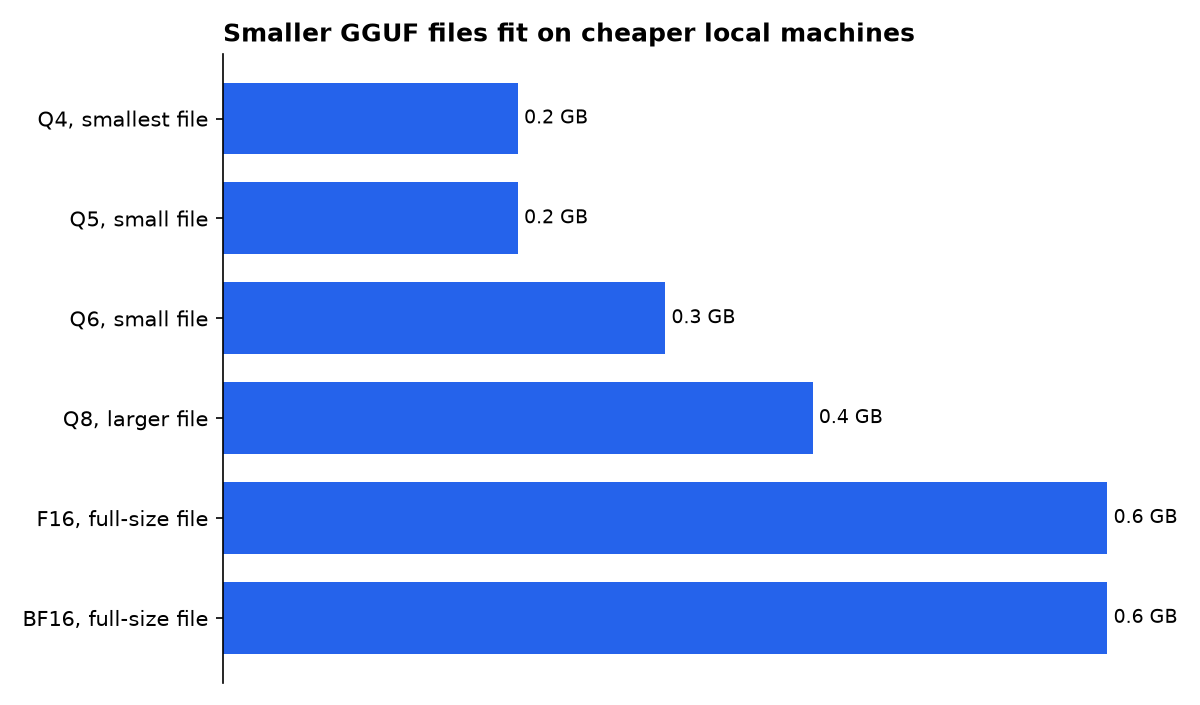
Our estimates from the published GGUF files put Q4 and Q5 at roughly 0.2 GB with a modest cache. Q8 needs about 0.4 GB. These are model-memory planning figures, not total system requirements, so leave room for the operating system, server process and the vectors your application stores.
How do you make the first text index?
Start with a tiny collection and verify the whole chain before indexing thousands of files. A retrieval index has two inputs: the documents you store and the user queries you later search. They need different task instructions for asymmetric search.
- Start the local server with the GGUF command above.
- Send document text using the document format, including a title where one exists.
- Send the user’s search phrase using the search-query task instruction.
- Store the returned vectors alongside document IDs, then compare query and document vectors with cosine similarity.
- Reject results if the returned embedding is not a finite 768-value vector before writing it to an index.
Google’s model card specifies the document form as title: {title} | text: {content}, using title: none when no title exists. Its search-query instruction is task: search result | query: {query}. The runtime may offer a convenience name such as SearchQuery, but with the GGUF HTTP route you should add the literal text prefix yourself.
This is the setup gap that causes many poor early results. The model will still produce vectors without the task prefixes, but Google says precision falls. Do not mix a prefixed query with raw documents and mistake a plausible score for a validated search system.
How do you install the real multimodal path?
The non-GGUF route is the safer path for a local search system that must handle pictures, sound or video. Google’s setup calls for Sentence Transformers 6.1.0 or newer, plus Transformers; add image, audio and video extras when you actually ingest those formats.
python -m venv .venv
source .venv/bin/activate
pip install -U "sentence-transformers[image,audio,video]" transformers
Google’s LiteRT-LM page says its current release also supports multimodal EmbeddingGemma 2 embeddings across Python, Kotlin, Swift, web JavaScript and C++. That is a separate deployment route from llama.cpp. It is useful when an application needs a supported on-device API rather than a GGUF server.
from sentence_transformers import SentenceTransformer

model = SentenceTransformer(
    "google/embeddinggemma-2",
    config_kwargs={"vision_config": None, "audio_config": None},
)

query = model.encode(
    "how do I rotate service logs",
    prompt_name="SearchQuery",
    truncate_dim=256,
    normalize_embeddings=True,
)

document = model.encode(
    "title: Operations guide | text: Rotate logs daily.",
    truncate_dim=256,
    normalize_embeddings=True,
)
Google’s original Hugging Face checkpoint contains the complete model rather than the text GGUF alone. The configuration above deliberately disables vision and audio, which keeps the process on the 270M-parameter text base. Remove those two settings only when your ingestion pipeline has installed and tested the relevant media dependencies.
What dimension should the vectors use?
Use 768 dimensions first when search quality matters more than storage. Use 256 dimensions when the vector database is the limiting cost, because it cuts each stored vector to one-third of its native size while retaining much of the model’s reported quality.
Google documents four supported output sizes: 768, 512, 256 and 128 dimensions. The same page describes up to a 6x storage reduction at the smallest size. This storage saving applies to vectors in your database, not necessarily to the model weights loaded into memory.
- 768 dimensions: use for the first quality baseline and multimodal retrieval.
- 512 dimensions: use when a modest storage cut is enough.
- 256 dimensions: use for space-constrained text, code or mixed-media indexes after checking result quality.
- 128 dimensions: reserve for large text-heavy indexes and test it on your own queries before rollout.
Every vector compared in one index must have the same length. Truncation also requires L2 normalization, which scales a vector back to length one before cosine similarity. Google warns that skipping this step can silently reduce ranking quality, rather than producing an obvious software error.
Which setup mistakes break retrieval quality?
The most serious mistake is FP16. Unsloth’s setup guidance repeats Google’s warning that FP16 can produce NaN values or degraded embeddings; use BF16 on capable hardware and FP32 elsewhere.
- Do not mix vector dimensions. A 256-dimensional query cannot search a 768-dimensional collection.
- Do not omit retrieval prefixes. Queries and indexed documents have deliberately different formats.
- Do not treat a GGUF download as complete multimedia support. Test each required media type through a runtime that loads its encoder and processor.
- Do not change models mid-index without re-indexing. Store the model name, prompt convention, dimension and normalization setting with every collection.
- Do not exceed the shared context budget. Text and media consume the same 8,192-token allowance.
For mixed inputs, placeholders determine where media belongs in the text stream: <|image|>, <|video|> and <|audio|>. Google’s model card says video defaults to one frame per second and audio should be supplied as 16 kHz mono, so preprocessing is part of retrieval quality, not a cosmetic extra.
What we could not verify?
No public release note establishes that the basic llama.cpp GGUF server command handles image, video or audio embeddings end to end. A maintained llama.cpp capability statement or a reproducible upstream example covering the projection model and media processors would settle that question.
Public materials also do not give a universal latency figure for every laptop, CPU or GPU running the GGUF files. Hardware-specific measurements from the runtime maintainers, using stated context sizes and input types, would be needed before setting a production response-time target.
Sources
- Google: EmbeddingGemma 2: an open, lightweight multimodal embedding model
- Google Developers Blog: Introducing EmbeddingGemma
- Google Developers Blog: EmbeddingGemma 2: The Developer Guide
- Google AI for Developers: EmbeddingGemma documentation
- Google AI for Developers: EmbeddingGemma 2 model card
- Google AI Edge: LiteRT-LM
- Hugging Face: Unsloth EmbeddingGemma 2 GGUF
- Hugging Face: GGML EmbeddingGemma 2 GGUF
- Unsloth: EmbeddingGemma 2 setup guide

