
FuturPulse analysis · 10 October 2026
Qwen released Qwen-Image-2.1-Turbo on 9 October 2026 with an 8-step editing schedule; the base Qwen-Image-2.1 examples use 40 steps. For local AI photo editing, choose Turbo for rapid drafts and the base model for a deliberate, repeatable comparison.
At a glance
- Qwen-Image-2.1-Turbo uses 8 denoising steps, while Qwen’s base-model examples specify 40 steps.
- Both Qwen checkpoints are listed as 7B-parameter BF16 models on Hugging Face.
- Qwen-Image-2.1 supports up to 10 reference images, masks, painted annotations and circle-based local edits.
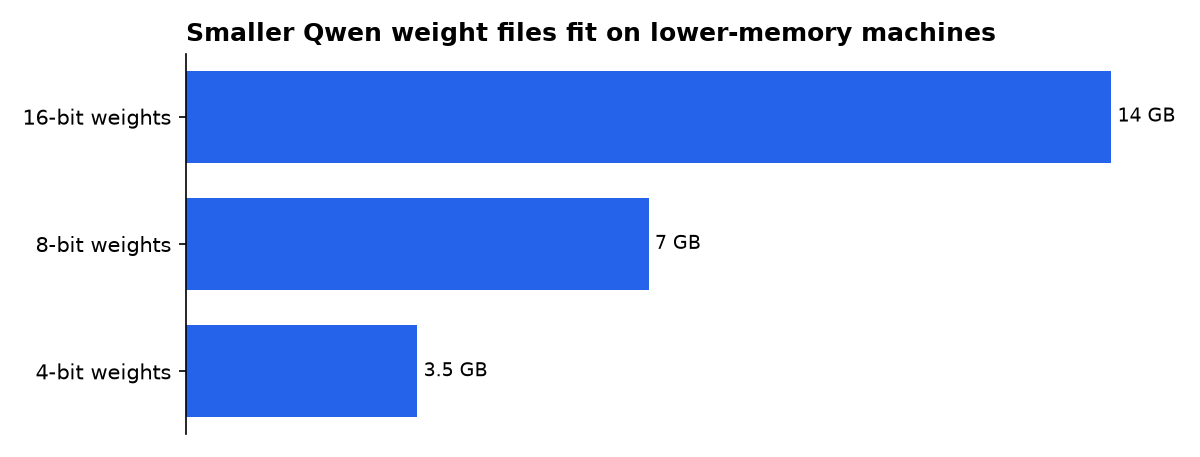
- Our calculation puts the weights alone at about 14.0 GB in 16-bit form, 7.0 GB at 8-bit and 3.5 GB at 4-bit.
- Neither Qwen model card publishes a local hardware requirement, a tested images-per-minute figure or a hosted API price.
What changed with Qwen-Image-2.1-Turbo?
Qwen-Image-2.1-Turbo is an accelerated version of Qwen-Image-2.1 for generating and editing images. Qwen says Turbo keeps the same 7B visual-generation architecture but uses an 8-step denoising schedule, the repeated refinement passes used to turn image noise into an edit. The base model’s published image-generation and image-editing examples each specify 40 inference steps. The Turbo model card and the base model card establish that difference.
That is the practical news for photo editors. Turbo is designed for a faster prompt-and-adjust loop: change the instruction, change the mask, then try again. The base model is not described as inferior by Qwen. It simply uses a much longer example schedule, so it is the safer starting point when you want to compare edits under a fixed workflow.
The important caveat is that eight steps do not prove an image completes five times faster. Loading time, image size, processor type, memory pressure and the rest of the pipeline affect wall-clock time. The defensible claim is narrower: Turbo has 32 fewer configured refinement steps than Qwen’s 40-step base examples, which should reduce this part of the work.
Which Qwen model is better for photo edits?
Qwen-Image-2.1-Turbo is the better default for iterative edits. Pick it when the job involves testing background replacements, composition changes or several versions of the same product image. Its saved sampling schedule loads with the checkpoint, so the model can start with Qwen’s intended settings rather than asking the user to tune the scheduler first.
Qwen-Image-2.1 is the more cautious choice for a final comparison. Its examples expose the 40-step setting directly, which makes the trade-off clearer. Run the same image, seed and instruction through both models before treating either one as your final renderer. A seed is the starting random value; holding it steady makes variations easier to inspect.
Features matter more than a generic “best AI” badge. Qwen’s project page says Qwen-Image-2.1 supports up to 10 reference images, local changes marked with circles, painted annotations or masks, plus identity preservation for people and products. It also supports RGBA, an image format with transparency, so it can make or edit transparent layers and extract a subject from a photograph.
Those capabilities make Qwen especially interesting when the task is not basic exposure correction. It is for altering a photo while using other images as visual references. A retailer can provide product angles. A designer can circle only the object to replace. A creator can use a mask to keep a person while changing the setting.
| Concrete option | Exact figure | What it means for photo editing | Evidence tier |
|---|---|---|---|
| Qwen-Image-2.1-Turbo | 8 denoising steps | Choose for rapid versions of the same edit, especially while changing prompts or masks. | Primary vendor page |
| Qwen-Image-2.1 base model | 40 steps in published examples | Choose as the longer-schedule control when you are judging a final output yourself. | Primary vendor page |
| Qwen-Image-2.1 editing workflow | 10 reference images | Choose the base workflow when multiple people, products or style references must inform one edit. | Primary vendor statement |
| Turbo’s schedule advantage | 5× fewer steps | Expect fewer refinement passes, not a promised fivefold reduction in elapsed time. | FuturPulse calculation |
The fifth figure is our arithmetic: 40 divided by 8. It is not a speed benchmark, and Qwen has not published a matched Turbo-versus-base quality test in the model cards.
Is Turbo actually five times faster?
No published evidence shows that Qwen-Image-2.1-Turbo finishes a complete photo edit exactly five times faster than Qwen-Image-2.1. It has five times fewer steps in the cited configurations. That is useful, but it is not the same as a measured timing result.
The implementation explains why the distinction matters. A merged Diffusers change on 5 October 2026 added fixed sampling schedules for accelerated QwenImage21 checkpoints. The selected schedule determines step count, while users can override it at runtime. That makes Turbo’s default schedule a model setting, not a simple slider that automatically turns every base-model run into Turbo.
Turbo also defaults to classifier-free guidance, or CFG, of 1, according to Qwen’s Turbo card. CFG is a setting that pushes an image toward the text instruction. The card says Turbo reuses text and reference-image context through prefix KV caching, a technique intended to avoid recalculating the same context during repeated steps.
For a buyer, this means Turbo is the speed-oriented choice without a published quality guarantee. Do not assume that a shorter schedule preserves tiny text, skin detail or object edges equally well in every edit. Those are image-specific outcomes. Save the original and evaluate at full size before delivery.
Which AI is best photo editing?
The best AI for photo editing depends on the job: Qwen-Image-2.1-Turbo is the best fit here for locally run generative changes, while Photoshop and Lightroom remain the practical broad suite for photographers who need established editing tools. Zapier lists Adobe Photoshop from $19.99 a month in its Photography Plan, but that price is for a subscription workflow, not a local Qwen checkpoint.
For traditional photo work, “best” means predictable controls for exposure, colour, selections and raw files. Creative Bloq positions Luminar Neo as an all-round editor with portrait, landscape, masking and local-adjustment tools. It also says Photoshop offers more fine control for digital art, even if Luminar can be easier to approach.
Qwen answers a different need. It is for instructions such as “replace the background,” “make this product shot transparent,” or “use these references while preserving the subject.” It is not a reason to discard a conventional editor. Use conventional controls for correction. Use Qwen when the desired edit requires generating pixels that were not in the source image.
Can a laptop run Qwen Image 2.1 locally?
Both Qwen listings identify the models as 7B BF16 checkpoints, but neither publishes a minimum graphics-memory requirement. By our calculation from that declared 7B parameter count, weights alone occupy about 14.0 GB at 16-bit precision. That is before the image-processing pipeline, temporary working memory and operating-system overhead. The Turbo listing identifies the checkpoint as BF16 and 7B parameters.
Quantization reduces how many bits store each model value. It can reduce memory needs, but it is not a free upgrade: available formats, output behaviour and runtime support vary. Qwen’s cards demonstrate BF16 loading with CUDA, meaning Nvidia-compatible GPU acceleration, and the base card also shows CPU offload, which moves parts of the model to system memory when needed.
| Qwen 7B weight option | Calculated weights-only memory | Buyer decision | Evidence tier |
|---|---|---|---|
| 16-bit weights | 14.0 GB | Use only when you have substantial spare accelerator memory beyond the weights. | FuturPulse calculation |
| 8-bit weights | 7.0 GB | Consider when memory is the constraint, after checking your runtime supports the format. | FuturPulse calculation |
| 4-bit weights | 3.5 GB | Consider for the smallest weight footprint, but verify image quality in your chosen workflow. | FuturPulse calculation |
Our estimate multiplies the listed 7B parameters by 2, 1 or 0.5 bytes. It covers the weights only. It is not a hardware test and cannot tell you whether a given laptop will finish an edit successfully.
How should photographers use Qwen safely?
Start with the image you have permission to edit, then keep the original untouched. Qwen’s tools are capable of changing a photo’s setting, objects and visual identity. Treat every generated result as a new image that needs inspection, not as an invisible correction.
For a portrait, first use a mask or circle to limit the requested change. Ask for one operation at a time: remove a stray object, change a background or add transparency. That creates a clear trail of what changed and makes failures easier to reverse. Qwen says local edits can use masks, painted annotations and circles. Its project page also describes identity preservation for people and products, but that is not a guarantee of exact likeness.
Face swaps deserve extra caution. The community package BFS-Best-Face-Swap tells users not to use or share results involving public figures or people who have not consented. Its instructions also say demonstrations do not guarantee identical results on every image. Consent and clear labelling are sensible minimums, especially for client work.
What should you actually do?
Choose Qwen-Image-2.1-Turbo if you already have a compatible local setup and your priority is trying many generative photo edits quickly. The eight-step schedule is the one measurable advantage Qwen publishes. Use it for draft backgrounds, product variations, transparent cut-outs and prompt experiments.
Keep Qwen-Image-2.1 base available when an image matters enough to compare the final output. Run the same source photo and instruction at its documented 40-step setting. If the longer run preserves a detail Turbo loses, use the base result. If it does not, Turbo saves time without requiring you to claim that it is universally equal.
If you primarily edit raw photographs, need mobile convenience or want predictable retouching controls, use a conventional editor first. Shotkit’s current roundup recommends Adobe Lightroom and Photoshop as its all-round AI photo-editing platform, while one hands-on review positions Facetune for quick phone portrait changes. Qwen is the specialist pick when controlled generative alteration matters more than an all-in-one photo workflow.
What we could not verify?
Qwen has not published a matched quality comparison between Qwen-Image-2.1-Turbo and the base model using identical photos, prompts, resolutions and hardware. It has also not published a universal images-per-minute figure, a minimum graphics-memory specification or a local performance guarantee. Qwen could settle those questions with reproducible test prompts, seeds, timing methodology and output galleries.
Public model pages also do not establish whether Turbo preserves every base-model editing capability at identical quality under every prompt. The cards confirm its shared 7B architecture and its generation-and-editing role, but not a universal winner for faces, text, products or masks. A buyer should therefore test the exact photos that matter before committing a production workflow.

