
Anatomy is a Claude, OpenCode and Codex skill that builds interactive machine-style explainers in SVG, WebGL or beta 3D; its published 3D audit can take 15 to 20 minutes for 30 parts. (github.com)
At a glance
- Anatomy supports three output types: SVG, SVG with WebGL effects, and a beta 3D mode.
- The repository says the installer copies about 10 MB, including examples, and the current skills CLI requirement is Node.js 22.20 or later.
- The Raptor engine example separates into 11 assemblies, while the beta turning dial re-projects roughly 90 parts per frame.
- Open Medical Skills lists 698 clinical tools, but its anatomy-related tools serve education and clinical support rather than product-diagram generation.
Can Anatomy generate production-ready diagrams?
It can generate production-ready web assets, not automatically production-approved engineering drawings. Anatomy’s stated output is a standalone HTML page, a self-contained SVG, or React and Next.js components. That makes it suited to documentation, product pages and technical explainers where an interactive visual must ship with source code. (github.com)
The distinctive claim is not merely that it draws isometric art. The skill asks an agent to express an idea as a working physical object, then links visible numbers to the same small model that drives motion. A token bucket, for example, can become a physical mechanism rather than a conventional box-and-arrow diagram. The project’s README describes that object-first workflow. (raw.githubusercontent.com)
That approach is useful when the reader must understand cause and effect. A cache hit, pressure change, queue, moving valve or dial position can be shown as motion. It is less useful for a financial chart, a geographical map or a literal human body illustration, because the maintainer says Anatomy is not a chart library and does not draw people or exact maps. (github.com)
What does the Anatomy skill actually produce?
SVG is the sensible default for most teams. Anatomy describes its core SVG format as solid isometric parts with four-tone shading, a live readout and eased motion. The resulting file can remain readable when WebGL is unavailable, which matters for documentation sites with restrictive browsers or accessibility settings. (github.com)
SVG plus WebGL is the option for effects that flat vectors cannot explain well. The repository places a WebGL canvas between back and front SVG layers, allowing fire, exhaust, water, glow or reflections to sit within the same isometric view. The Raptor example combines SVG machinery with a shader-driven plume. (github.com)
Beta 3D is the most ambitious route, but it carries the clearest caveat. The skill re-projects and re-shades moving components while static artwork remains flat. The project’s own skill page says its small 3D figure runs at 60 frames per second, while a 380-part stress hand reached about 20 frames per second on a heavily loaded machine. (skills.wheresryan.sh)
Which Anatomy option should you choose?
Choose SVG for an explainer that must load broadly and live in a normal documentation stack. Choose SVG plus WebGL when the visual lesson depends on fluid, flame, light or particles. Choose beta 3D only when rotation or a moving mechanical part is the lesson itself, because the published checks are slower and the project says production validation remains limited. (github.com)
| Concrete option | Exact published figure | What that means in practice | Evidence tier |
|---|---|---|---|
| Anatomy SVG | About 300 lines in the smallest published example | Best starting point for a compact interactive diagram that can become standalone HTML, SVG or a React component. | Verified: maintainer repository |
| Anatomy SVG + WebGL | 11 assemblies in the Raptor example | Use when the reader needs to see a machine come apart or understand a visual effect such as exhaust. | Verified: maintainer repository |
| Anatomy beta 3D | About 90 parts re-shaded per frame | Use for a dial, turntable or moving component, not as the lowest-risk route for a public launch. | Publisher claim: beta feature |
| Web Anatomy skill pack | 3,500+ scored sections | Choose this for a landing-page audit or wireframe. It is a different “anatomy”: page conversion structure, not machine diagrams. | Publisher claim: benchmark library |
| Open Medical Skills marketplace | 698 clinical tools | Choose this for medical education or clinical workflows with stated safety labels, not for visual mechanical storytelling. | Publisher claim: curated marketplace |
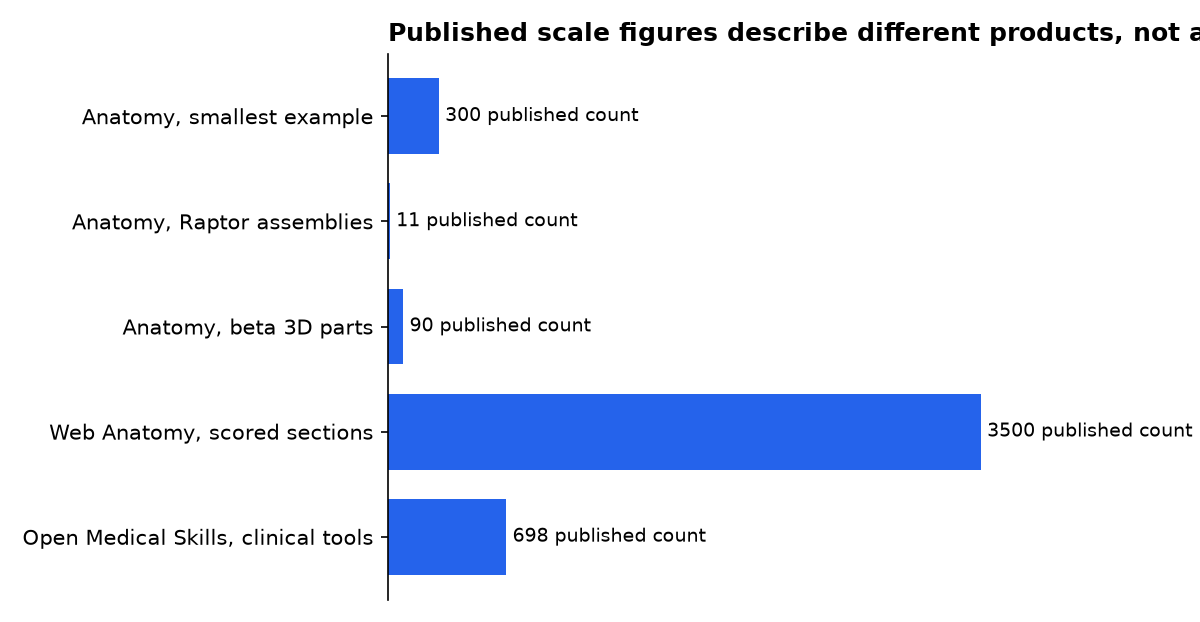
Anatomy publishes the 300-line, 11-assembly and 90-part examples. Web Anatomy publishes its 3,500-plus-section benchmark claim, while Open Medical Skills publishes its 698-tool count. These figures measure different things and are not performance rankings. (github.com)
How is Anatomy different from Web Anatomy?
Despite the similar names, these projects solve separate jobs. Anatomy by wheresryan22 makes a visual object to explain a system. Web Anatomy by Gabriel Amzallag audits, rewrites and assembles landing pages using a library of scored page sections. It produces research reports, copy and wireframes rather than illustrated machines. (github.com)
Web Anatomy has several skills, including page auditing, finding examples, copywriting and building a shareable wireframe. Its optional hosted MCP connection supplies live benchmark data, but its repository says the pack can fall back to static guidance without that connection. That makes it a better fit for conversion teams than for an engineer explaining cooling loops or cache invalidation. (github.com)
For a launch page, the two can work together. Use Web Anatomy to decide which page sections need proof, hierarchy and calls to action. Then use Anatomy for the one central interactive figure that helps a visitor understand a difficult mechanism. That is a workflow inference from each project’s stated scope, not an advertised integration. (github.com)
Can Anatomy run in OpenAI Codex?
Yes. Anatomy’s repository lists Codex alongside Claude Code and OpenCode, and says Codex invokes the installed skill as $anatomy. This aligns with OpenAI’s skills documentation, which describes a skill as a directory containing SKILL.md plus optional scripts, references and assets. (github.com)
Codex users should plan for one operational wrinkle. Anatomy uses headless Chrome for screenshots, close-ups and interaction checks. The repository warns that Codex sandbox settings can block Chrome; the visual may still build, but the automated checks can fail until the user approves the command or changes the local sandbox configuration. (github.com)
That is an important difference between “the agent made an SVG” and “the agent checked an interactive deliverable.” Anatomy includes geometry auditing, line-end checks and browser-driven capture scripts. Those checks are useful guardrails, but they validate the generated geometry and behaviour described by the project; they cannot verify whether a rate limit, medical process or machine specification is factually correct. (github.com)
Is this a medical anatomy skill?
No. The word “Anatomy” here means the anatomy of a machine or concept, not the human body. The skill explicitly focuses on machines, instruments, tools and furniture. A technical writer could ask for a heat-exchanger espresso machine or a rate-limiter mechanism, but should not treat the result as an anatomical teaching aid. (github.com)
For healthcare work, Open Medical Skills occupies a different category. It says its listed skills are physician-reviewed, evidence-informed and assigned safety classifications such as Safe, Caution and Restricted. Its education category includes an Interactive Anatomy Learning Assistant, while its clinical tools cover diagnosis, imaging, pharmacy and treatment workflows. (github.com)
The safety distinction matters. Open Medical Skills says outputs do not replace professional judgment and asks users to verify them against current clinical guidance and institutional protocols. Anatomy has no comparable medical safety framework because it is not positioned as clinical software. (github.com)
Research-focused alternatives also exist. Harvard Medical School’s ToolUniverse showcase lists specialist AI-agent workflows for scientific research, including remote-tool setup, biological analysis and validation tasks. Those are tool orchestration skills, not an interactive diagram kit. (zitniklab.hms.harvard.edu)
What is the safest practical workflow?
Start with a fact sheet before you ask for art. Write the measured quantities, states, thresholds and labels that the diagram must show. Anatomy’s own prompting guidance asks for real sizes, counts, rates and thresholds, because its physical metaphor works better when the agent has a defined mechanism to model. (github.com)
- State the lesson. Ask what the reader should understand, such as why requests queue after all connections are busy.
- Provide trusted values. Give the verified pool size, timing, throughput or threshold. Do not ask the agent to invent operating facts.
- Request the simplest output first. Start with SVG and add WebGL only if a visual effect carries real explanatory value.
- Run the checks. Review screenshots, interaction states and close-ups. In Codex, approve browser checking only for a repository you trust.
- Get subject review. Have the engineer, scientist or product owner approve every displayed label and number before publication.
The underlying distribution format is portable. The Agent Skills standard describes skills as folders with instructions and optional supporting files, while OpenAI says Codex can discover skills from repository, user, admin and system locations. That is why Anatomy can plausibly move between agent environments without rewriting its core workflow. (agentskills.io)
What we could not verify?
No public independent benchmark establishes that Anatomy beats a designer, a diagramming application or another agent skill on accuracy, accessibility, conversion or time saved. The published examples demonstrate capability, but they do not provide a controlled production-success rate.
No public price is published for Anatomy itself in the repository. The project says it needs no API key and no additional npm package, but a user may still need paid access to an agent host, compute, a browser environment or deployment infrastructure. The maintainer and the relevant agent vendors could settle those commercial terms.
The beta 3D mode also lacks broad production proof. The repository says it has been proven on an example and one test figure, rather than a production figure. For now, use it as a selective enhancement, and ship SVG when reliability matters more than rotation. (github.com)
What should you actually do?
Install Anatomy if you need one interactive technical explainer that a normal web team can inspect, edit and ship. Start with an SVG request for a well-defined system, provide the real numbers yourself, and treat its audit scripts as quality checks rather than factual verification.
Use Web Anatomy when the real problem is a weak landing page, not a difficult technical diagram. Use Open Medical Skills or specialist scientific workflows for medical and research tasks. Do not use wheresryan22’s Anatomy as a human-anatomy tutor, clinical decision tool or substitute for an engineering drawing review.

