
FuturPulse analysis · 16 October 2026
Black Forest Labs has shipped FLUX 3 Image Klein for ComfyUI: the distilled 5.6B image model accepts up to 10 references, uses 16 steps, and Black Forest Labs says its INT8 build can run on 8GB GeForce RTX GPUs.
At a glance
- FLUX 3 Image Klein takes up to 10 reference images and produces one generated or edited image.
- The distilled checkpoint uses 16 steps, while the base checkpoint uses 50 steps with CFG 3.5 guidance.
- Black Forest Labs lists the distilled INT8 transformer at 5.8GB and the INT8 visual text encoder at 4.9GB.
- Our calculation puts the complete INT8 ComfyUI download, including the supplied prompt upsampler, at 20.8GB on disk.
- The older FLUX.2 Klein Enhancer node pack targets FLUX.2 Klein 9B, not FLUX 3 Image Klein.
What was promised, and what shipped?
FLUX 3 Image Klein is no longer a future ComfyUI idea. Black Forest Labs now says the model is available as open weights, through its API and with day-one ComfyUI support. That changes the practical advice: users can build a local image-to-image workflow now, but should use the new model files and workflow templates rather than recycle a FLUX.2 graph unchanged. (bfl.ai)
23 July 2026 — promise
InstaSD’s account of Black Forest Labs’ July announcement said FLUX 3 Image would arrive through APIs and private weight access “in the following weeks.” Its practical conclusion at that point was correct for July: there was no local FLUX 3 ComfyUI workflow to queue.
13 October 2026 — weights
Black Forest Labs’ FLUX 3 Image Klein model repository appeared as an image-to-image checkpoint. Its model card describes a 5.6B image transformer, a separate Qwen3-VL-4B-Instruct text encoder, text generation, editing and multi-reference composition in one model. (huggingface.co)
14 October 2026 — ComfyUI packaging
Black Forest Labs published a separate ComfyUI package containing base and distilled transformers, text encoders, a prompt upsampler and the image autoencoder. This is the release a ComfyUI user should download, rather than manually translating the Diffusers package layout. (huggingface.co)
16 October 2026 — usable workflow
The reference repository now supplies a command-line image-editing path, including multiple input images, an output-size rule and saved generation metadata. The result is a shipped local workflow, not merely an API preview. (github.com)
The important qualification is control. FLUX 3 Image Klein treats references as content anchors, not frozen pixel layers. Black Forest Labs says a caption controls composition, and its own limitations say edits can affect material outside a requested box. That makes the model suitable for creative retouching, product composites and scene changes, but not proof that an unmasked pixel region will remain untouched locally. (huggingface.co)
Which FLUX 3 Klein files belong in ComfyUI?
The shortest successful setup uses the distilled checkpoint, the visual text encoder and the FLUX.2 VAE. Add the prompt upsampler for ordinary human-written requests. Black Forest Labs explicitly says short prompts produce generic results, because the model expects a full scene caption with framing, subject, surroundings and lighting. (huggingface.co)
Put the transformer in models/diffusion_models, the visual encoder and optional upsampler in models/text_encoders, and flux2-vae.safetensors in models/vae. The filenames matter: _sd_ means step-distilled, while files without that marker are the slower base checkpoint. (huggingface.co)
- Choose distilled for editing: it is the 16-step model intended for generation and self-hosted edits.
- Choose base for training: it is the 50-step, CFG 3.5 model intended for LoRA training, research and fine-tuning.
- Choose INT8 for broad RTX support: Black Forest Labs says it also supports RTX 30-series hardware.
- Choose NVFP4 only on Blackwell: Black Forest Labs says that format requires a Blackwell GPU.
The phrase “runs on an 8GB GPU” needs care. Black Forest Labs applies it to the INT8 build, but the supplied workflow also needs a text encoder and VAE. The prompt upsampler is another model, so storage requirements and active VRAM requirements are different measurements. (huggingface.co)
How large is a complete local install?
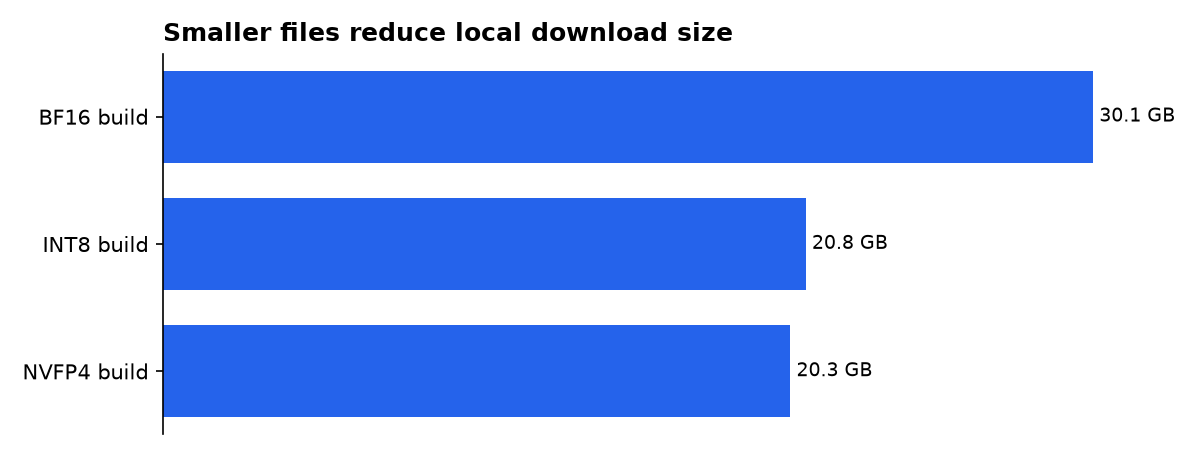
Our calculation uses Black Forest Labs’ published ComfyUI file sizes and assumes the distilled transformer, matching text encoder, VAE and supplied INT8 prompt upsampler are downloaded. That produces a more useful planning number than transformer size alone: 30.1GB for BF16, 20.8GB for INT8 and 20.3GB for NVFP4. These are disk figures, not a GPU-memory test. (huggingface.co)
| ComfyUI choice | Transformer file | Complete download, our calculation | Best fit |
|---|---|---|---|
| Distilled BF16 | 11.1GB | 30.1GB | Maximum published precision |
| Distilled INT8 | 5.8GB | 20.8GB | General RTX compatibility |
| Distilled NVFP4 | 5.3GB | 20.3GB | Blackwell-only lower storage option |
Source: FuturPulse calculation from Black Forest Labs’ listed ComfyUI component sizes. It compares a complete working download, not image quality or measured speed.
A community GGUF conversion offers another route, but it is not Black Forest Labs’ official ComfyUI package. The community repository lists Q4 through Q8 GGUF presets and warns that mixed-K labels do not mean every tensor uses one uniform precision. Treat those files as an experimentation path, not a like-for-like substitute for the vendor workflow. (huggingface.co)
What is the practical image-to-image workflow?
The practical workflow is simple in shape: load an image, write an edit request, turn that request into a full caption, then sample with the distilled model. The quality-critical step is the caption expansion. “Make the jacket blue” is too sparse; a useful request describes the subject, camera view, jacket, unchanged surroundings, lighting and the intended blue tone.
- Load the source image into the standard image input node.
- Set the output canvas from the first reference image when preserving its framing matters.
- Load
flux3_image_klein_sd_int8_convrot.safetensorsor another matching distilled transformer. - Load the matching Qwen3-VL text encoder and the FLUX.2 VAE.
- Enable the supplied prompt upsampler, then give it a concise edit instruction.
- Use the 16-step distilled workflow first, changing one creative variable between attempts.
- Save the prompt, seed and output before testing a new instruction.
Black Forest Labs’ reference CLI follows the same principle: the first reference establishes output size, and additional images provide more reference material. Its example uses two images to place a dog from one image onto a mug in another, which is a useful mental model for multi-reference composition. (github.com)
For one source photograph, ask for only one major visual change per first pass. Keep subject, lens view, pose, background and illumination explicit when they should remain stable. Then make a second pass for the new prop, color or style; a long list of conflicting edits asks the model to solve several composition problems at once.
“Keep the same subject, camera angle, pose and framing as the reference image. Change only [object or attribute]. Preserve [specific clothing, product shape, background or lighting]. Render [new result] with [materials, color and light].”
Use bounding boxes when the job is placement rather than a whole-scene restyle. Black Forest Labs uses a 0-to-1000 coordinate grid and says boxes guide size and position, rather than acting as strict masks. A box can therefore reduce drift, but it cannot guarantee that the generated object stops precisely at its edge. (huggingface.co)
Should FLUX.2 Klein nodes be added?
Not by default. The popular FLUX.2 Klein Enhancer is a separate custom-node project whose stated primary target is FLUX.2 Klein 9B. It recognizes some conditioning used by a smaller Klein model, but its model-hook schedules are designed around the 9B block layout. (github.com)
That distinction matters because FLUX 3 Image Klein already has its own reference handling, text encoder and prompt-upsampling requirement. Importing a FLUX.2 identity-transfer or conditioning patch into a FLUX 3 graph without explicit FLUX 3 support risks a workflow that appears connected yet changes nothing useful, or changes model behavior in untested ways.
The existing FLUX.2 tutorial advice remains useful as editing craft, not as a direct install recipe. Its guidance to separate model loading, standard editing, enhanced controls and detail controls is sound graph hygiene. Its numeric strengths and sampling adjustments are not verified settings for FLUX 3 Image Klein. (myaiforce.com)
If identity retention is weak, first improve the source image and expanded caption. Then add another reference with a complementary view, such as a product close-up or a clearer facial angle. Only after the vendor workflow works should you test third-party controls, one node at a time, with a fixed seed and a saved baseline.
When should you use multi-reference editing?
Use multiple references when each image contributes a different fact. One image can establish the scene, another the product, and another a color or material detail. FLUX 3 Image Klein supports as many as 10 references, but adding pictures that disagree about pose, perspective or illumination will give the model contradictory anchors. (huggingface.co)
A good two-image product workflow is more reliable than a random ten-image pile. Start with a clean hero shot as reference one, because the official command-line workflow uses the first image for output size. Add a close-up only when it supplies a needed texture, logo placement or accessory that the first image does not show. (github.com)
Community examples are beginning to appear, including a three-image FLUX.2 Klein workflow that uses reference conditioning, a second sampling pass and upscaling. It is useful for understanding graph structure, but it is not a FLUX 3 Image Klein workflow and should not be treated as compatibility evidence. (comfy.icu)
What we could not verify?
Black Forest Labs publishes performance figures for named NVIDIA hardware, including a 1MP INT8 ComfyUI result on an RTX 4070. We could not independently verify those timings, image-quality claims, or the vendor’s API latency comparisons. Reproducible third-party tests using the same resolution, seed, prompt upsampler and checkpoint would settle them. (bfl.ai)
The public pages also do not establish that FLUX.2 Klein Enhancer nodes are compatible with FLUX 3 Image Klein. The node-pack maintainer could settle that with a declared compatibility matrix and example workflow. Black Forest Labs could settle the broader question by publishing a supported list of third-party custom nodes and known-good ComfyUI versions.
Finally, an 8GB claim is not a full hardware-buying guide. A user’s practical result depends on the chosen transformer format, resolution, whether the upsampler stays loaded, GPU architecture and ComfyUI memory management. The most useful next public evidence would be a vendor memory table for the complete ComfyUI graph at common resolutions.

