

Local LLMs are worth running with Home Assistant for private, open-ended household questions, but not as the default controller: Home Assistant recommends fewer than 25 exposed entities for experimental local AI control.
At a glance
- Home Assistant shipped fully local speech processing in version 2023.5 on 3 May 2023.
- Its official Ollama integration arrived in Home Assistant 2024.4 and defaults to an 8,000-token context setting.
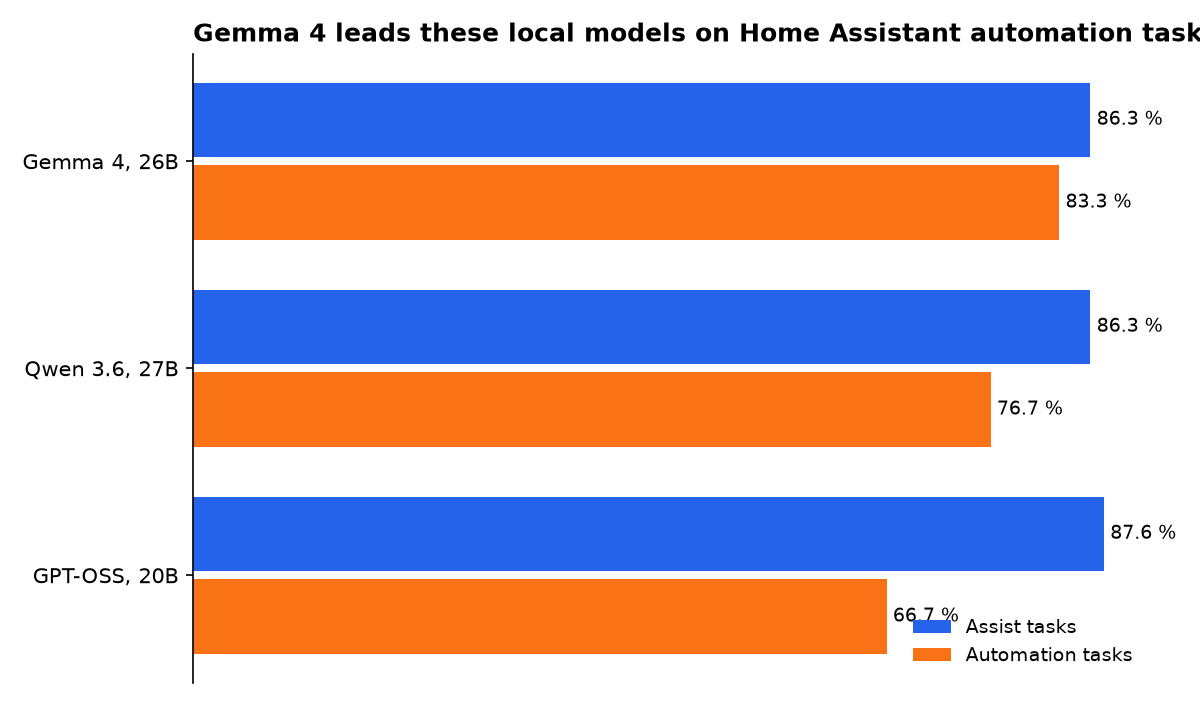
- Gemma 4 26B scored 83.3% on Home Assistant automation tasks in the published local-model leaderboard.
- Home Assistant advises exposing fewer than 25 entities to a local model, limiting the scope of risky actions.
- A local model removes per-request AI charges, but it does not remove hardware, electricity, setup, or maintenance costs.
Is a local LLM worth it for Home Assistant?
Yes, if privacy and flexible questions matter more than perfect answers. No, if you want a hands-off replacement for dependable switches, timers, alarms, and safety automations.
A local large language model, or LLM, generates and interprets text on hardware you run. In Home Assistant, it can turn loose requests into an answer or a device action. That helps with questions such as “Why is the living room warm?” where several sensor readings need a plain-English explanation.
The catch is that an LLM is not a deterministic controller. A traditional Home Assistant automation follows conditions you set. An LLM chooses an interpretation, then may call an available tool. Home Assistant labels AI control through Ollama experimental and says smaller models make more mistakes.
The practical answer is to split work. Keep lights, locks, alarms, heating limits, leak responses, and routines in regular Home Assistant automations. Use a local LLM for summaries, exploratory questions, drafting automations, and the occasional conversational command.
The useful rule: an LLM can decide how to phrase a request. Your established automations should still decide what happens when a sensor detects smoke, water, motion, or an open door.
What was promised, and what actually shipped?
Home Assistant’s local-AI path began with private voice components, then added a local model connection. The dated record shows a narrower outcome than the marketing shorthand “AI home”: local speech and local model access shipped, while reliable autonomous home management remains outside the stated design.
| Date | Promise or direction | What shipped or is available | What it means now |
|---|---|---|---|
| 3 May 2023 | Home Assistant said its Year of the Voice would offer configurable, entirely local voice choices. | Home Assistant 2023.5 shipped local Piper text-to-speech, local Whisper speech-to-text, Assist pipelines, and Wyoming support. | Voice can remain local without requiring an LLM. |
| 25 July 2024 | Ollama added tool calling, where a model selects a defined software action. | Ollama shipped tool support for models able to return tool calls through its API. | This created the basic capability an LLM needs to request Home Assistant actions. |
| Home Assistant 2024.4 | Local model access had to be practical for ordinary Home Assistant installations. | The official Ollama integration shipped as a local conversation agent connection. | Home Assistant can send selected context to a model on your network, rather than a cloud model. |
| 28 May 2025 | Tool actions needed to begin before a whole answer was complete. | Ollama added streaming tool calling, allowing compatible applications to receive tool calls while output streams. | It can reduce waiting in tool-driven conversations, but it does not prove a command is correct. |
Timeline sources are linked in the table. Dates describe product announcements or release availability, not a guarantee that every model behaves the same way.
Which local LLM is best for Home Assistant?
The best verified local LLM for Home Assistant automation drafting is Gemma 4 26B, based on the published Home LLM Leaderboard.
“Best” therefore depends on whether you mainly want conversational device control or help generating automations.
The leaderboard evaluates synthetic homes and known expected outcomes. It is useful evidence, not a promise for your rooms, names, accents, network failures, or unusual devices. The automation column is especially small, with 60 cases, so its confidence intervals are wide.
| Local model | Assist score | Automation score | Practical reading |
|---|---|---|---|
| Gemma 4 26B | 86.3% | 83.3% | Best listed local score for automation creation. |
| Qwen 3.6 27B | 86.3% | 76.7% | A close Assist result with a lower automation score. |
| GPT-OSS 20B | 87.6% | 66.7% | Strongest Assist score in this comparison. |
| Qwen 3.5 4B | 81.1% | Not listed | A smaller option, but without a published automation result here. |
Scores from the Home LLM Leaderboard report. “Assist” and “automations” are separate tests, so they should not be merged into one score.
Do not pick a model only from a general chatbot ranking. Home Assistant needs tool use, meaning the model must select a real service and the right entity. A model that writes elegant prose can still turn on the wrong light or misunderstand a room name.
There is also a specialist route. The community Home LLM integration offers models tuned for smart-home control and supports built-in llama.cpp, Ollama, generic OpenAI-compatible servers, and llama.cpp servers. Its setup guide warns that exposed devices become model context and recommends no more than 32 entities for that integration.
What’s the best LLM I can run locally?
For a Home Assistant-first setup, start with Gemma 4 26B if you can host a model of that class comfortably, or try GPT-OSS 20B when direct Assist-style requests matter more than automation generation. Those choices follow the available Home Assistant-specific scores, not generic claims about intelligence.
For a modest machine, a smaller model can still be useful, but narrow its job. Let it summarize sensors, answer questions about a small exposed set, or rewrite an automation description. Avoid making it the voice route for every action in a large home.
Home LLM’s project describes a separate route for small, smart-home-tuned models and says its component can connect to several local back ends. Its published setup also includes a Home 3B model path. The model’s downloadable package is listed on Hugging Face, but no public, comparable leaderboard score establishes it as the overall best choice.
Model size is not the only constraint. Context is the text and structured device information a model reads before replying. More exposed devices mean more context. Home Assistant’s Ollama integration defaults to 8,000 tokens, the chunks of text a model reads, and says a larger context can support bigger homes but uses more RAM.
Is there a way to run LLM locally?
Yes. The simplest supported route is an Ollama server on a Mac, Linux PC, or Windows PC, connected to Home Assistant through the official Ollama integration. Home Assistant then creates a conversation agent and lets you decide which entities that agent may see or control.
Set up the basic system in this order:
- Build a standard local Assist pipeline first, with speech recognition and speech output.
- Run Ollama on a machine reachable from Home Assistant.
- Add the Ollama integration and choose a model that supports tools.
- Expose a small, low-risk entity set before allowing any control.
- Test short, unambiguous requests before using voice around other people.
Local voice does not require local LLM inference. Home Assistant’s local voice guide says Speech-to-Phrase can transcribe supported home-control commands in under one second on Home Assistant Green or a Raspberry Pi 4. That is often the better default for “turn on the kitchen light.”
Piper text-to-speech is part of that local route, while Whisper or Speech-to-Phrase handles speech recognition. Adding an LLM should be an optional second lane for flexible language, not a requirement for basic private voice control.
What is the cheapest way to run LLMs locally?
The cheapest useful approach is to use the hardware you already own, run a small model, and restrict it to a handful of entities. Local inference has no metered model bill when the model runs on your equipment, but it shifts the cost into a computer, electricity, storage, and your time.
Do not buy a GPU solely to make existing light controls sound more conversational. Home Assistant’s ordinary Assist commands and local Speech-to-Phrase already cover constrained household control. The spending case improves only if you also value private summaries, local chat, automation drafting, or other local AI work.
Keep the model on a separate computer when possible. That isolates heat, memory pressure, updates, and failures from the Home Assistant host. The official Ollama integration is designed for an external server and accepts a network URL such as http://localhost:11434.
There is no verified public price-to-performance table covering current Home Assistant local-LLM hardware, electricity tariffs, and response speed across homes. A dollar comparison would therefore imply precision that has not been published. Treat local AI as an appliance you maintain, not as a free cloud substitute.
What we could not verify?
Home Assistant has not published a universal hardware requirement for each local model, a standard response-time target for household commands, or an electricity-cost comparison across current devices. Model makers and Home Assistant could settle those questions with repeatable tests using stated hardware, context sizes, entity counts, and power measurements.
No public benchmark proves that any local model is safe for locks, alarms, heating safety limits, or emergency actions. Home Assistant can narrow exposure, but the homeowner still chooses which services are available. That is why local LLMs are most worthwhile as a private conversational layer beside deterministic automations.
Sources
- Home Assistant — Ollama integration
- Home Assistant — 2023.5 release notes
- Ollama — Tool support
- Ollama Registry — Streaming responses with tool calling
- Home LLM Leaderboard report
- Home LLM integration project
- Home 3B GGUF model page
- Open Home Foundation — Piper local voice announcement

