
FuturPulse analysis · 5 November 2026
qwen3.5_9b_w4a8_gptq.safetensors is a 7.34 GB Qwen3.5-9B text-encoder checkpoint for ComfyUI’s MOSS-Image workflow. It is not the normal Qwen3.5-9B download for a local assistant, coding server or llama.cpp chatbot. Its practical job is to turn an image prompt into conditioning data for MOSS-Image.
At a glance
- The Comfy-Org file is 7.34 GB and belongs in
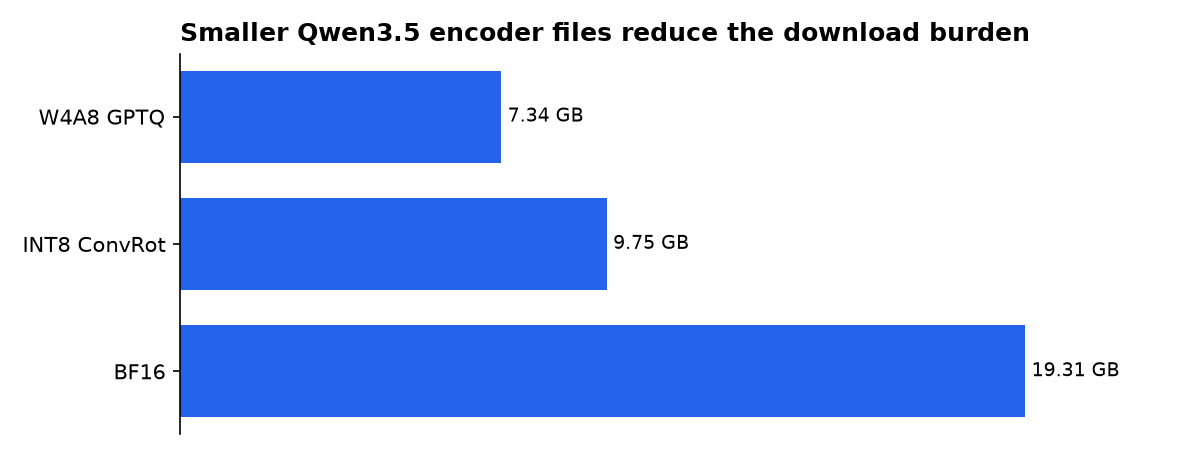
ComfyUI/models/text_encoders/. - The W4A8 GPTQ encoder download is 2.41 GB smaller than the 9.75 GB INT8 ConvRot alternative.
- The BF16 Qwen3.5-9B encoder is 19.31 GB, making the W4A8 file 11.97 GB smaller by our calculation.
- ComfyUI v0.42.0, released on 18 October 2026, added MOSS-Image support and v0.42.1 followed with crash fixes.
- Qwen3.5-9B’s standard model card lists a 262,144-token context window, but that does not make this ComfyUI file a drop-in API model.
What is qwen3.5_9b_w4a8_gptq?
It is a single-file, quantized copy of the Qwen3.5-9B encoder packaged for MOSS-Image. A text encoder reads a written prompt and produces numerical guidance for an image model. It does not itself draw an image, and it is not the MOSS-Image diffusion model that performs the denoising work.
The filename describes the intended compression format: W4A8 means four-bit stored weights and eight-bit activations, while GPTQ identifies the quantization approach in the package name. The ComfyUI file guide lists this checkpoint beside INT8 ConvRot and BF16 Qwen3.5-9B encoder options, all placed under models/text_encoders.
That distinction avoids a common mistake. The standard Qwen/Qwen3.5-9B model card describes a general multimodal model that can be served through inference frameworks and has a default context length of 262,144 tokens. The MOSS-Image file is a workflow component, not a documented replacement for that full serving setup.
When did native ComfyUI support ship?
Native MOSS-Image support moved from a project-side recommendation to a released ComfyUI feature in October 2026. The important change is that current ComfyUI builds can use core loaders with Comfy-format files, rather than requiring users to load an entire Diffusers-format directory through the original plugin path.
| Date | What was stated or expected | What shipped |
|---|---|---|
| 16 October 2026 | MOSS-Image documentation described native ComfyUI support as the recommended route. | Support was merged into ComfyUI code, according to the MOSS-Image workflow record. |
| 18 October 2026 | Users needed a build containing the MOSS-Image changes. | ComfyUI v0.42.0 shipped the MOSS-Image feature through pull request 17095. |
| 19 October 2026 | Early native workflows still faced reported loading crashes. | ComfyUI v0.42.1 shipped fixes for crashes in the MOSS-Image template workflow. |
The timeline matters because screenshots and old tutorials may still show a separate MOSS-Image loader. A graph based on those nodes is not automatically compatible with the newer core-node route. Import a current MOSS-Image template instead of replacing files inside an old graph.
How do you install it in ComfyUI?
The short path is to use ComfyUI v0.42.1 or newer, then select a MOSS-Image template. The native workflow instructions identify three components: a MOSS-Image diffusion model, this Qwen3.5 encoder and a FLUX.2 VAE, or variational autoencoder, which converts compressed image data into pixels.
- Update ComfyUI to at least v0.42.1.
- Put
qwen3.5_9b_w4a8_gptq.safetensorsinComfyUI/models/text_encoders/. - Put either a Base or SFT MOSS-Image diffusion checkpoint in
ComfyUI/models/diffusion_models/. - Put the selected FLUX.2 VAE in
ComfyUI/models/vae/. - Use CLIP Loader with the
moss_imagetype, then choose the encoder file.
The ordinary template choice is the SFT checkpoint. SFT means supervised fine-tuned: it is intended for finished image generation. Base is the better fit when training or testing a LoRA, a small add-on that changes a model’s style or subject behavior.
Which Qwen3.5 encoder file should you choose?
The W4A8 file is the storage-saving option, not a published quality winner. No official benchmark in the cited MOSS-Image material compares prompt fidelity, text rendering or image quality across these three encoder packages. Choose it when disk space and memory headroom matter more than preserving the largest available numeric representation.
| Qwen3.5-9B encoder package | Published file size | Difference from W4A8 | Best reason to choose it |
|---|---|---|---|
| W4A8 GPTQ | 7.34 GB | Baseline | Smallest published ComfyUI encoder package. |
| INT8 ConvRot | 9.75 GB | +2.41 GB | Higher-storage INT8 alternative. |
| BF16 | 19.31 GB | +11.97 GB | Largest published representation. |
Those file sizes come from the published MOSS-Image ComfyUI file list. The differences are FuturPulse calculations from that list. They describe download and stored-weight size, not a guarantee that a GPU with the same amount of VRAM will finish a generation.
A working graph also has to load a diffusion model and VAE. The commonly described smaller set pairs the 7.34 GB encoder with an INT8 MOSS-Image model and a small VAE. That reduces the files you download, but ComfyUI’s runtime memory changes with resolution, sampling steps and offloading.
Can this file replace a normal Qwen3.5 model?
No. The regular Qwen3.5-9B release supports text, image and video tasks, and its model card describes direct serving through OpenAI-compatible APIs. It also defaults to thinking mode, which produces hidden reasoning content before the final response unless disabled in the serving configuration.
By contrast, the W4A8 file is named and distributed as a MOSS-Image text encoder. It is selected inside a visual workflow and feeds the image model’s conditioning path. A user who needs a general local assistant should use a Qwen distribution and runtime expressly documented for conversation, not repurpose a workflow checkpoint.
The distinction also applies to GPTQ files from earlier Qwen families. A GPTQ package for Qwen3-VL-8B, for example, is not evidence that its loader, tensor layout or vision components are interchangeable with a Qwen3.5-9B MOSS-Image encoder. File names can look similar while the surrounding pipeline is different.
How does it compare with other Qwen3 variants?
For ComfyUI image work, compare components by role before comparing parameter counts. Qwen3.5-9B here is the prompt encoder, while MOSS-Image is the five-billion-parameter diffusion transformer that creates the image. The MOSS-Image technical report describes that transformer as a five-billion-parameter single-stream diffusion model built for long text rendering and layout control.
For local ComfyUI language tasks, a separate custom-node project supports Qwen3.5 models from 0.8B through 27B. Its Qwen3.5-9B entry estimates about 20 GB of VRAM in FP16, around 12 GB in eight-bit mode and roughly 7 GB in four-bit mode. Those are node-project estimates, not a MOSS-Image hardware requirement or an independent benchmark.
The ComfyUI-Qwen3.5 project also separates Transformers-based Qwen use from llama.cpp-based GGUF use. GGUF is another local model format. It is not the same as this safetensors W4A8 GPTQ encoder, and its stated speed figures should not be applied to MOSS-Image image generation.
What does local use cost against the API?
Local use avoids per-token billing after download, but it shifts the cost to hardware, storage and electricity. Cloud Qwen3.5-9B remains a separate option for text or multimodal applications. Tokens are the chunks of text that a model reads and bills by.
By FuturPulse’s calculation from OpenRouter list prices, 1,000 short Qwen3.5-9B chat turns cost about $0.30 when each turn uses 1,000 input tokens and 500 output tokens. A larger retrieval-augmented answer profile costs about $1.48 per 1,000 requests under the stated 8,000-input and 500-output assumption.
That comparison is not a claim that the local W4A8 encoder can replace an API request. The API model returns language responses. The ComfyUI file primarily conditions a MOSS-Image graph. They solve different parts of an AI workflow.
What should image makers do now?
Start with the W4A8 file if a current MOSS-Image template lists it and your priority is the smallest official Comfy-Org encoder download. Start with the INT8 or BF16 encoder only when you have room to compare outputs and a reason to retain a larger representation.
Keep the model roles clear while troubleshooting. A missing selection in CLIP Loader usually points to placement, a stale ComfyUI build or the wrong loader type. It does not prove that the Qwen checkpoint is broken.
- Use the file only under
models/text_encoders. - Select
moss_imagein the relevant CLIP Loader. - Use a fresh native MOSS-Image workflow after updating ComfyUI.
- Do not substitute this file for a general Qwen chat checkpoint.
What we could not verify?
Neither the published file page nor the current MOSS-Image workflow material states a minimum VRAM requirement for this encoder in every ComfyUI configuration. GPU memory use depends on the selected diffusion model, VAE, resolution, sampler and offloading behavior. Comfy-Org and OpenMOSS could settle that with a hardware matrix using fixed workflows.
There is also no official quality study comparing W4A8 GPTQ, INT8 ConvRot and BF16 on MOSS-Image prompt adherence, typography or layout accuracy. The file sizes are public, but a ranking of visual quality is not. Comfy-Org or OpenMOSS would need to publish matched outputs and evaluation methods to make that comparison defensible.
Sources
- Comfy-Org/MOSS-Image: qwen3.5_9b_w4a8_gptq.safetensors
- Qwen/Qwen3.5-9B model card
- ComfyUI releases: v0.42.0 and v0.42.1
- ComfyUI-Qwen3.5 custom node
- MOSS-Image ComfyUI workflow file guide
- FuturPulse: MOSS-Image reaches ComfyUI with native one-file loaders
- MOSS-Image Technical Report
- OpenRouter model list prices

