
Viggle Turbo v0.3’s correct default is six Euler steps using raw sigmas [1, 0.9375, 0.875, 0.75, 0.5, 0.25]. Use that exact list for normal generation and editing. The faster five-step option removes only a high-noise node; the nine-step mode changes model behavior by handing its final two steps to Qwen Image 2.1 base.
At a glance
- Viggle Turbo v0.3 uses 6 steps rather than the Qwen Image 2.1 example workflow’s 40 steps.
- The default six-step schedule divides the first 12.5% of the noise range into two short 6.25% intervals.
- Viggle’s documented five-step schedule is
[1, 0.875, 0.75, 0.5, 0.25]. - The v0.3 nine-step route runs 7 Turbo steps, then 2 base-model steps for finer detail.
- A separate v0.2.1 demo used an eight-step text schedule that is not the current v0.3 default.
Which Viggle Turbo sigma schedule should you use?
Use the six-step list unless your image has very small, dense lettering or needs unusually fine detail. Viggle’s v0.3 model card specifies six Euler steps, no classifier-free guidance, and raw nodes of 1.0, 0.9375, 0.875, 0.75, 0.5 and 0.25. The pipeline applies its own resolution-dependent shift after receiving those values. (huggingface.co)
A sigma is the model’s noise level during one denoising pass. Higher values govern broad layout and subject placement. Lower values handle texture, edges and fine lettering. A schedule is not a cosmetic setting here: Viggle distilled its adapter against particular landing points, so a generic ComfyUI scheduler can feed it a sequence it was not trained to handle.
The practical rule is simple. Do not enter only a step count and expect the result to match. Pass the raw sigma array into the sampler, retain Euler sampling, set true_cfg_scale=1.0, and leave the negative prompt empty. Viggle explicitly warns that ordinary step changes without sigmas= do not help this adapter. (huggingface.co)
“Eight-step Viggle Turbo” does not identify one universal schedule. The current v0.3 card documents the six-step default, a five-step alternative, a seven-step alternative and a hybrid nine-step mode. An older demo used a separate eight-step recipe for dense text.
What do the raw sigma numbers change?
The six-step list preserves four core nodes: 0.875, 0.75, 0.5 and 0.25. Viggle says extra steps belong at the high-noise end, before 0.875. That is where subject arrangement is decided. Moving the later nodes makes outputs softer, according to the publisher’s instructions. (huggingface.co)
FuturPulse calculation: the table below converts each raw list into noise-range intervals. It assumes the scheduler completes the final implicit interval from the last listed sigma to zero. This is arithmetic from Viggle’s published sigma nodes, not a hardware benchmark or image-quality test.
| Mode | Published raw nodes | Where added work goes | Passes versus 6-step | Best use |
|---|---|---|---|---|
| 4-step training pattern | 1, .75, .5, .25 | No split above .875 | 0.67× | Historical baseline; less detail and diversity |
| 5-step | 1, .875, .75, .5, .25 | One high-noise split | 0.83× | Fast drafts |
| 6-step default | 1, .9375, .875, .75, .5, .25 | Two high-noise splits | 1.00× | Normal text-to-image and editing |
| 7-step | 1, .9583, .9167, .875, .75, .5, .25 | Three high-noise splits | 1.17× | More room for layout stability |
| 8-step dense-text demo | 1, .9375, .875, .75, .625, .5, .25, .125 | Splits later detail intervals | 1.33× | Legacy dense-text comparison cases |
| 9-step hybrid | 1, .9583, .9167, .875, .75, .5, .25, 1/6, 1/12 | Two final base-model passes | 1.50× | Fine detail and small text |
The pass multiplier is step-count arithmetic, not a claim about end-to-end generation time. Text encoding, VAE decoding, memory pressure and the nine-step mode’s cache re-extraction also affect elapsed time.
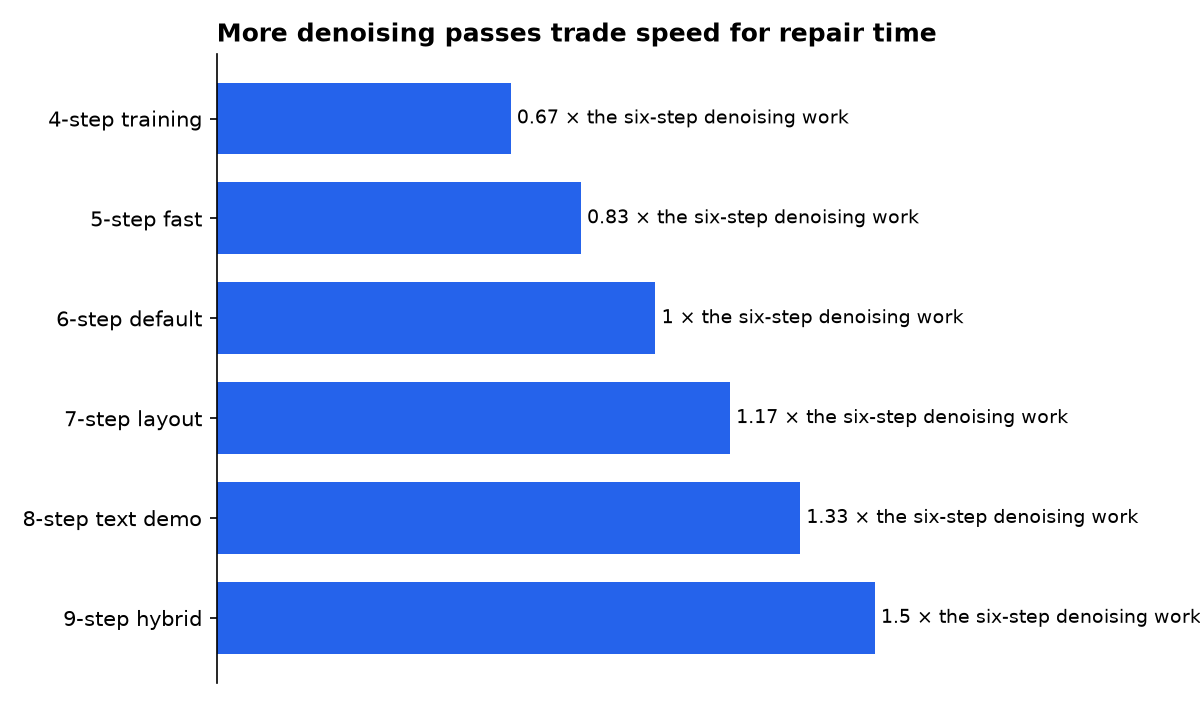
The key measurement is the early spacing. The default route breaks the range from 1.0 to 0.875 into two intervals of 0.0625. The five-step route covers that same range in one 0.125 interval. The seven-step route creates roughly three 0.0417 intervals. That is a direct explanation of the speed-quality trade: more early passes give composition more chances to settle.
Why is the six-step schedule shaped this way?
Viggle’s earlier public demo describes the six-step design as a four-node training pattern with the high-noise range split more finely. Its stated reason is composition: one long pass across that range caused ghosting and layout drift. The lower nodes were retained because the student had been trained to land on them. (huggingface.co)
That explanation fits the reported held-out comparison data, but it should be read as a publisher measurement. A mirrored v0.2.1 release report says six steps achieved 0% visibly different layouts against the 40-step base in its 96-request set. The same report puts intra-prompt diversity at 0.98× the base model, versus 0.93× at five steps. BizyAir’s archived release page reproduces the methodology: 32 prompts, eight seeds per prompt for diversity, plus the broader 96-request layout measure. (bizyair.ai)
Those figures do not prove that six steps will beat five on every prompt. They do identify the intended compromise. Five steps reduce repeated transformer work by one-sixth versus the default. Six steps keep the second high-noise split that Viggle associated with stable composition. For portrait drafts, product mock-ups and simple edits, that is the setting to start with.
When should you use five or seven steps?
Use five steps for quick iteration, and seven steps when composition matters more than the last slice of speed. Viggle’s current recipe keeps the late nodes fixed in both cases. The five-step array is [1, 0.875, 0.75, 0.5, 0.25]; the seven-step array is [1, 0.9583, 0.9167, 0.875, 0.75, 0.5, 0.25]. (huggingface.co)
For a simple single-subject prompt, five steps are the sensible speed experiment. For a scene with several people, specified object positions or a reference-image edit, seven steps are the safer experiment. Neither route should move 0.75, 0.5 or 0.25, because that changes the part of the trajectory Viggle says is most vulnerable to softness.
Do not confuse the adapter file name with the sampling recipe. The v0.2 files retain “5step” in some names, but the release material states that the same files can use the six-step nodes. The filename records an earlier launch schedule; it is not a command to set ComfyUI to five steps. (bizyair.ai)
What is the eight-step dense-text schedule?
The eight-step schedule is an older v0.2.1 comparison recipe for dense text, not the v0.3 general-purpose recommendation. It uses [1, 0.9375, 0.875, 0.75, 0.625, 0.5, 0.25, 0.125]. Unlike the v0.3 rule, it inserts nodes into later, lower-noise regions as well as preserving the early split. (huggingface.co)
The demo’s author reported two OCR checks. On an academic infographic caption, word recall rose from 0.71 at six steps to 0.83 at eight. On Chinese architecture-board labels, it rose from 0.76 to 0.90. The 40-step base scored 0.95 on both checks, according to the same comparison code. (huggingface.co)
The evidence is narrow: 16 seeds for the first OCR example and four for the second. It is useful evidence that extra late repair steps can help lettering. It is not enough to establish eight steps as the right schedule for photos, broad layouts or multi-reference edits. Use it as a reproducible special case, not as a replacement for the current default.
How does the nine-step hybrid improve detail?
Viggle’s nine-step route is not simply a longer Turbo schedule. It runs seven steps with the Turbo LoRA active, disables the LoRA after the seventh pass, re-extracts cached conditioning, and lets the Qwen Image 2.1 base model complete the last two passes. The published nodes end with 1/6 and 1/12. (huggingface.co)
Viggle says this mode produces finer detail and makes small text correct more often, though not every time. It estimates the result takes about 1.4–1.5× as long as six steps and remains about 3.5× faster than the base workflow. Those are Viggle’s own performance claims, not an independent cross-hardware benchmark. (huggingface.co)
The base reference point is substantial. Qwen’s official Qwen Image 2.1 examples specify 40 inference steps for text-to-image, editing and transparent-image generation. That makes Turbo’s six and nine passes meaningful reductions, but it also explains why difficult editing can still favor the original model. (huggingface.co)
How should ComfyUI users wire the schedule?
Feed Viggle’s sigma list directly to a custom sampler, rather than selecting a stock scheduler in KSampler. Viggle’s published ComfyUI path uses Euler, a BasicGuider with CFG off, an unmerged LoRA at strength 1.0, and a dedicated sigma node. The adapter’s guidance behavior is already distilled into the weights. (huggingface.co)
- Use the Qwen Image 2.1 base transformer and the Viggle Turbo LoRA.
- Keep the LoRA unmerged if you are following Viggle’s main path.
- Set the sampler to Euler.
- Send the six raw nodes to a SIGMAS input.
- Use no negative prompt and keep CFG at 1.0.
- Use Viggle’s scheduler configuration, including
shift_terminal: null.
The last setting matters because Viggle says Qwen’s base scheduler configuration uses shift_terminal: 0.02, which stretches the last step and breaks the intended endpoint. The vendor’s warning is specific: use the shipped configuration rather than mixing a normal Qwen scheduler with the Turbo adapter. (huggingface.co)
Third-party nodes should not be treated as evidence that their curves are Viggle-approved. Sigmaboy Turbo, for example, advertises nine hand-tuned values for an eight-step Qwen Image workflow and exposes an “aggression” control. Its published BASE profile ends at 0.4043 before its terminal zero, which is structurally different from Viggle’s six-step sequence. (comfy.icu)
Sigmax’s Krea 2 scheduler makes a related but separate point: turbo models can need variant-specific schedules, and the node distinguishes its own Turbo and RAW modes. It is not a Qwen Image 2.1 Viggle Turbo recipe. Treat its eight-step default as a setting for Krea 2, not a substitute for Viggle’s published nodes. (comfy.icu)
Who is making the quality and speed claims?
Viggle makes the central claims and has the clearest commercial interest in Turbo appearing fast and close to Qwen Image 2.1 quality. Its model card describes the adapter as about five times faster than the base model, while also acknowledging weaker dense text and complicated edits. That admission is useful, but the speed and quality framing remains publisher evidence. (huggingface.co)
Qwen supplies the base-model reference point. Qwen’s interest is in adoption of Qwen Image 2.1 and its ecosystem. Its 40-step examples establish the published comparison baseline, but do not independently validate Viggle’s claimed speed-up or its OCR results. (huggingface.co)
BizyAir hosts a community model page and mirrors older Viggle v0.2.1 material. Its commercial interest is in usage of its model community and platform. The archived figures are valuable for preserving methodology, but readers should not treat a mirror as an independent benchmark lab. (bizyair.ai)
Third-party node authors sell convenience rather than the Viggle model itself. Sigmaboy’s repository received an “Update nodes” commit on 18 October 2026, while Sigmax’s cited commit on 27 October 2026 was a license correction. Those repository events show active maintenance, not independent validation of their schedules’ image quality. Rimor-dev’s commit record and rookiestar28’s commit record support the maintenance dates. (github.com)
Hugging Face Diffusers provides the software stack, not a performance verdict. Its v0.42.1 release, published on 27 October 2026, was a security patch for component resolution in from_pretrained. It does not certify any Viggle schedule, but users should keep security fixes separate from schedule changes. Diffusers’ release notes recommend upgrading from v0.42.0. (github.com)
What we could not verify?
No public independent benchmark establishes that one Viggle Turbo sigma schedule wins across the same prompts, seeds, GPUs and output sizes. Viggle’s six-step, eight-step and nine-step quality claims come from its own model and demo work. An outside lab could settle the question with a preregistered prompt set, blind human preference tests, OCR across more languages, and time measurements on several GPUs.
There is also no public v0.3 ComfyUI workflow that implements the hybrid nine-step handoff from Turbo to the base model. Viggle says the mode works in Diffusers and its demo Space. Viggle or ComfyUI maintainers could settle practical support by publishing a maintained workflow that exposes the LoRA switch and cache re-extraction.
For now, the defensible answer is narrow: use six steps for ordinary Viggle Turbo work, use five or seven only by changing the high-noise end, treat the older eight-step list as a dense-text experiment, and move to the nine-step hybrid only when fine detail is worth its extra passes.
Sources
- PRIMARY SOURCE — Viggle Qwen-Image-2.1-viggle-turbo v0.3 model card
- BizyAir archive of Viggle Turbo v0.2.1 release details
- PRIMARY SOURCE — ComfyUI-Sigmaboy commit record
- PRIMARY SOURCE — ComfyUI-Sigmax commit record
- ComfyUI Cloud listing for Sigmaboy Turbo
- ComfyUI Cloud listing for Sigmax Krea 2 Sigma Scheduler

