

On 23 November 2026, Impeccable Loop 0.2.2 became the project’s latest listed release. The Impeccable skill is the broader Claude Code choice when a team needs 24 design commands and a 62-rule local detector; Hallmark is the narrower choice for a new page built from 50 themes.
At a glance
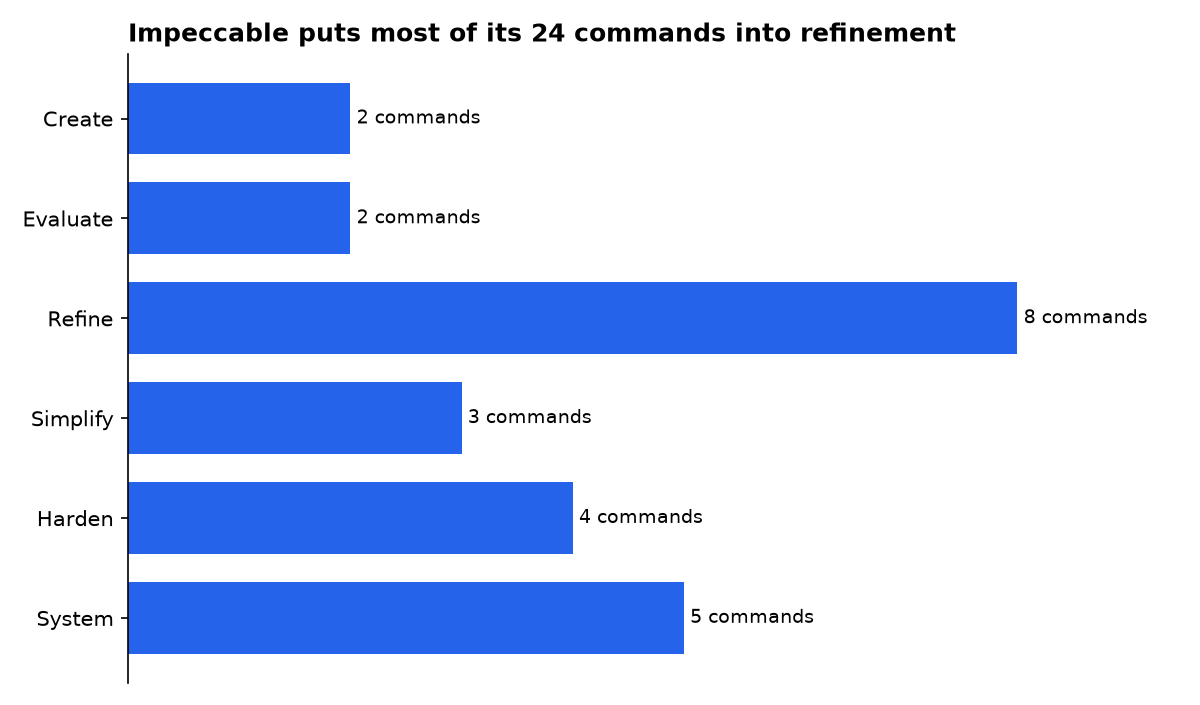
- Impeccable’s current documentation groups 24 command entries across creation, review, refinement, simplification, hardening and system work.
- Impeccable says its detector has 62 deterministic rules, meaning checks written as fixed tests rather than model judgments.
- Hallmark starts a new page with 50 themes and selects three that fit the prompt before a user chooses or asks for a custom route.
- Claude Code users can install Impeccable through its plugin marketplace command, then run
/impeccable initto record product context.
What is the Impeccable skill?
Impeccable is a design framework for coding agents, not a visual editor. It gives an agent named moves such as critique, audit, polish and bolder, so a request can identify the kind of design change wanted instead of merely asking for something “better.” The vendor describes the tool as design vocabulary for agents that can build new interfaces, improve existing work and retain a project’s design system.
The important distinction is that Impeccable treats a design task as a sequence of decisions. Its workflow records durable product facts in PRODUCT.md and visual-system decisions in DESIGN.md. Its documentation tells users to run /impeccable init to save audience and goals in PRODUCT.md, then use focused commands when the requested work is clearer.
That makes Impeccable most useful after a project exists. A pricing page, dashboard, onboarding flow or component gives its review commands something real to inspect. The project’s own README says it is strongest on interfaces that already exist, while also supporting new pages. The README lists 62 deterministic detector rules and says they require neither an LLM nor an API key.
How does Impeccable work with Claude Code?
For Claude Code, the practical route is a plugin or the installer. Impeccable’s official setup page gives the Claude Code command /plugin marketplace add pbakaus/impeccable, followed by installation through the plugin menu. The same page offers npx impeccable install for terminal installation.
Once installed, Claude Code receives a single command namespace: /impeccable. You can then issue a scoped instruction such as /impeccable critique the checkout flow. This matters because a named target limits the agent’s attention; reviewing one component closely is more actionable than asking for a whole application to be “made premium.”
Impeccable also separates review from change. critique is intended as a scored design review, while audit checks implementation concerns such as accessibility, performance, theming and responsive behaviour. The official command reference places both commands in its two-item Evaluate category. That is a more formal loop than a one-shot prompt because the agent first identifies what is wrong, then receives a specific refinement request.
OUR CALCULATION
By our count of the officially listed command categories, Impeccable’s 24 entries divide into 2 Create, 2 Evaluate, 8 Refine, 3 Simplify, 4 Harden and 5 System commands. The assumption is simple: each current command entry in the vendor’s category list counts once. This is a count of documented controls, not a measure of output quality.
How many commands does Impeccable have?
Impeccable currently presents 24 command entries, but the count needs a small footnote. The vendor’s command page totals 24 entries across six categories. Its GitHub README also says “24 commands,” but describes craft as a deprecated alias while the current documentation presents the general impeccable entry instead.
That difference is not a reason to distrust either page. It is a reminder not to treat a command count as a benchmark score. The useful question is whether the set includes the move you need: critique a weak page, harden a production flow, simplify clutter, adapt a screen or extract reusable design-system patterns.
| Impeccable command group | Exact documented count | What the group lets an agent do | Evidence tier |
|---|---|---|---|
| Create | 2 | Start a design request or turn an idea into a buildable brief. | Primary: vendor documentation |
| Evaluate | 2 | Review usability and inspect technical design quality before making changes. | Primary: vendor documentation |
| Refine | 8 | Adjust motion, colour, layout, typography, intensity and personality. | Primary: vendor documentation |
| Simplify | 3 | Clarify wording, remove excess and adapt an interface for devices. | Primary: vendor documentation |
| Harden | 4 | Prepare edge cases, onboarding, performance and final finish work. | Primary: vendor documentation |
| System | 5 | Document a system, extract patterns, initialise context and iterate visually. | Primary: vendor documentation |
Source: Impeccable command reference. Counts are FuturPulse arithmetic from the published categories.
How is Impeccable different from Hallmark?
Hallmark is a competing design skill with a more bounded new-page process. Hallmark says it deals one of 50 themes, proposes three fitting themes, and lets a user choose a custom route. A theme is a defined material direction, including type, colour, surfaces and image treatment.
Impeccable has a broader command surface. It lets a team begin with a new design, but it also supplies specialised work modes for an existing product, including audit, harden, extract and live iteration. The vendor says its browser workflow can compare variations for a named or selected element. That makes it a better fit for teams that expect repeated maintenance rather than a single campaign page.
Hallmark is more opinionated about new-page generation. Its site says browser checks lint work and that a fresh reviewer performs a final review; it also says a rendered lint checks at eight widths in the project README. Impeccable’s disclosed figure is different: 62 deterministic detector rules, with rendered-page checks available when the user points the CLI at a running URL.
| Buyer choice | Exact published figure | Best fit | Trade-off | Evidence tier |
|---|---|---|---|---|
| Impeccable for an existing product UI | 24 command entries | A team needs distinct review, refinement and production-readiness moves. | More commands mean more choices about which workflow to invoke. | Primary: vendor documentation |
| Impeccable detector in an agent workflow | 62 deterministic rules | A team wants repeatable checks for common UI mistakes without API-key billing. | A rule can flag a pattern, but cannot decide whether a deliberate exception is good design. | Primary: project README |
| Hallmark for a fresh marketing page | 50 themes | A team wants a structured visual starting point before generating a page. | Theme-led direction is less suited to detailed maintenance of an established system. | Primary: vendor website |
Figures come from Impeccable’s official documentation, its GitHub README and Hallmark’s vendor site.
What does Impeccable’s critique framework demand?
Impeccable’s new-work framework insists that an agent establish what is already true before it invents a visual direction. It asks the agent to inspect existing design decisions, components, tokens and assets. A published copy of the current skill instructions says the workflow distinguishes Persuade, Operate, Read and Experience surfaces, based on what the visitor must accomplish.
That distinction is more useful than a generic instruction to “make it beautiful.” A dashboard belongs in the Operate mode, where clarity and familiar patterns matter. A landing page belongs in Persuade, where the visual direction can carry more of the product’s message.
For a replacement visual world, the framework makes the agent generate seven grounded candidates from the audience’s cultural world, then compare them against the assigned direction. The primary workflow requires seven concrete candidate systems and asks the agent to weigh them on audience identification and product clarity. This is the most substantive difference from a style prompt: it demands alternatives, a stated judgment and visible reasons for rejecting them.
The framework also limits false choice. It allows at most three full challenger cards at once, while weaker rejected candidates remain visible in a reduced form. That constraint matters because an agent can otherwise overwhelm a user with attractive but shallow directions. The new-work guidance says a user locks a chosen direction before the build path proceeds.
What should teams watch before installing it?
Impeccable is open source under Apache-2.0, but “free” does not mean every workflow is free of cost. You still pay for the coding agent and any model it uses. The vendor’s documentation also says image generation can require a coding tool capability or an OpenAI API key, depending on the route selected.
Live mode deserves particular care. The repository warns that Live mode edits a local checkout and should not be injected into a deployed site. Its README also says that, in a fallback condition, applying staged copy edits can invoke a local Codex or Claude command with approvals and sandboxing disabled. That is a material operational risk, not a design preference.
impeccable:manual-edit-validate script before accepting changes, and do not loosen a production content-security policy merely to enable an editing overlay.Version labels from skill directories should not be treated as release evidence. One catalogue displays an index label of v1.10.0, while another republishes the skill text as an installable entry. The current primary skill metadata identifies version 4.10.0, and the latest listed Loop release is 0.2.2; those labels refer to different parts of the project and are not safely comparable.
What should you actually do?
Choose Impeccable if your real problem is maintaining or improving a product interface over time. Start with /impeccable init, record the product facts, then use critique on one narrow component before asking for polish, harden or another specific follow-up. This gives the agent a clear job and gives you a visible review point.
Choose Hallmark if you are making a new marketing page and want the first creative decision constrained by a catalogue of 50 themes. Ask for custom only when you have a strong brief and references. Hallmark’s site says its custom route drops themes while retaining its rules and checks.
Do not choose either tool because of a star count, a directory description or an “anti-slop” claim. Use one on a disposable branch with a real page. Compare the result against your existing design system, check the generated copy, and decide whether the workflow reduces review time rather than merely changing the page’s aesthetic.
What we could not verify?
No public source here establishes a measured improvement in conversion, accessibility scores, design-review time or engineering cost from using Impeccable. The vendors publish workflows, command inventories and examples, not a controlled comparison against Claude Code without the skill.
There is also no public dollar price for either open-source skill in the reviewed vendor pages. The maintainers could settle commercial support terms, enterprise licensing, telemetry behaviour beyond the published documentation, and future compatibility changes through release notes and updated installation guidance.
Sources
- Impeccable Loop 0.2.2 release
- pbakaus/impeccable repository README
- Impeccable vendor homepage
- Impeccable official documentation
- Hallmark vendor website
- AgenticSkills Impeccable listing
- UI Skills Impeccable listing

