
Devvm 0.1.0 launched on 6 November 2026 with one isolated virtual machine for each project folder, using Lima on macOS 13 or newer and Linux. Its practical advantage over a normal Docker development container is a separate guest kernel plus a default network allowlist, while its biggest trade-off is that it is a new project with no published commercial support terms.
At a glance
- Devvm 0.1.0 creates 1 VM per project folder and was released on 6 November 2026.
- Devvm offers 4 network tiers: open, internet, allowlist and none.
- Devvm’s
--clonemode gives the VM 0 writable mounts of the host working tree. - Docker containers share 1 host kernel, while Devvm and Firecracker workloads use a guest kernel.
- Firecracker’s documented default configuration starts with 1 vCPU and 128 MiB of memory.
How does Devvm isolate a coding project?
Devvm runs a full Linux VM for each project rather than placing every project in a shared container runtime. Devvm’s backend documentation says Lima provides each project with a VM “with a kernel of its own,” on macOS or Linux hosts using arm64 or x86_64 processors. That is the core boundary: code run by an agent talks first to its guest operating system, not directly to the host kernel.
The first public release makes the project-folder model unusually direct. Devvm 0.1.0’s release notes say that running devvm inside a folder creates or reopens that folder’s VM, then opens a shell at the same path. By default, that project folder is mounted read-write. That is convenient for a human editor, but it means an agent can still edit the files you have checked out.
Devvm also packages common agent workflows around that VM. The release supports Claude Code, Codex and opencode inside the guest, with settings, skills and MCP servers copied into Devvm’s separate local store. The important distinction is not that an agent exists in a VM. It is that the tool, its shell commands and its test runs start inside the project’s VM instead of being installed directly on the workstation.
For a solo developer, this removes toolchain collisions. Node, Python, Rust, Go and .NET can be detected from project files, while Docker, Nix and desktop-oriented layers can change the guest image. For a team, it creates a repeatable boundary, although Devvm does not turn an unsafe repository into safe code.
What do Devvm’s network tiers change?
Devvm gives new VMs the allowlist network tier by default, meaning the guest can reach only hosts explicitly permitted in its policy. Devvm’s network-tier guide defines 4 choices: open, internet, allowlist and none. The last three are confined to Devvm’s proxy; open is deliberately different and can reach the host’s localhost services and LAN.
This matters more for coding agents than ordinary editor extensions. Agents install packages, fetch repositories, start test servers and follow links in prompts or issue trackers. An allowlist reduces the number of destinations available to a mistaken command or malicious dependency. It does not inspect whether an allowed package registry serves harmful code.
Devvm says secrets such as tokens and agent logins remain on the host on every tier. Its proxy injects a real secret into the appropriate outbound request, while the guest receives a placeholder. That reduces the chance that a plain environment dump inside the VM exposes a working credential, but it is not a reason to give an agent access to a production token.
The open tier deserves special caution. Devvm’s documentation says an open VM can reach what the host reaches, including the host’s own services and local network. Choose it for a project that genuinely needs LAN discovery or unrestricted development traffic. Do not choose it merely because a dependency download failed.
When should you use Devvm –clone?
Use devvm --clone when an agent must be able to make broad changes but should not touch your current working tree. The option gives the VM its own Git clone, rather than mounting the host project folder, and Devvm’s release notes direct you to bring changes back with git fetch devvm before review.
This is the stronger choice for autonomous work because it changes the file boundary, not only the process boundary. The agent can reformat a repository, delete a branch file or rewrite a lockfile in its clone. Those changes do not alter the host checkout until you fetch and merge them.
The workflow has a cost: it is no longer instant shared-file editing. You must inspect a branch or diff before merging it. That is usually a useful cost for an agent assigned a migration, dependency upgrade or large refactor. It is less useful when you want an assistant to make a small change while you watch it in the same editor.
Devvm’s own guidance also draws a line between separate worktrees and separate VMs. Agents inside one VM share its network policy, secrets, CPU, memory, disk and visible worktrees. Give separate folders and separate Devvm VMs to agents that need different credentials, different network rules or isolation from each other’s code.
Is a Docker development container enough?
A Docker development container is often enough for trusted code and reproducible toolchains. Docker’s container overview describes a container as an isolated process with its needed files, while multiple containers share the host kernel. That makes containers lightweight and useful, but the host kernel remains part of the security boundary for every container.
That difference should guide the choice. A Dev Container is a sensible default when a developer runs reviewed project code, needs quick rebuilds and wants the same environment in local development and continuous integration. It is also a good fit when the key problem is package-version drift, not hostile or unreviewed execution.
For coding agents, a container needs careful configuration. Docker’s security guidance warns that only trusted users should control the Docker daemon, which commonly has root privileges. Docker also notes that a bind mount can allow a container to alter the mounted host files without additional restriction.
That does not mean Docker is unsafe by definition. Namespaces separate process, network and filesystem views, while cgroups limit resource use. But a Docker socket mount, a privileged container or an overly broad host bind mount can defeat the practical protection many developers assume they have.
How do Lima and Firecracker fit in?
Lima is the VM runner beneath Devvm, not a direct substitute for Devvm’s policy layer. Lima’s project documentation says it launches Linux VMs with automatic file sharing and port forwarding. A skilled developer can build a per-project Lima workflow manually, but must decide the mounts, image lifecycle, agent setup and network controls alone.
That manual route is appropriate for teams with an established VM image and security baseline. It can also suit projects that need guest settings Devvm does not expose. The downside is ownership: your team must review configuration changes, upgrades and the paths shared from the host.
Firecracker sits lower still. Firecracker’s project page describes lightweight microVMs built with Linux KVM, aimed at secure multi-tenant container and function workloads. Its virtual machine monitor has a deliberately small device model, seccomp filters and a jailer process that adds cgroup and namespace isolation before dropping privileges.
Firecracker is compelling infrastructure for a platform team that needs to issue many short-lived, tightly controlled agent machines. It is not a ready-made laptop development environment. Its documented defaults are 1 vCPU and 128 MiB of memory, which show its minimal starting posture rather than a sensible configuration for every language server, test suite or browser-based task.
Firecracker 1.17.0 was released on 10 September 2026 and added support for 6.18 guest kernels, among other changes. Devvm does not claim to be a Firecracker front end. It instead makes Lima-based full VMs practical for project-by-project use on developer machines.
Which option should a coding team buy into?
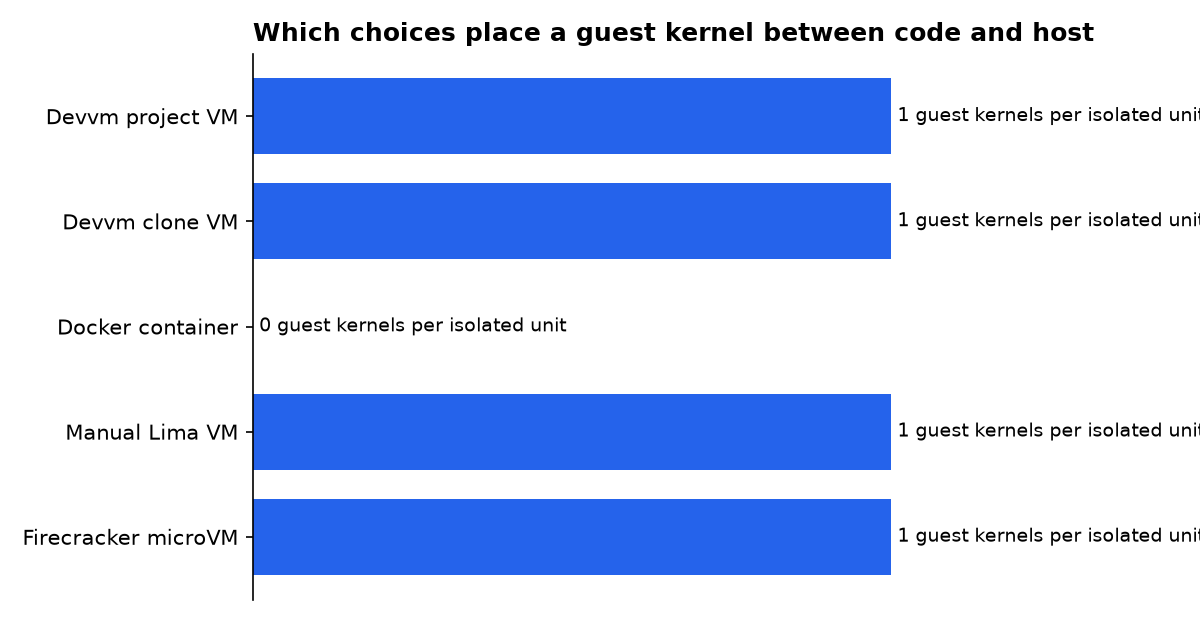
The decision is less about a universal “best sandbox” than the code you plan to execute and the host assets it can reach. The table uses one concrete boundary measure: whether each execution option has its own guest kernel. A value of 1 means the code runs behind a guest kernel; 0 means it shares the host kernel.
| Concrete option | Exact figure | Guest kernel per isolated unit | Best fit | Important limitation | Evidence tier |
|---|---|---|---|---|---|
| Devvm 0.1.0, normal project VM | 4 network tiers | 1 | Human-led work with an agent in the same project checkout | 1 host project folder is mounted read-write by default | Official release statement |
Devvm 0.1.0 with --clone | 0 writable host working-tree mounts | 1 | Autonomous refactors, upgrades and experiments that need review | Changes return through Git rather than live shared files | Official release statement |
| Docker development container | 1 shared host kernel | 0 | Fast, repeatable environments for trusted project code | Mounts and Docker-daemon access need deliberate limits | Primary vendor documentation |
| Manual Lima project VM | 1 Linux VM | 1 | Teams able to own their own images, mounts and policies | No Devvm-style project defaults or agent workflow layer | Primary vendor documentation |
| Firecracker microVM deployment | 1 vCPU and 128 MiB default | 1 | Platform-operated, multi-tenant agent execution | Requires an orchestration and developer-experience layer | Primary project documentation |
The numeric comparison is deliberately narrow. A guest kernel is one meaningful layer of separation, not a complete security verdict. Host patching, mount rules, network egress, secret handling and user privileges still decide whether the deployment is safe enough for its task.
What should a developer actually do?
Choose Devvm with the default allowlist tier if you work across several projects and want each project’s toolchain and agent activity separated from the rest of your machine. It is the most direct choice for a Mac or Linux developer who wants a VM per repository without designing that workflow from scratch.
Choose Devvm with --clone for an agent that can run commands unattended, rewrite many files or explore untrusted dependencies. Treat the Git fetch step as a mandatory review gate. Use a new clone and VM for each agent when their credentials, network access or trust level differ.
Choose Docker or Dev Containers when the primary problem is reproducibility and team onboarding. Keep containers unprivileged where possible, avoid mounting the Docker socket, and mount only the directories the task needs. That is simpler than a VM for routine work, but it is not the same boundary.
Choose manual Lima when you have VM expertise and requirements that Devvm does not meet. Lima’s FAQ identifies QEMU as its default Linux hypervisor and Apple’s Virtualization.framework as the default on macOS. That flexibility is useful, but it transfers policy design and maintenance to your team.
Choose Firecracker only when you are building an internal sandbox service or a multi-user agent platform. Firecracker is the right building block when many isolated machines must be scheduled, configured and discarded. It is not the shortest path to “run this coding agent safely on my laptop.”
What should the first Devvm rollout look like?
Start with one non-production repository and an allowlist policy that admits only the package registries, Git host and model-provider endpoints that work requires. Confirm that tests, local ports and agent login behave as expected before broadening access. Do not begin with an open network tier just to avoid policy work.
- Run normal Devvm mode for a task you actively supervise in your editor.
- Switch to
devvm --clonebefore assigning broad changes to an autonomous agent. - Keep production credentials out of agent sessions, even when Devvm proxies secrets.
- Use one VM per agent when agents need different network rules or project visibility.
- Review fetched branches, lockfile changes and new scripts before merging them.
Devvm’s current support statement is specific: it runs on macOS 13 or newer and Linux, on arm64 and x86_64, and is tested on Apple silicon Macs plus Linux on both architectures. The 0.1.0 release says Intel Macs are not yet tested, so teams standardised on Intel Macs should validate a pilot before adopting it as a required workflow.
What we could not verify?
Devvm has no published subscription price, service-level agreement, enterprise support plan or performance benchmark in the public project information reviewed here. The project’s release describes a first stable-looking version, but it does not establish how quickly security fixes will ship or what support response a business buyer can expect.
There is also no public comparative benchmark showing Devvm startup time, memory use or build speed against Docker Desktop, a hand-built Lima VM or a Firecracker service under the same repository and workload. DevvmHQ could settle those questions with repeatable measurements and a support policy. Until then, choose Devvm for its stated architecture and workflow, then validate its speed and reliability on your own representative project.

